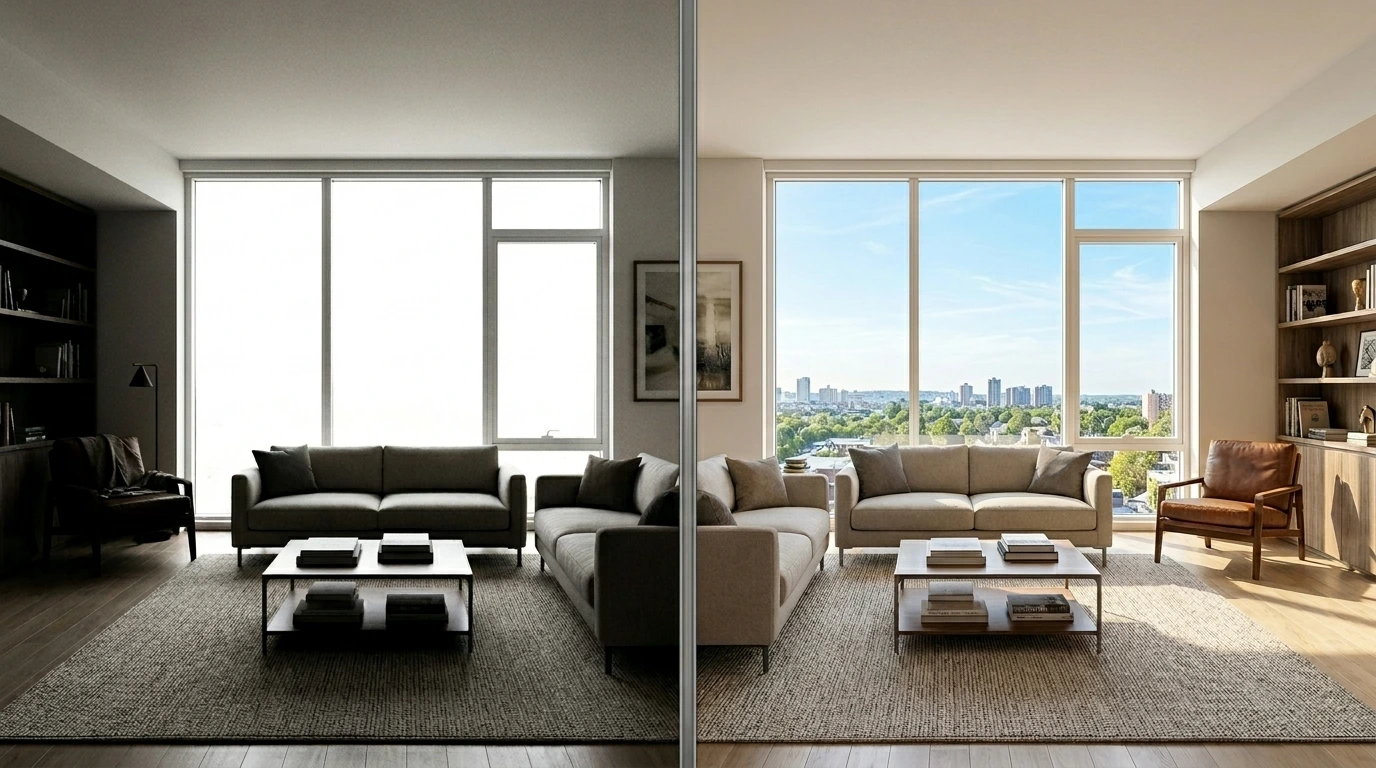
Every camera captures a limited slice of the light range that human eyes can actually see. Point your phone at a scene with a bright sky and a shadowed foreground, and one of two things happens: either the sky blows out to pure white while the foreground looks acceptable, or the sky renders correctly while the foreground goes dark and detail-less. The camera cannot capture both at the same time in a single exposure. Human eyes can. That gap is the entire reason HDR (High Dynamic Range) processing exists.
Traditional HDR photography solved this by taking multiple exposures of the same scene (one for shadows, one for midtones, one for highlights) and blending them together in software. That workflow required a tripod, careful bracketing, and specialised software, which meant HDR stayed the exclusive territory of dedicated photographers for years. The mid-2010s consumer HDR boom then gave the technique a bad reputation because most consumer tools over-processed the effect, producing cartoonish results that looked obviously edited rather than naturally more detailed.
AI HDR has changed both problems. Modern AI models can extract HDR-quality dynamic range from a single photo without requiring bracketed exposures, and they can do so while producing results that look natural rather than over-processed. The Templix AI HDR tool sits inside that shift, and this guide covers what it does, where it fits, and how to get natural HDR enhancement that actually improves photos rather than making them look obviously edited.
What Is the Templix AI HDR Tool?
The Templix AI HDR tool is an AI-powered photo enhancement app that expands the dynamic range of any single photo, recovering detail in blown-out highlights and lost shadows while balancing overall exposure. Upload a photo, and the AI produces an enhanced version with wider tonal range in seconds without requiring bracketed exposures, manual masking, or specialised HDR software.
The tool is designed specifically for natural-looking HDR enhancement rather than the exaggerated stylised HDR effect that dominated consumer HDR software a decade ago. The output should look like a better version of your original photo, not an obviously HDR-processed image with halos, unnatural saturation, or cartoonish local contrast. This distinction matters because natural HDR is useful across professional and consumer photography, while exaggerated HDR is a stylistic choice with a narrow window of appropriate use.
Templix runs the AI HDR tool inside the wider creative suite, which means enhanced photos can flow directly into other Templix workflows without moving files between platforms. Once the dynamic range is expanded, the same file can move into upscaling for print resolution, colour adjustment, background changes, or any other cleanup work the photo needs before publishing.
Free credits on signup let you test the tool on your own photos at no cost before committing to a paid plan. That matters especially for HDR because the value depends heavily on how well the tool handles your specific photo types, lighting conditions, and colour palettes.
How AI HDR Actually Works
Understanding how the AI works helps set the right expectations for what you can and cannot ask it to do.
The AI has been trained on large datasets of paired photo examples: source images with limited dynamic range paired with professionally enhanced versions that show wider tonal information. During training, the model learned the specific patterns that separate natural HDR enhancement from over-processed HDR effect: what shadow recovery looks like when it preserves natural darkness in the darkest areas, what highlight recovery looks like when it retains natural brightness in the brightest areas, and what local contrast enhancement looks like when it adds depth without producing visible halos around edges.
When you upload a photo, the AI runs several operations in sequence. It analyses the tonal distribution across the image to identify which areas are close to clipping in the shadows or highlights. It uses trained understanding of how the scene should look to reconstruct plausible detail in those clipped areas. It applies local contrast adjustments that add depth to midtones without producing the halo artifacts that characterise poorly executed HDR. It balances the overall exposure so the enhanced result looks like a naturally well-exposed photo rather than a technically processed one.
The critical distinction lives in what the AI does not do. Basic HDR filters apply uniform contrast and saturation boosts that produce the exaggerated look. Better AI HDR tools including the Templix version preserve the scene's natural colour palette, maintain natural darkness in genuine shadow areas, and add detail selectively rather than pumping every pixel to maximum saturation and contrast. The output should read as a better version of the original scene, not a stylised interpretation of it.
Key Features of the Templix AI HDR Tool
Six specific capabilities define what the tool does well.
Single-photo HDR without bracketing: Traditional HDR required multiple exposures of the same scene captured with a tripod. AI HDR extracts the same wider dynamic range from any single photo, which makes the technique practical for phone photos, existing photo libraries, and any situation where bracketing was not possible at capture time.
Natural output rather than exaggerated effect: The tool produces enhancement that looks like a better version of your photo rather than an obviously HDR-processed image. This matters for professional contexts (real estate listings, editorial photography, product marketing) where over-processed HDR undermines credibility.
Shadow and highlight detail recovery: Areas that were near clipping in the original photo regain visible detail. Dark shadows retain natural darkness while showing texture and structure that was previously lost. Bright highlights retain natural brightness while showing detail that was previously blown out to pure white.
Local contrast enhancement without halos: Midtone contrast increases add depth and dimensionality to the photo without producing the visible halos around high-contrast edges that characterise poorly executed HDR from earlier tools.
Support for varied photo types: Landscape, real estate interior, product photography, travel, event photography, and portrait work all benefit from AI HDR when the source photo has genuine dynamic range limitations to address.
Commercial-use output: Enhanced photos are available for commercial use across editorial content, real estate listings, product marketing, brand campaigns, and any other commercial application. Users retain full ownership of both the original photo and the enhanced version.
Use Cases for the Templix AI HDR Tool
Six specific use cases consistently produce strong results.
Real estate listing photography: Interior real estate photography is one of the strongest fits for AI HDR because interior scenes almost always have extreme dynamic range: bright windows next to shadowed room corners. Traditional real estate photographers use bracketed exposures and manual HDR blending to handle this. AI HDR produces comparable output from a single photo, which speeds up real estate photography workflows for agents and small brokerages that cannot justify professional photographer costs for every listing.
Landscape and travel photography: Outdoor scenes with bright skies and shadowed foregrounds are the classic HDR use case. AI HDR handles these scenes well while producing natural rather than stylised output, which is exactly what landscape and travel photography needs for editorial publication or personal portfolio use.
Product photography for ecommerce: Product photos frequently have exposure challenges: bright reflective surfaces next to shadowed product details, or packaging elements that need to be readable across a range of tonal values. AI HDR balances these challenges without changing the product's actual appearance in ways that would misrepresent it to customers.
Interior design and architectural photography: Similar to real estate but with higher standards for editorial or portfolio publication. AI HDR enables interior designers and architectural photographers to publish with the tonal range that magazine-quality photography requires without needing full manual HDR bracketing workflows.
Event photography with challenging lighting: Wedding photography, concert photography, and event photography frequently involve mixed lighting that produces exposure problems. AI HDR recovers detail in the areas where the camera struggled, which can salvage otherwise unusable shots and improve the keeper rate from difficult lighting situations.
Restoring old or underexposed photos: Older digital photos, poorly exposed shots from earlier camera generations, and any photo where the original exposure was suboptimal often improve meaningfully through AI HDR. The tool cannot recover truly lost information, but it can significantly improve photos that had enough underlying information to work with.
How to Use the Templix AI HDR Tool
The workflow is straightforward. Most HDR enhancements complete end to end in under a minute.
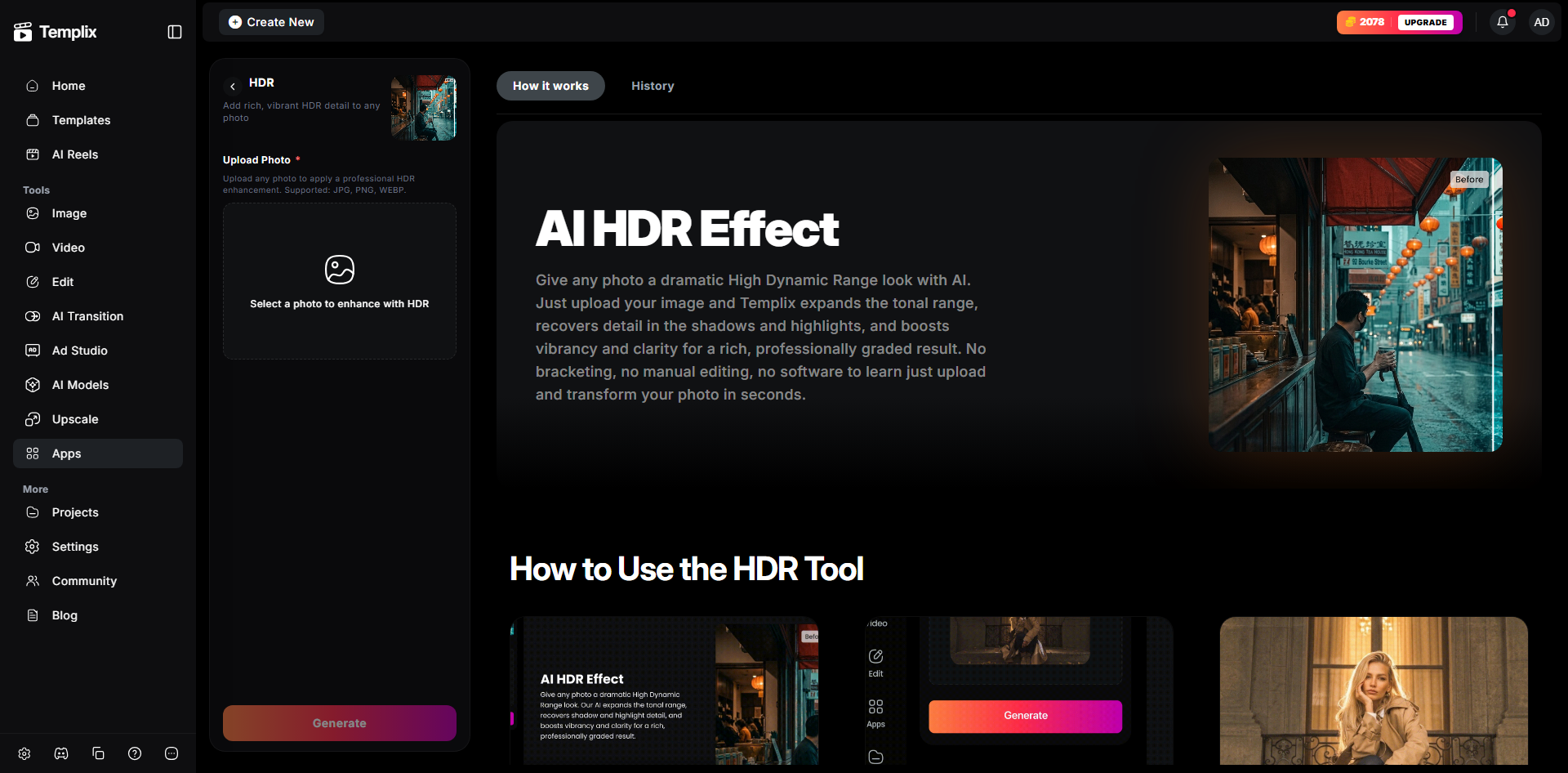
Step 1: Open the Templix AI HDR tool: Head to Templix and select AI HDR from the app directory. New users can sign up for free credits without needing a card. Existing users can head straight to the app and start uploading.
Step 2: Upload the photo: Templix accepts common image formats including JPG, PNG, and WebP. Higher-resolution source images consistently produce noticeably better HDR results than compressed or low-resolution versions. If you have the RAW file or a high-quality JPEG straight from the camera, use that rather than a downsized web copy.
Step 3: Generate the enhanced version: Click generate and let the AI process the photo. Most enhancements complete within seconds. The tool returns the enhanced version alongside the original so you can compare side by side and confirm the result reads the way you want it to.
Step 4: Review and refine: Compare the enhanced photo to the original at the actual publishing size, not just at heavy zoom. HDR enhancement that looks appropriate at publishing size is what matters. If the result is too heavy for your specific context, you can regenerate with different settings or use the Image Editor for finer manual adjustments on specific regions.
Step 5: Continue the workflow: Once HDR enhancement is complete, the same file flows into other Templix tools without downloading and re-uploading. Upscale to print resolution using the Image Upscaler, extract the subject, adjust the background, or continue any other cleanup work the final asset needs.
Tips for Natural, Professional-Looking HDR Results
The single biggest mistake in AI HDR is going too far. The best HDR enhancement is invisible: the photo looks like a better version of itself, not an obviously processed image. A few habits produce noticeably more natural results.
Match HDR intensity to the final use context: Real estate listing photos can carry slightly more enhancement because buyers expect polished imagery. Editorial and portfolio work needs lighter treatment that preserves natural photographic character. Product photos need enough enhancement to show detail without misrepresenting the actual product appearance. Match the treatment to the specific context.
Preserve genuine dark areas: The most common failure of poor HDR is lifting genuine shadows to grey mush that destroys the photo's tonal structure. Genuine shadow areas should stay dark, just with visible detail and texture rather than pure black. If your enhanced photo has no truly dark areas anywhere, the HDR went too far.
Preserve genuine bright areas: The mirror image failure: pulling bright highlights down to grey that flattens the photo's tonal energy. Bright areas should stay bright, just with recovered detail rather than pure white. If nothing in your enhanced photo reads as genuinely bright, the HDR went too far.
Watch for halos around high-contrast edges: The visual signature of poorly executed HDR from earlier tools was visible halos around edges where dark meets light (tree branches against sky, roof lines against clouds). Modern AI HDR should not produce these, but always inspect the enhanced result at zoom to confirm no halos are visible before publishing.
Keep the original file: Always save the original photo before HDR processing. Having the unedited version preserved lets you re-process later with different settings, compare against the enhanced version, or provide the original if a client prefers a lighter treatment than the initial enhancement produced.
Review at actual publishing size: HDR that looks over-processed at 400 percent zoom often reads completely natural at the actual size the photo will be published at. Match your review zoom to how the image will actually be seen by your audience rather than to how it looks at editing zoom.
Final Thoughts
AI HDR has genuinely closed the gap between what phone cameras and consumer digital cameras can capture in a single frame and what human eyes can see in a scene. For photographers producing real estate listings, landscape work, product imagery, or any content where dynamic range matters more than the camera itself could deliver, the Templix AI HDR tool eliminates the tripod-and-bracketing workflow that HDR used to require.
The tool works best when treated as an enhancement to solid original photography rather than a rescue for fundamentally broken exposures. A well-composed photo with limited dynamic range becomes a stronger version of itself. A poorly composed or drastically underexposed photo becomes a slightly better version of a weak original. Start with the strongest source photo you have, apply enhancement that fits the delivery context, and review at publishing size before committing.
Start Enhancing Photos Free on Templix
Frequently Asked Questions
What is the Templix AI HDR tool?
The Templix AI HDR tool is an AI-powered photo enhancement app that expands the dynamic range of any single photo, recovering detail in blown-out highlights and lost shadows while balancing overall exposure. It produces natural HDR enhancement rather than the exaggerated stylised HDR effect that dominated consumer HDR software a decade ago.
Do I need bracketed exposures to use AI HDR?
No. The Templix AI HDR tool works on any single photo. Traditional HDR photography required multiple bracketed exposures captured with a tripod, but AI HDR extracts wider dynamic range from a single source photo, which makes the technique practical for phone photos, existing photo libraries, and any situation where bracketing was not possible at capture time.
Is the Templix AI HDR tool free to use?
Yes. Templix offers free credits on signup so you can test the AI HDR tool and every other tool on the platform at no cost. Paid plans unlock higher credit volumes and priority processing for photographers processing larger batches.
What image formats does the AI HDR tool accept?
Templix accepts common image formats including JPG, PNG, and WebP. Higher-resolution source images consistently produce noticeably better HDR results than compressed or low-resolution versions, so upload the highest-quality copy of the photo you have available.
Will AI HDR make my photos look over-processed or cartoonish?
Not when used correctly. The Templix AI HDR tool is specifically designed to produce natural enhancement that looks like a better version of your photo rather than an obviously processed image. Match the enhancement intensity to your specific use context, review results at actual publishing size rather than heavy zoom, and preserve genuine dark and bright areas in the final image.
Can I use AI HDR photos commercially?
Yes. Photos enhanced through Templix are available for commercial use across real estate listings, editorial content, product marketing, brand campaigns, and any other commercial application. You retain full ownership of both the original photo and the enhanced version.
What kinds of photos benefit most from AI HDR?
Photos with genuine dynamic range challenges benefit most: interior real estate with bright windows, landscape shots with bright skies and shadowed foregrounds, product photos with mixed reflective surfaces, and event photography under challenging mixed lighting. Photos that were already well-exposed with balanced tonal range benefit less because there is less latent range to recover.
How does AI HDR compare to manual HDR in editing software?
AI HDR is dramatically faster and requires no bracketing or masking skills. Manual HDR in tools like Lightroom, Photoshop, or dedicated HDR software produces highly customised results tailored to specific creative direction but takes meaningful time per photo and requires photographer expertise. For high-volume workflows (real estate, event photography, product cataloguing), AI HDR usually produces stronger practical output because consistency across a batch matters more than per-image creative direction.
Can I combine AI HDR with other Templix tools?
Yes. Once HDR enhancement is complete, the file flows into other Templix tools without moving between platforms. Pair with the Templix Image Upscaler for print-resolution output, the Background Remover for extracting the subject, or the wider creative suite for continued image processing in one subscription.
What is the biggest advantage of AI HDR over traditional HDR workflows?
Speed and accessibility. What used to require a tripod, bracketed exposure capture at shoot time, and specialised HDR software in post-production now happens in seconds from any single photo with no capture-time preparation and no specialised software knowledge. For photographers producing at consistent volume, this reduces the total workflow time meaningfully while producing output of comparable practical quality for most professional and consumer use contexts.

Komal Yousaf
Komal Yousaf covers design and marketing at Templix, bridging creative tooling with growth strategy to help brands turn AI-generated content into real results.