Google Gemini AI's Nano Banana image models have become the dominant tools behind the viral photo trends spreading across TikTok, Instagram, and other short-form platforms. Identity preservation across heavy restyling, photoreal output, and prompt accuracy make Gemini AI the default reach for portraits, lifestyle imagery, and holiday content at scale. The practical catch is that Gemini AI output quality depends on prompt structure, and most creators spend more time hunting prompts than producing content.
This guide solves that directly: copy-paste Gemini AI photo prompts organised by category, each tagged with the specific Templix model for that prompt type. Every prompt runs on Google Gemini AI's Nano Banana 2 or Nano Banana Pro through the Templix AI Image Generator, which also carries complementary models (GPT Image 2.5, Seedream 5.0 Lite, Flux 3, Ideogram v4) under one subscription with a shared coin balance.
What Makes a Strong Gemini AI Photo Prompt
Three elements separate Gemini AI prompts that produce consistently strong output from prompts that produce weak results.
Explicit subject preservation when editing existing photos. Gemini AI's specific strength sits in identity preservation through heavy restyling, which is why most viral photo trends run on Nano Banana. Prompts that transform uploaded photos need to name explicitly what should remain unchanged (facial features, bone structure, identity) alongside what the model should transform (outfit, era, style, environment). Prompts that only describe the target style often produce output where the subject drifts enough to break personal recognition.
Specific style vocabulary rather than vague adjectives. "Soft diffused studio lighting from camera-left" produces measurably better output than "nice lighting". The specific technical vocabulary transfers predictably across subjects on Gemini AI, which is why the prompts below favour explicit terms over general aesthetic language.
Model matching per prompt category. Gemini AI Nano Banana handles identity-preservation prompts best, but Templix's broader catalog covers complementary cases where other models produce stronger output: in-image text (GPT Image 2.5 or Flux 3), typography-dominant creative (Ideogram v4), and fast iteration workflows (Seedream Lite). The Gemini AI prompts below each include the recommended Templix model so you reach for the right tool from the start rather than iterating through models looking for the one that works.
Which Templix Model for Which Gemini AI Prompt
Templix carries two Gemini AI Nano Banana variants alongside complementary image models, and understanding which model handles which prompt type produces measurably stronger output across the full Gemini AI prompt library.
Google Gemini AI Nano Banana 2 handles general-purpose Gemini AI photo prompts across trending portraits, lifestyle imagery, editing requests, and standard content directions. The model's identity preservation across heavy restyling makes Gemini AI the right default for prompts that transform uploaded photos while keeping the subject recognisable.
Google Gemini AI Nano Banana Pro sits at the premium tier of the Gemini AI family for projects requiring maximum photoreal fidelity, including hero marketing imagery, premium portraits, and Gemini AI prompts requiring multi-subject identity preservation across couples and families.
GPT Image 2 and GPT Image 2.5 complement the Gemini AI workflow on prompts with in-image text where Nano Banana handles the text layer less reliably. Holiday cards with text, labelled products, posters with headline typography, and any output requiring readable text inside the image benefit from running these specific prompt types on GPT Image 2.5 instead of Nano Banana. GPT Image 2.5 Pro covers the premium tier for maximum fidelity.
Flux 3 combines strong prompt adherence with native 2K and 4K output, in-image text rendering, and reference-based composition. The model fits marketing campaign work and prompts requiring both photoreal subjects and readable text in the same composition.
Seedream 5.0 Lite fits fast iteration workflows where creators test many creative directions quickly without burning through excessive credits per draft. The model handles stylised and lifestyle aesthetic directions competently for exploratory phases of production.
Ideogram v4 leads on typography-heavy creative where custom lettering, graphic design treatment, or layout-driven composition matters most. Posters with elaborate typography, magazine cover mockups, and design-focused creative benefit from this model specifically.
For creators building stronger prompt discipline across these models, our AI image prompt guide covers the three-layer prompt framework (subject, craft, technical) that produces consistent output across every model. For specific prompting technique on Templix's flagship general-purpose model, our Nano Banana 2 prompt guide covers the patterns that produce consistently clean output on that model across creative use cases.
Trending Gemini AI Portrait Prompts
The core category where Gemini AI photo content dominates social feeds. Eight prompts covering the most common portrait styles, each with the recommended Templix model.
These eight trending Gemini AI styles consistently produce the strongest social engagement because they combine recognisable viral aesthetic patterns with the specific identity preservation that makes Nano Banana the default reach for personal photo content. For creators building Instagram, TikTok, and other short-form social content around personal portraits, these prompts cover the backbone of weekly content production. The structural pattern across every Gemini AI portrait prompt is explicit facial identity preservation combined with specific style, lighting, and background direction, which transfers predictably across subjects.
1. Soft-Glam Pastel Studio Portrait
Transform the uploaded photo into a soft-glam studio portrait featuring
pastel lavender hair, dewy glowing skin, soft diffused studio lighting
from a large softbox, and a clean seamless cream background. Keep the
subject's exact facial features, bone structure, and recognisable
identity. Change only the hair colour, makeup, and background. Visible
natural skin texture with pores. Portrait 4:5 aspect ratio.
Recommended model: Nano Banana 2 for standard output, Nano Banana Pro for premium fidelity.
2. Cinematic Urban Portrait
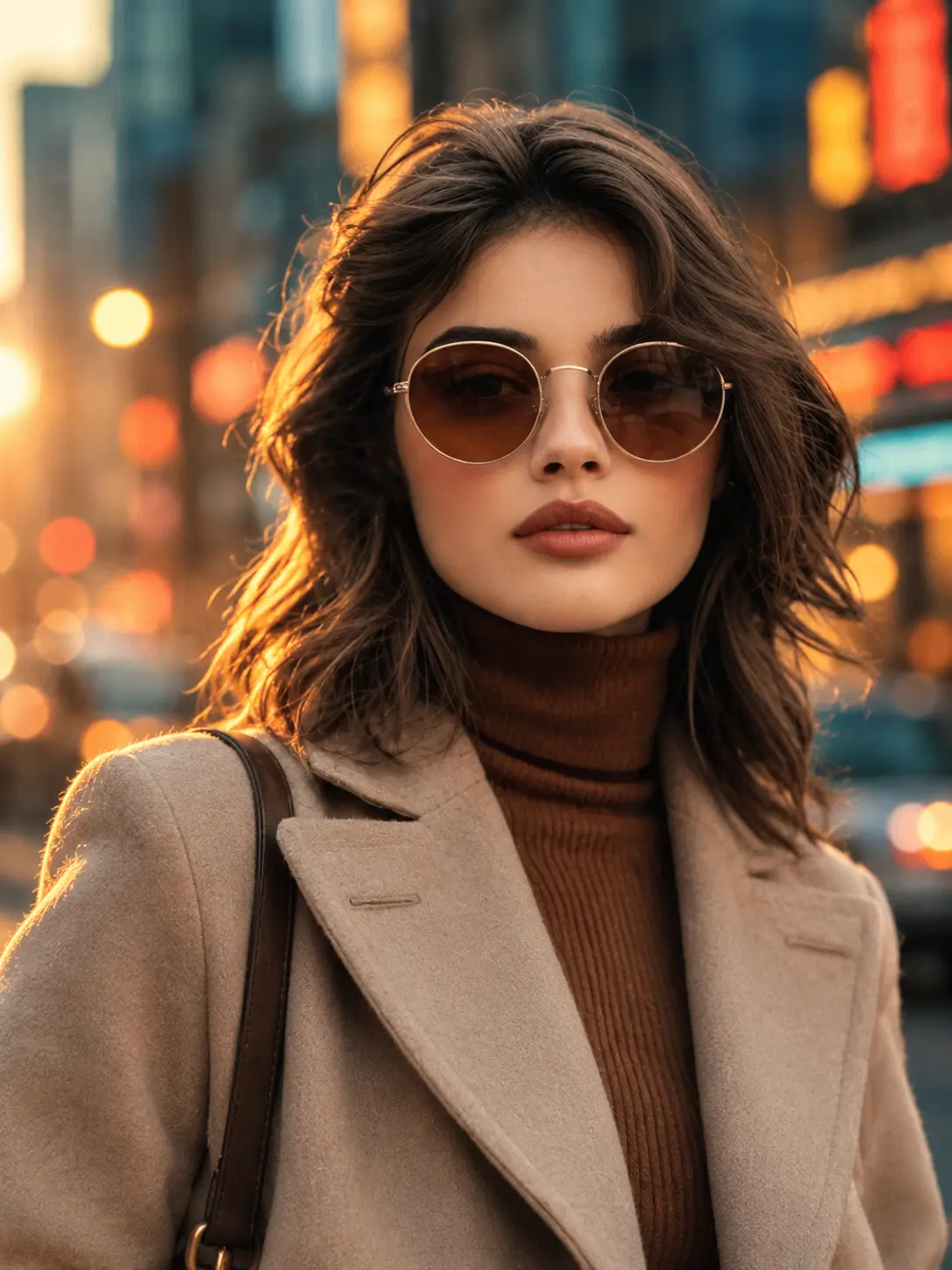
Transform the uploaded photo into a cinematic urban street portrait
with teal-and-orange colour grading, soft rim lighting from behind the
subject's left shoulder, and a blurred cityscape backdrop with warm
neon bokeh. Preserve the subject's exact facial features and identity.
Natural candid pose, 85mm lens compression, shallow depth of field,
film grain. Portrait 4:5 aspect ratio.
Recommended model: Nano Banana 2.
3. Evening Cinematic Couple Portrait
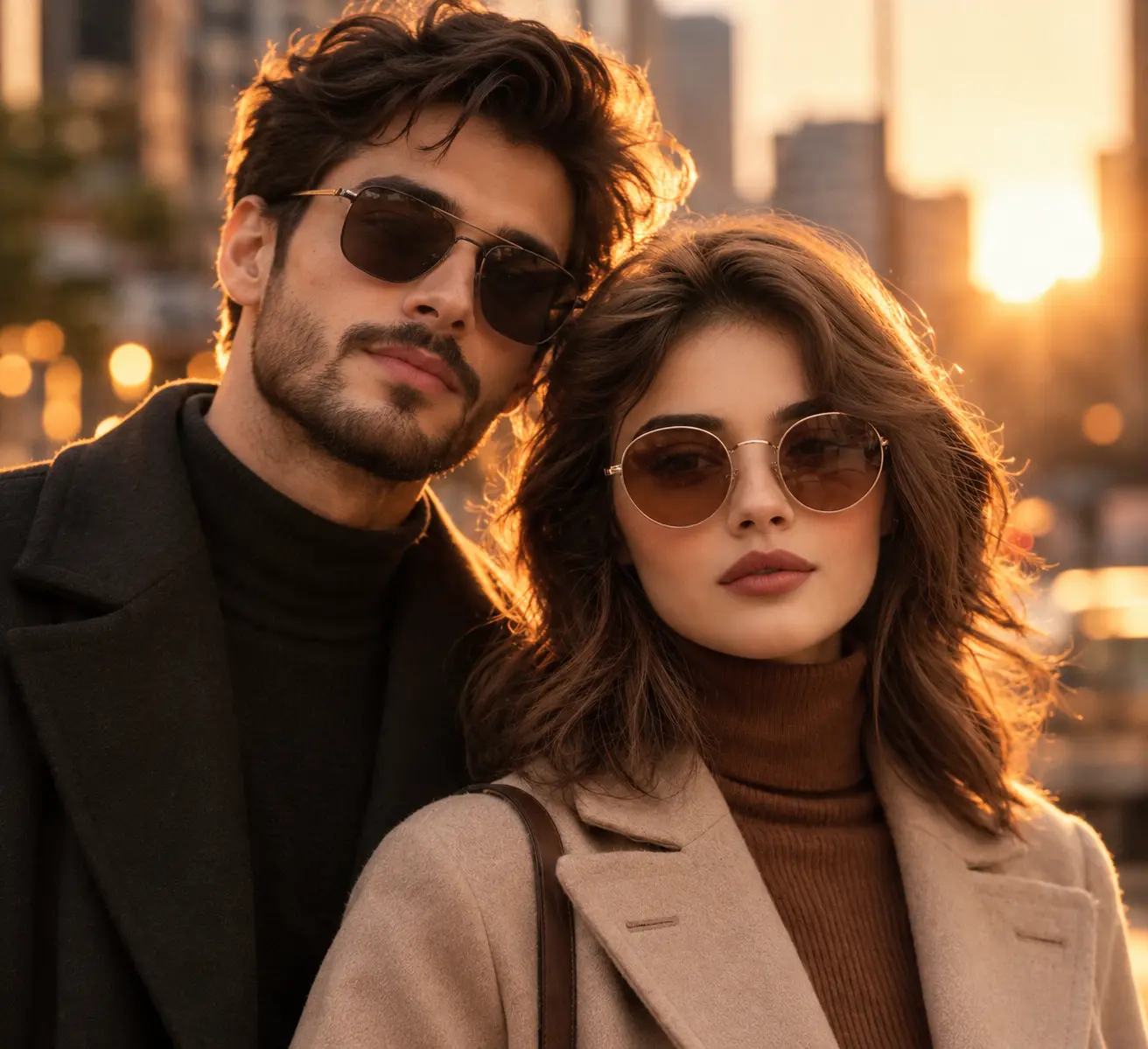
Transform the uploaded couple photo into a cinematic evening couple
portrait with warm golden backlight from behind, soft rim light across
both subjects' faces, and a blurred urban environment. Preserve BOTH
subjects' exact facial features and recognisable identities. Natural
expressions, warm film grading, cinematic shallow depth of field.
Landscape 16:9 aspect ratio.
Recommended model: Nano Banana Pro for stronger multi-subject identity preservation.
4. Dreamy Pastel Butterfly Portrait
Transform the uploaded photo into a dreamy pastel aesthetic portrait
with soft pink and lavender gradient background, luminous glowing skin,
delicate butterfly accessories in the hair, and ethereal diffused
lighting. Preserve the subject's exact facial features and identity.
Visible natural skin texture. Portrait 4:5 aspect ratio.
Recommended model: Nano Banana 2 or Flux 3.
5. Golden Hour Field Portrait
Transform the uploaded photo into a golden hour outdoor portrait
standing in a wheat field with sunset backlight creating warm rim
lighting on the subject's hair and skin, natural wind movement in
the hair. Preserve the subject's exact facial features and identity.
Soft lens flare, warm colour palette, 85mm lens. Portrait 4:5
aspect ratio.
Recommended model: Flux 3 for native high resolution.
6. Clean Editorial Instagram Profile Picture
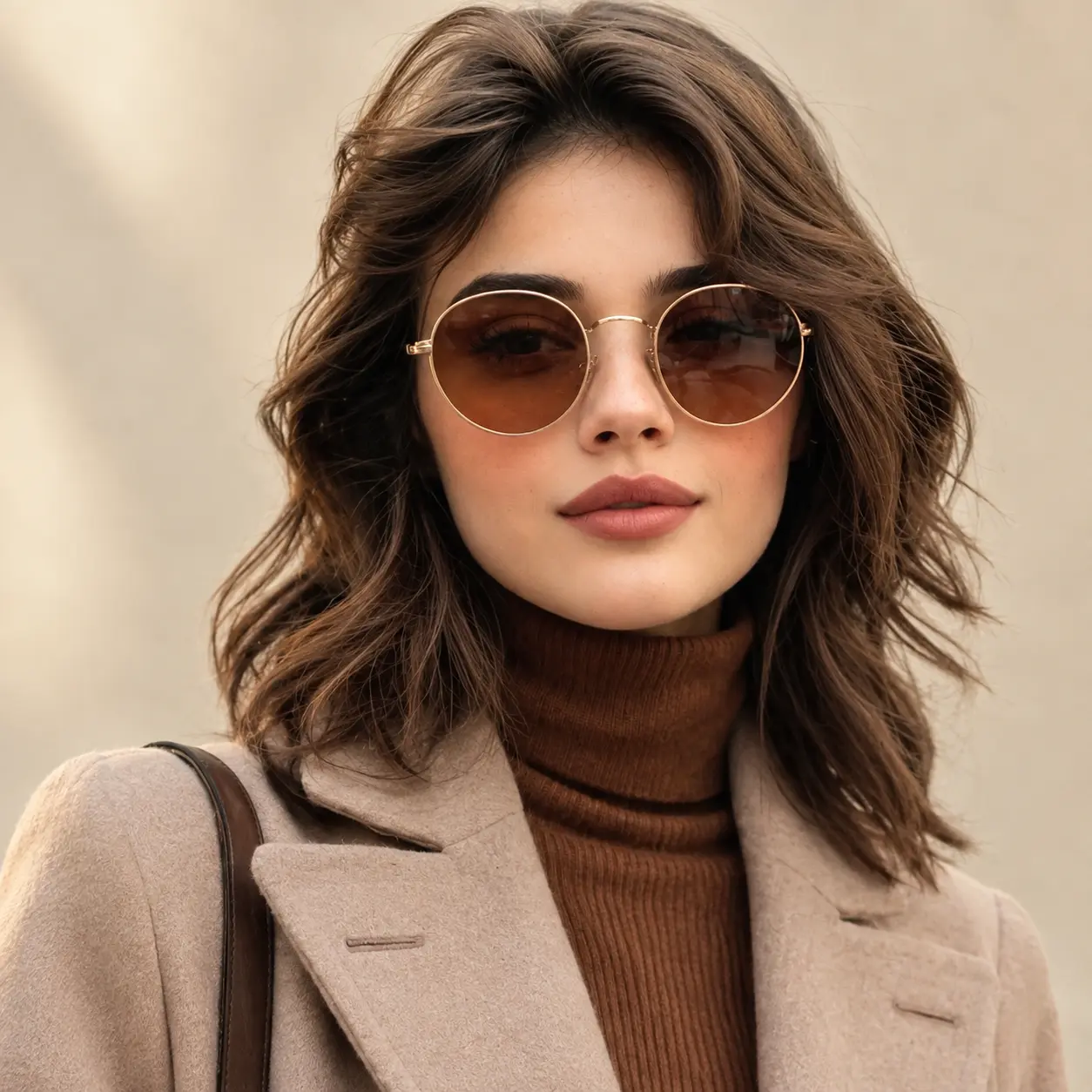
Transform the uploaded photo into a clean editorial Instagram profile
picture with soft natural daylight, neutral warm cream background,
subtle genuine smile, and polished magazine photography aesthetic.
Preserve the subject's exact facial features and recognisable identity.
Natural skin texture visible, not over-smoothed. Square 1:1 aspect ratio.
Recommended model: Nano Banana 2.
7. Traditional Saree Golden Portrait
Transform the uploaded photo into an elegant ethnic portrait wearing
a deep crimson traditional saree with intricate gold embroidery,
statement gold jewellery including large earrings and a layered
necklace, soft blurred warm temple-interior background. Preserve the
subject's exact facial features and identity. Natural skin texture,
warm golden lighting. Portrait 4:5 aspect ratio.
Recommended model: Nano Banana Pro.
8. Candid Café Golden Hour Portrait
Transform the uploaded photo into a candid café golden hour portrait
holding a ceramic coffee mug, warm sunlight streaming through a large
window from camera-left, soft shadows across the subject's face.
Preserve the subject's exact facial features and identity. Documentary
photography aesthetic, natural skin texture, 85mm lens, shallow depth
of field. Portrait 4:5 aspect ratio.
Recommended model: Nano Banana 2 or Flux 3.
Cinematic and Aesthetic Portraits
Nine prompts shifting into elevated cinematic direction where visual mood carries the content weight.
Where trending portraits fit as everyday social posts, cinematic prompts work better for hero content, portfolio pieces, standout feed posts, and promotional imagery that needs to break visual pattern. The technical challenge with cinematic prompts is that lighting direction and colour grading carry most of the mood weight, which means prompts need to name lighting language explicitly rather than relying on general style terms. The Y2K and 1990s era prompts specifically have driven some of the strongest trending content on social feeds because they combine specific visual nostalgia with identity preservation that lets viewers see themselves in a particular era aesthetic. For creators building a portfolio of elevated self-portraits or brand ambassador content, these prompts produce output that competes with professional photography while preserving the recognisable identity that makes the content personally relevant.
9. 1970s Vintage Film Couple
Transform the uploaded couple photo into a 1970s vintage film couple
portrait with warm vintage colour grading, visible film grain,
period-accurate 70s wardrobe (turtleneck sweater for one, printed
blouse for the other), muted earth-tone palette. Preserve BOTH
subjects' exact facial features and identities. Shot on 35mm film
aesthetic. Landscape 3:2 aspect ratio.
Recommended model: Nano Banana Pro.
10. Moody Aura Rim-Light Portrait
Transform the uploaded photo into a moody aesthetic portrait with
dramatic coloured rim lighting from behind the subject in deep purple
and electric cyan, a dark atmospheric background with subtle smoke
or haze, high contrast dramatic shadows across half the face. Preserve
the subject's exact facial features and identity. Natural skin texture
with moody rim lighting. Portrait 4:5 aspect ratio.
Recommended model: Nano Banana Pro.
11. Neon-Noir Cinematic Portrait
Transform the uploaded photo into a neon-noir cinematic portrait with
hot pink and electric blue neon lighting from opposite sides of the
subject, a rain-slick urban night background with blurred bokeh neon
signs, moody atmospheric contrast. Preserve the subject's exact facial
features and identity. Natural skin texture, cinematic drama lighting.
Portrait 4:5 aspect ratio.
Recommended model: Nano Banana 2 or Flux 3.
12. Y2K Early-2000s Flash Portrait
Transform the uploaded photo into an early-2000s Y2K flash photography
portrait with harsh direct flash lighting, slight overexposure,
period-accurate Y2K wardrobe (low-rise jeans, bedazzled crop top,
chunky accessories), background suggesting a 2003 house party scene.
Preserve the subject's exact facial features and identity. Film grain,
slight red-eye effect, authentic era aesthetic. Portrait 4:5 aspect
ratio.
Recommended model: Nano Banana 2.
13. 1990s Grunge Film Portrait
Transform the uploaded photo into a 1990s 35mm film portrait with
muted period-accurate film colours, slight natural grain, period
wardrobe (oversized flannel shirt or vintage band tee), natural outdoor
backlight through trees. Preserve the subject's exact facial features
and identity. Shot on vintage film aesthetic, authentic 90s grunge
atmosphere. Portrait 4:5 aspect ratio.
Recommended model: Nano Banana 2.
14. 90s Sitcom Promotional Poster
Transform the uploaded photo into a 1990s sitcom promotional poster
portrait with bold saturated colours, laugh-track aesthetic,
period-accurate sitcom wardrobe (bright coloured blazer or patterned
button-down), confident arms-crossed pose. Preserve the subject's
exact facial features and identity. Bright flat lighting typical of
90s TV promotional photography. Portrait 4:5 aspect ratio.
Recommended model: Nano Banana 2.
15. Dramatic Burning-Newspaper Portrait
Transform the uploaded photo into a dramatic artistic portrait where
the subject holds a burning newspaper that illuminates their face with
warm orange firelight. Dark atmospheric background with floating
embers around the subject. Preserve the subject's exact facial features
and identity. Natural skin texture, cinematic drama lighting from the
flame. Portrait 4:5 aspect ratio.
Recommended model: Nano Banana Pro or Flux 3.
16. Fine-Art Black-and-White Portrait
Transform the uploaded photo into a fine-art black-and-white portrait
with high contrast dramatic single-source side lighting from
camera-right, deep shadows across half the face, plain dark background.
Preserve the subject's exact facial features and identity. Natural
skin texture visible, editorial fine-art photography aesthetic.
Portrait 4:5 aspect ratio.
Recommended model: Nano Banana Pro.
17. Double-Exposure Forest Portrait
Transform the uploaded photo into an artistic double-exposure portrait
where the subject's silhouette is filled with a dense forest landscape
at sunset. Preserve the subject's exact facial features and identity
in the dominant exposure. Soft blended edges where the two exposures
merge together. Editorial artistic aesthetic. Portrait 4:5 aspect ratio.
Recommended model: Nano Banana 2 or Flux 3.
3D Figure Transformations
Two prompts covering the viral collectible figure trends.
The 3D figure category drives some of the fastest-spreading viral trends on social feeds because of the specific uncanny shift between recognisable personal identity and the plastic-figure aesthetic. The two figure variations below cover complementary use cases: the desk collectible figure situates the subject in a lifestyle context, while the boxed action figure wraps the subject in retail packaging with their own name on the box. For stronger output on figure prompts specifically, Nano Banana Pro produces measurably better fidelity on the texture rendering that makes figures read as actual collectibles. The boxed action figure prompt benefits meaningfully from GPT Image 2.5 or Flux 3 for the box text layer, since the subject's name on the packaging needs to render legibly rather than appearing as garbled characters that break the retail-product aesthetic.
18. Desk Collectible PVC Figure
Transform the uploaded photo into a 3D collectible desk figure in
detailed PVC statue style, sitting on a wooden desk beside a laptop,
coffee mug, and small succulent. The figure should appear approximately
15cm tall in scale, with detailed painted features, articulated base.
Preserve the subject's exact facial features and recognisable identity
rendered in the figure. Studio photography lighting. Square 1:1 aspect
ratio.
Recommended model: Nano Banana Pro.
19. Retail Boxed Action Figure
Transform the uploaded photo into a retail boxed action figure of the
subject in blister packaging with cardboard backing, clear plastic
bubble, bold title text at the top of the box reading the subject's
first name in large graphic typography. Include accessories (phone,
laptop, coffee mug) in separate compartments beside the main figure.
Preserve the subject's exact facial features and recognisable identity.
Shot as a clean product photograph on a white background. Portrait
4:5 aspect ratio.
Recommended model: GPT Image 2.5 or Flux 3 for stronger box text rendering.
Old Photo Restoration and Colorization
Two prompts for restoring and colorizing damaged old photographs.
Family photo restoration and colorization represent one of the use cases where AI image generation produces genuinely practical personal value beyond content creation. Damaged old photographs of parents, grandparents, deceased family members, and historical family records all become repairable through prompt-based restoration without requiring specialist services that typically charge significantly per image. The combination of restoration prompts for repair work and colorization prompts for black-and-white conversion covers most practical family photo preservation needs. The technical approach that produces the strongest output is running the repair step first on the damaged photograph before attempting any colorization or stylistic changes. Trying to combine restoration with heavy restyling in a single prompt produces weaker output than running the two steps in sequence, with the restoration prompt handling physical repair first and the colorization prompt working on the clean restored source. For creators handling restoration work at volume across many family photos, the dedicated Templix Photo Restoration app provides a purpose-built workflow that handles the restoration step more efficiently than running individual prompts per photograph.
20. Damaged Old Photo Restoration
Restore the uploaded damaged old photograph by removing visible
scratches, tears, dust spots, mould damage, and fading from the image.
Repair any missing or damaged areas of the subject's face, clothing,
and visible details. Preserve the exact subject features and the
original composition. Maintain the original black-and-white tonal
range. Enhance overall clarity and sharpness without introducing
artificial textures.
Recommended model: Nano Banana 2, followed by the Templix Photo Restoration app for dedicated restoration workflow at scale.
21. Historical Photo Colorization
Colorize the uploaded black-and-white photograph with historically
accurate skin tones, period-accurate clothing colours, and natural
environmental colours consistent with the apparent era of the image.
Preserve the exact subject features, composition, lighting direction,
and original photographic character. Soft natural colour palette with
subtle period-appropriate muted saturation.
Recommended model: Nano Banana 2 or Flux 3.
Editing and Restyle Prompts
Four practical editing prompts for professional and personal use cases.
The editing and restyle category covers practical content needs that fall outside pure social trends: professional headshots for LinkedIn and business profiles, hairstyle try-on for personal exploration, and quality enhancement workflows for existing photos. These prompts deliver meaningful practical value for personal and professional use cases where the goal is practical output rather than viral content. The business-casual headshot prompt specifically has become a standard default for creators and professionals who want LinkedIn-ready photos without the cost and time of traditional professional headshot sessions. The hairstyle try-on prompt demonstrates the practical application of identity preservation beyond entertainment content: the prompt structure deliberately locks every element except the hair itself, which lets creators and professionals genuinely evaluate how different hairstyles would look before making real-world salon appointments.
22. Business-Casual LinkedIn Headshot
Transform the uploaded photo into a professional business-casual
LinkedIn headshot wearing a well-fitted navy blazer over a plain
white shirt, soft natural office lighting from camera-right, clean
light grey seamless background. Preserve the subject's exact facial
features, bone structure, and identity. Natural confident expression
with subtle genuine smile. Natural skin texture. Portrait 4:5 aspect
ratio.
Recommended model: Nano Banana 2.
23. Hairstyle Try-On Experiment
Transform the uploaded photo by changing ONLY the subject's hairstyle
to [specify: long wavy chocolate brown, pixie cut, blonde balayage,
dark curly bob, platinum straight long, etc.]. Preserve the subject's
exact facial features, bone structure, identity, outfit, pose,
lighting, and background exactly as in the source image. Natural
hair texture with realistic shine and movement. Portrait 4:5 aspect
ratio.
Recommended model: Nano Banana 2.
24. Blurry Photo Sharpening Enhancement
Enhance the uploaded blurry photograph by increasing sharpness,
restoring edge detail, and improving overall image clarity. Preserve
the subject's exact features, composition, lighting, and colour
palette of the original photograph. Natural detail restoration
without introducing artificial sharpening artifacts or plastic
texture.
Recommended model: Flux 3, followed by the Image Upscaler through the broader Templix model catalog for additional resolution increase.
25. 4K Quality Glow-Up
Upgrade the uploaded photo to high-quality 4K resolution with enhanced
detail, improved natural skin texture with visible pores, sharper edge
definition, improved colour depth, and professional editorial polish.
Preserve the subject's exact features, composition, outfit, and
original photographic character. Natural detail enhancement without
over-smoothing or plastic skin output.
Recommended model: Nano Banana Pro for maximum fidelity.
Halloween Gemini AI Photo Prompts
Five Halloween costume and seasonal Gemini AI prompts.
Halloween drives one of the two biggest annual content spikes on social feeds alongside Christmas, and Gemini AI photo prompts have become the dominant workflow for creators producing Halloween content without the time and cost of physical costumes, makeup kits, and traditional photo shoots. The five Halloween prompts below cover individual costume portraits, VHS-era horror aesthetic, coordinated couple photoshoots, Day of the Dead sugar-skull makeup, and pet costume content. The specific advantage of AI Halloween content over traditional costume photography sits in flexibility and reach: one source photo transforms into dozens of different Halloween costume concepts across weeks of content production, which produces stronger social engagement than committing to a single costume for the full Halloween season. The vampire prompt specifically includes costume variations so the same structural prompt covers witch, zombie, ghost bride, and skeleton transformations with a single word change, making the Halloween section the most modular category in the entire library across annual production cycles.
26. Elegant Vampire Halloween Portrait
Transform the uploaded photo into an elegant Victorian vampire portrait
with pale luminous skin, deep crimson lips, dark red eyes, Victorian-era
black velvet costume with intricate lace collar, dark gothic background
with warm candlelight glow. Preserve the subject's exact facial features
and recognisable identity. Dramatic cinematic lighting with warm candle
illumination. Portrait 4:5 aspect ratio.
Recommended model: Nano Banana Pro.
Costume variations: Replace "Victorian vampire" with "classic witch with pointed hat and dark flowing robe", "zombie with pale greyish skin and dark eye circles", "ghost bride with torn white lace gown", or "classic Halloween skeleton with half-face skull makeup".
27. VHS 1990s Found-Footage Horror
Transform the uploaded photo into a 1990s VHS camcorder still from a
found-footage horror film, with authentic VHS scan lines, slight tape
distortion artifacts, timecode in the lower corner reading "10:14 PM
10-31-96", classic camcorder date-stamp aesthetic. Add a shadowy
humanoid figure in a doorway in the background. Preserve the subject's
exact facial features and identity. Dark hallway environment with
harsh camera flash lighting. Landscape 4:3 aspect ratio.
Recommended model: Nano Banana 2.
28. Coordinated Halloween Couple Photoshoot
Transform the uploaded couple photo into a coordinated Halloween couple
photoshoot with one subject as an elegant Victorian vampire in gothic
costume and the other as a sophisticated classic witch in flowing dark
robes. Standing on a Victorian wooden porch at dusk with carved
jack-o'-lanterns and warm candlelight. Preserve BOTH subjects' exact
facial features and recognisable identities. Natural interactive pose
between the two. Landscape 16:9 aspect ratio.
Recommended model: Nano Banana Pro.
29. Sugar-Skull Day of the Dead Portrait
Transform the uploaded photo into a sugar-skull Day of the Dead makeup
portrait with half the face painted in detailed sugar-skull style
featuring colourful floral patterns, intricate scrollwork, traditional
Mexican Dia de los Muertos symbols. The other half of the face remains
natural untouched. Background filled with marigold flowers and candles.
Preserve the subject's exact facial features and identity beneath the
makeup. Portrait 4:5 aspect ratio.
Recommended model: Nano Banana Pro.
30. Pet Halloween Costume Portrait
Transform the uploaded pet photo into a Halloween costume photograph
of the pet wearing a small black witch hat and a tiny purple cape,
sitting beside a glowing carved jack-o'-lantern on a wooden autumn
porch at dusk. Preserve the pet's exact breed, markings, and
recognisable features. Warm candle lighting from the pumpkin. Square
1:1 aspect ratio.
Recommended model: Nano Banana 2.
Thanksgiving Photo Prompts
Two Thanksgiving-focused prompts.
The Thanksgiving category covers two specific use cases that drive the strongest content performance for this holiday: the family dinner scene for group content and the solo autumn portrait for individual social posts or Thanksgiving card designs. Thanksgiving content tends toward warmer, more intimate aesthetic direction than Halloween or Christmas because the holiday centres on family gathering rather than public celebration. The family dinner prompt specifically needs attention to headcount accuracy because the model needs to know how many family members to seat around the table, and the prompt template includes a placeholder for the specific number of people in your source photo. For families with specific traditional elements (particular dishes, specific room settings, cultural variations), the prompt can be extended with those details added after the standard structure to produce output that matches the actual family tradition rather than a generic American Thanksgiving aesthetic.
31. Family Thanksgiving Dinner Scene
Transform the uploaded family photo into a warm Thanksgiving dinner
table scene with a golden roast turkey as centerpiece, bowls of
cranberry sauce, mashed potatoes, stuffing, and a pumpkin pie visible.
Family seated around a long rustic wooden table with warm candle
lighting and seasonal autumn foliage decorations. Preserve EVERY
family member's exact facial features and identities. Specify
headcount: [state exact number of people in your photo]. Landscape
16:9 aspect ratio.
Recommended model: Nano Banana Pro.
32. Autumn Pumpkin Patch Portrait
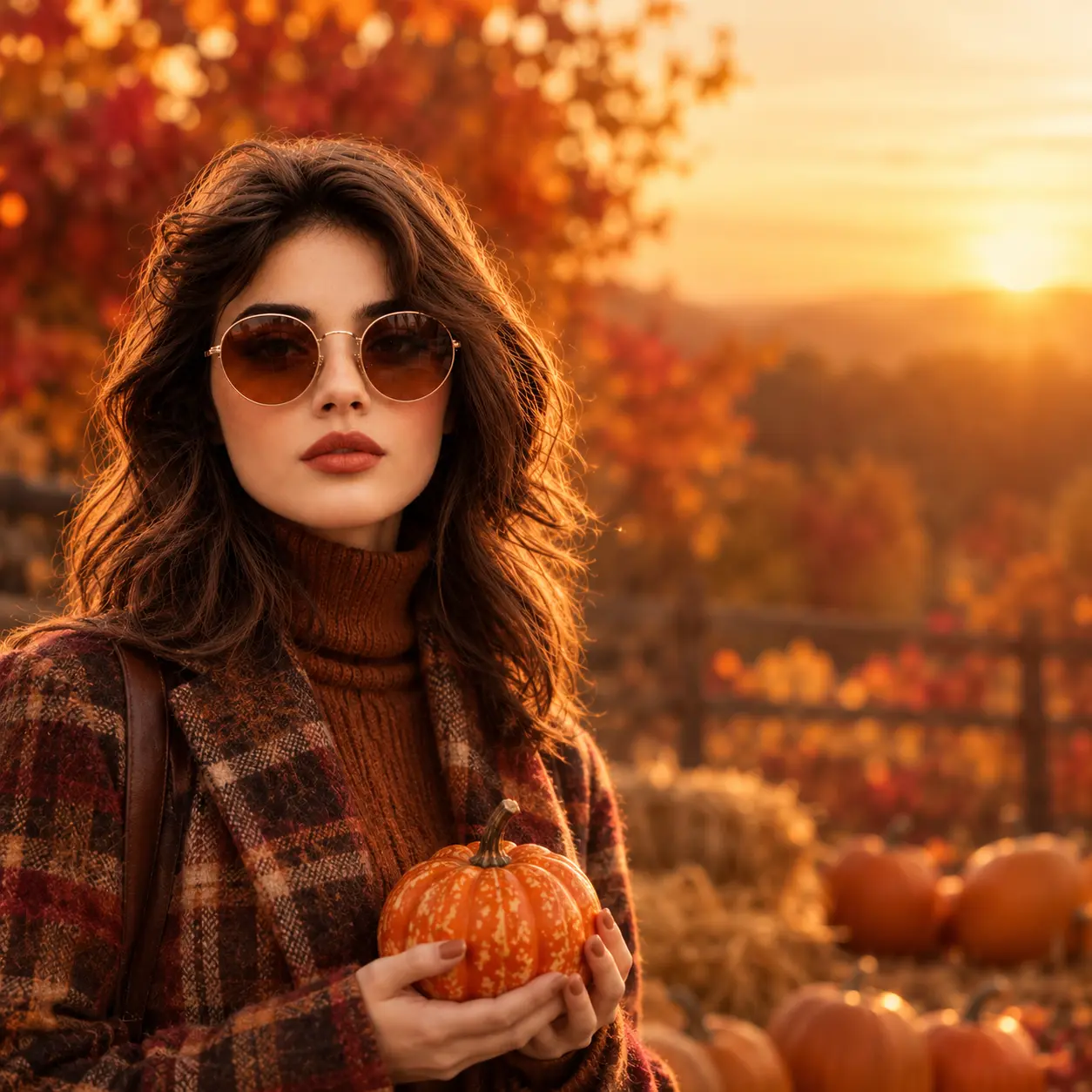
Transform the uploaded photo into a Thanksgiving autumn portrait
standing in a pumpkin patch at golden hour with warm sunset backlight,
holding a small decorative pumpkin. Autumn foliage in deep red, orange,
and gold blurred in the background. Preserve the subject's exact facial
features and identity. Natural skin texture, warm autumnal colour
palette. Add negative space on the right side suitable for a
Thanksgiving card greeting overlay. Portrait 4:5 aspect ratio.
Recommended model: Flux 3 or Nano Banana 2.
Christmas Gemini AI Photo Prompts
Five Christmas content Gemini AI prompts.
Christmas drives the largest annual content spike on social feeds across every major platform, and the five Gemini AI prompts below cover the most common content types creators produce during the holiday season. The gift box photoshoot, family pajama photo, outdoor Christmas tree farm scene, printed Christmas card design, and anime Christmas portrait each address a specific content need across the full holiday calendar from early December through New Year. Christmas card design specifically deserves attention because it combines portrait generation with in-image text rendering, which is where model selection matters most. The Christmas card prompt benefits meaningfully from running on GPT Image 2.5, Flux 3, or Ideogram v4 rather than Nano Banana when readable "Merry Christmas" typography is central to the card design. For creators producing Christmas cards at scale across family and friend recipient lists, this specific model choice produces cards ready for direct printing or digital sharing without additional typography work in separate design software.
33. Giant Christmas Gift Box Photoshoot
Transform the uploaded photo into a Christmas photoshoot where the
subject sits inside a large red gift box with the lid partially open
and warm golden fairy lights spilling out from inside the box. The
box is tied with a thick gold ribbon and bow. Preserve the subject's
exact facial features and identity. Warm golden lighting from the
fairy lights illuminating the subject's face. Portrait 4:5 aspect ratio.
Recommended model: Nano Banana Pro.
34. Family Christmas Pajama Portrait
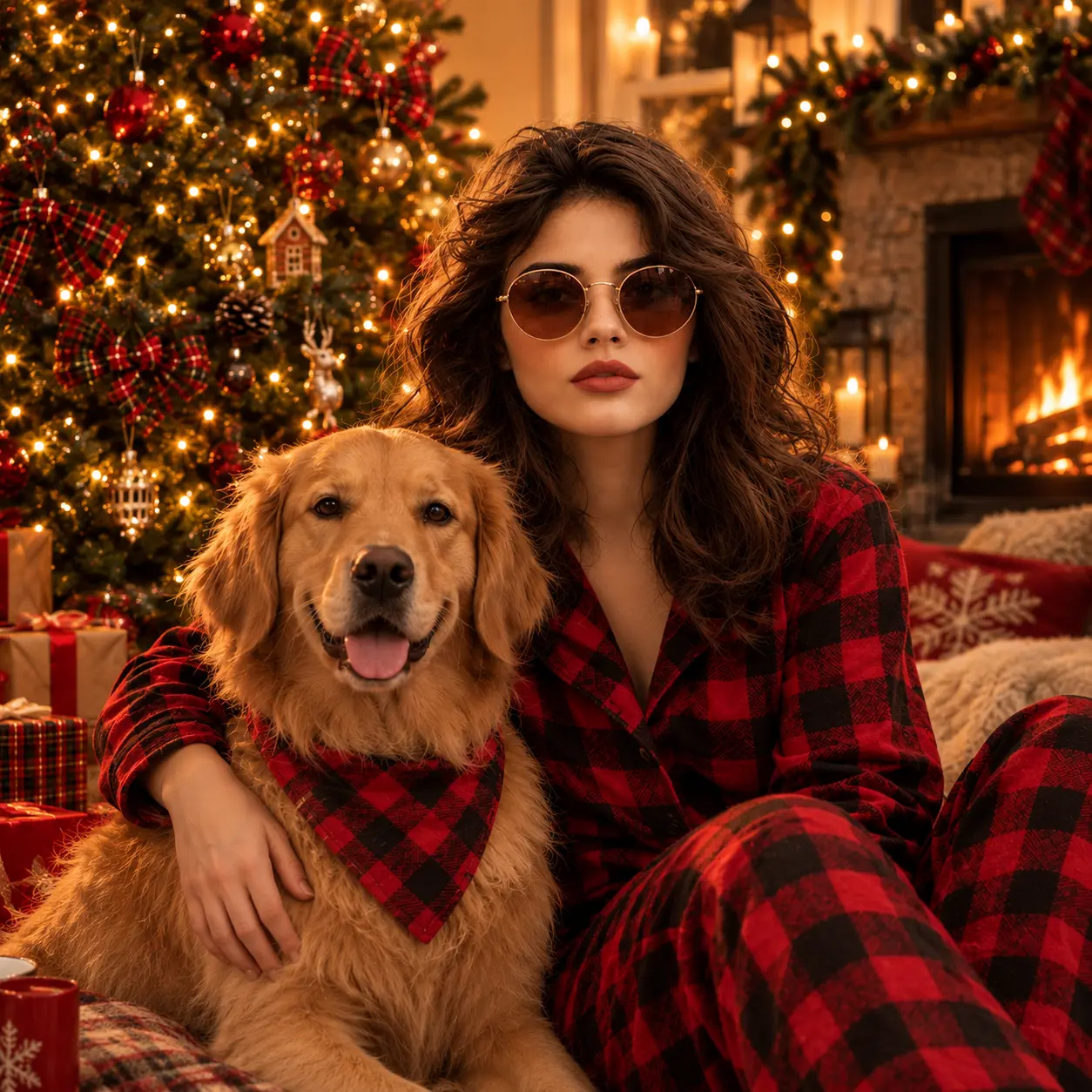
Transform the uploaded family photo into a Christmas morning family
portrait with everyone wearing matching red-and-black plaid pajamas,
seated by a decorated Christmas tree with warm fairy lights and
wrapped presents underneath. Include the family dog in a matching
plaid bandana if applicable. Preserve EVERY family member's exact
facial features and identities. Warm interior lighting from the tree
and fireplace. Landscape 16:9 aspect ratio.
Recommended model: Nano Banana Pro.
35. Snowy Christmas Tree Farm Portrait
Transform the uploaded photo into an outdoor Christmas tree farm scene
with the subject standing beside a freshly cut Christmas tree loaded
on a vintage wooden sled, wearing a cozy chunky knit sweater and warm
winter hat. Light soft snowfall in the air, warm late-afternoon sun
through pine trees. Preserve the subject's exact facial features and
identity. Natural winter lighting. Portrait 4:5 aspect ratio.
Recommended model: Nano Banana 2 or Flux 3.
36. Printed Christmas Card Design

Transform the uploaded photo into a printed Christmas card design
with the subject's portrait on textured cream card stock, bordered
by holly leaves and red berries, gold foil text at the top reading
"Merry Christmas" in elegant serif typography, a red wax seal in the
bottom right corner. Behind the portrait: a cozy snowy cabin scene
with warm windows glowing. Preserve the subject's exact facial
features and identity. Portrait 4:5 aspect ratio.
Recommended model: GPT Image 2.5, Flux 3, or Ideogram v4 for strong in-image text.
37. Anime Winter Christmas Portrait
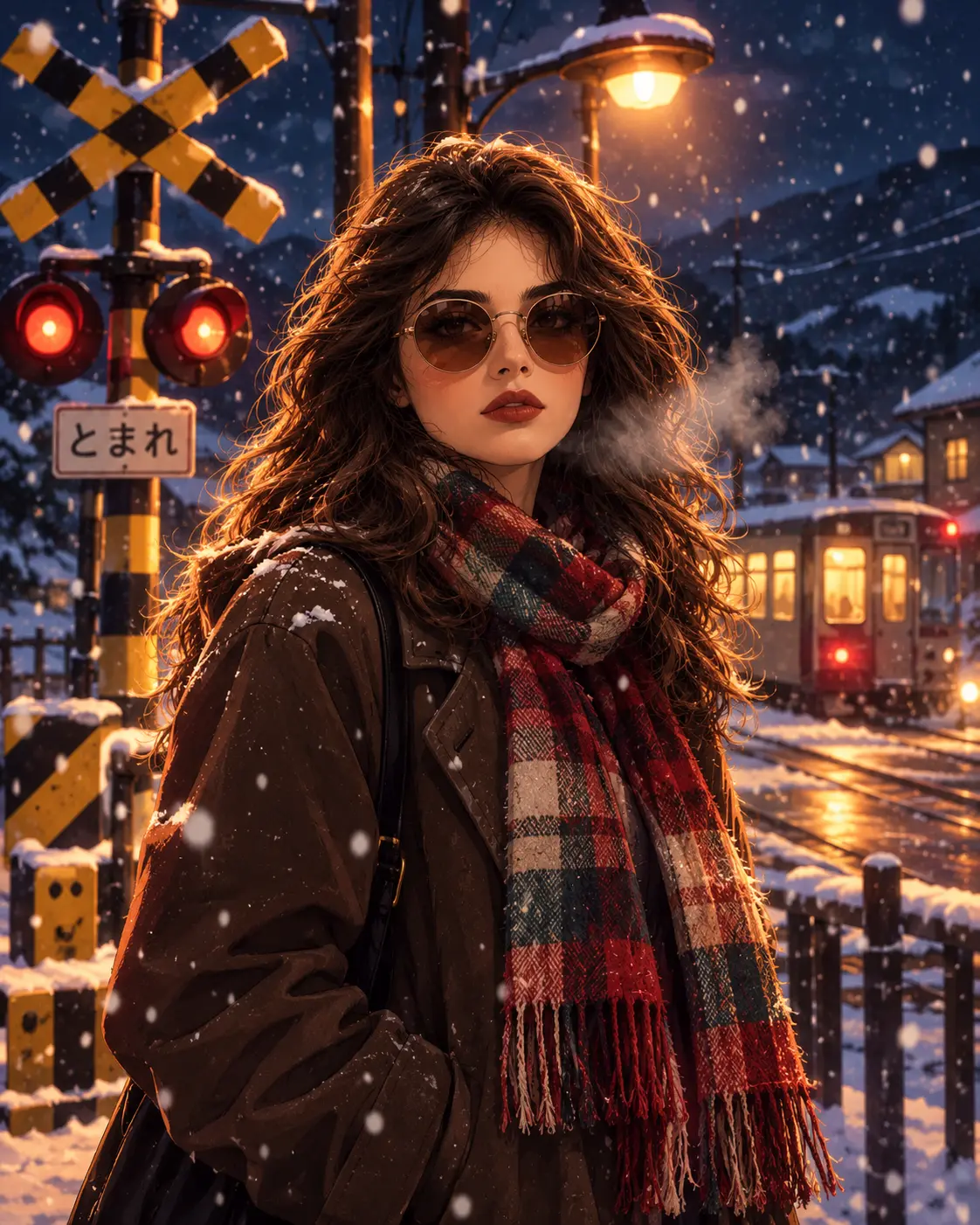
Transform the uploaded photo into a Japanese anime-style Christmas
portrait with the subject rendered in anime aesthetic standing at a
snowy railroad crossing at night, wearing a long colourful scarf and
warm winter coat. Soft falling snow, warm street lamp lighting,
atmospheric breath visible in the cold air. Preserve the subject's
recognisable facial features translated into anime illustration style.
Portrait 4:5 aspect ratio.
Recommended model: Nano Banana 2.
Seasonal and Festival Prompts
Four prompts covering the broader annual calendar.
This final prompt section covers four prompts spanning the broader annual calendar beyond Halloween and Christmas. Diwali content has become one of the fastest-growing holiday categories on social feeds. Spring cherry blossom fits March-April calendars, Valentine's covers February, and New Year's Eve drives engagement across the late December transition. These seasonal prompts share the same structural pattern as the holiday prompts above, which means creators who have internalised the structure can extend the pattern to any seasonal moment without needing a specific prompt for each occasion.
38. Diwali Festival Portrait
Transform the uploaded photo into a Diwali celebration portrait wearing
elegant traditional Indian attire (saree or kurta) in rich colours like
deep crimson or royal blue with intricate gold embroidery. The subject
is lighting a diya oil lamp with warm golden flame light illuminating
their face. Blurred background filled with glowing diyas and colourful
rangoli patterns. Preserve the subject's exact facial features and
identity. Portrait 4:5 aspect ratio.
Recommended model: Nano Banana Pro.
39. Spring Cherry Blossom Portrait
Transform the uploaded photo into a spring cherry blossom portrait
standing under a canopy of pink sakura blossoms in full bloom, soft
pink petals falling gently around the subject. Soft diffused afternoon
lighting filtering through the blossoms. Preserve the subject's exact
facial features and identity. Natural skin texture, soft pastel colour
palette. Portrait 4:5 aspect ratio.
Recommended model: Nano Banana 2 or Flux 3.
40. Valentine's Romantic Couple Portrait
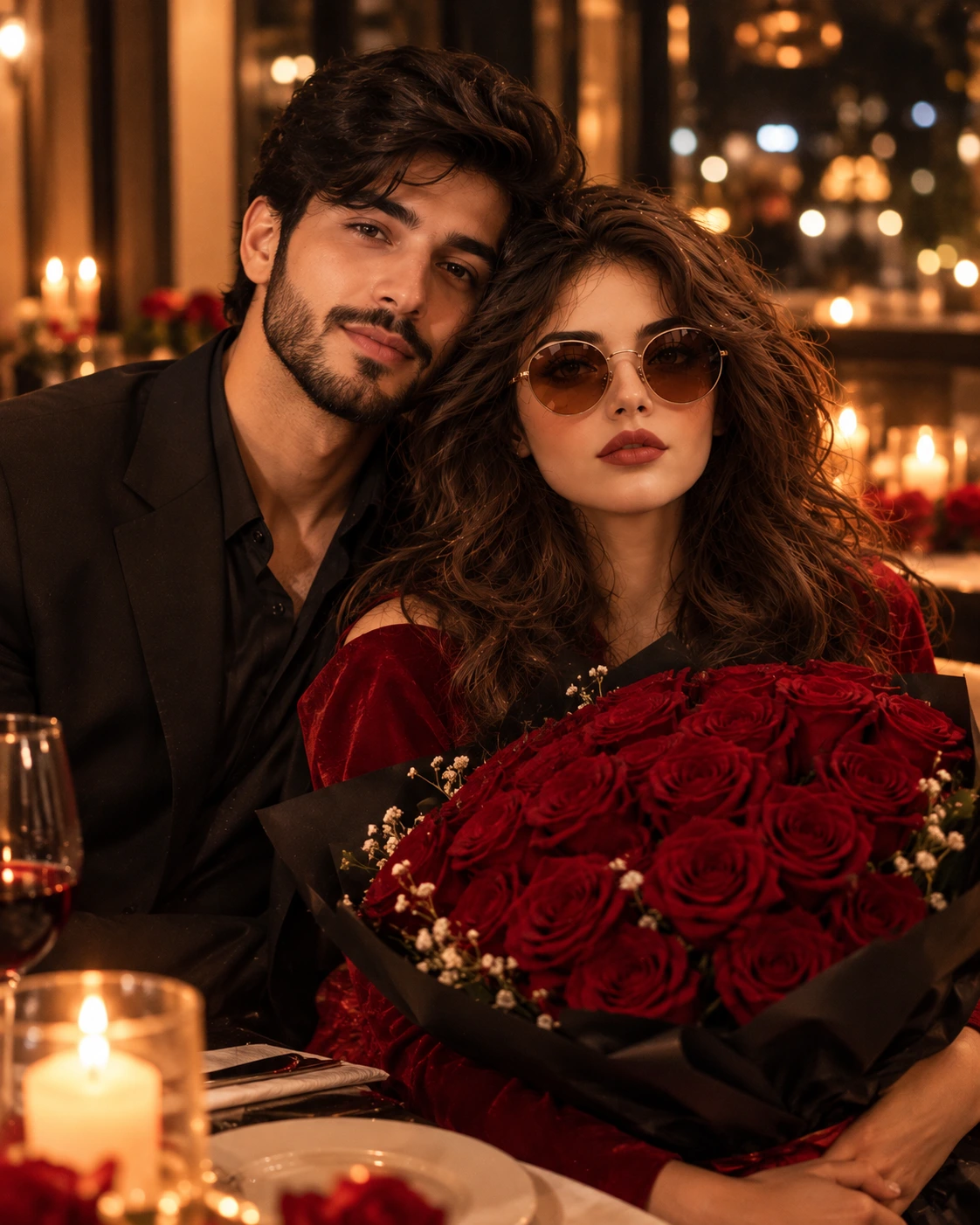
Transform the uploaded couple photo into a romantic Valentine's Day
portrait holding a large bouquet of deep red roses, warm candlelit
restaurant dinner background with blurred bokeh, elegant evening attire.
Preserve BOTH subjects' exact facial features and identities. Natural
intimate pose, warm cinematic lighting. Portrait 4:5 aspect ratio.
Recommended model: Nano Banana Pro.
41. New Year's Eve Celebration Portrait
Transform the uploaded photo into a New Year's Eve celebration portrait
holding a champagne flute glass, surrounded by colourful falling
confetti and warm bokeh party lights, elegant evening attire. Preserve
the subject's exact facial features and identity. Celebratory happy
expression, warm atmospheric party lighting. Portrait 4:5 aspect ratio.
Recommended model: Nano Banana 2.
How to Write Your Own Gemini AI Photo Prompt
The Gemini AI prompts above cover the most common requests, but understanding the structure that makes them work lets you write custom Gemini AI prompts for any use case the library does not cover directly.
The core structure for editing prompts follows five elements: start with the edit instruction naming what should change, add the keep-lock stating exactly what must stay the same (always include "preserve the subject's exact facial features and identity" for identity-dependent edits), add the change-only fence limiting what the model is allowed to modify, specify style and lighting direction with specific vocabulary, close with a natural skin texture or detail request to prevent plastic skin output, and name the aspect ratio.
The core structure for pure generation prompts drops the keep-lock and change-only fence since there is no source image to preserve. Replace those with explicit subject description, since the model has to invent the entire subject from the prompt rather than preserve one that already exists in the uploaded photo.
The five-second quality check before running any prompt covers five elements: source photo uploaded (for editing prompts), keep-line stated explicitly, change-line stated with scope limits, style named with specific vocabulary rather than vague adjectives, and natural skin or detail requested. Prompts missing any of these components typically produce weaker output than prompts covering all five.
Model Comparison for Common Photo Use Cases
Capability | Nano Banana | GPT Image 2 / 2.5 | Flux 3 | Seedream 5.0 Lite | Ideogram v4 |
|---|---|---|---|---|---|
Identity preservation | Strongest | Moderate | Strong | Moderate | Moderate |
Photoreal portrait | Excellent | Excellent | Excellent | Strong | Strong |
In-image text | Moderate | Strongest | Strong | Moderate | Strongest |
Prompt accuracy | Strong | Strongest | Strong | Strong | Strong |
Costume transformation | Strongest | Strong | Strong | Moderate | Moderate |
Multi-subject identity | Nano Banana Pro | Moderate | Strong | Moderate | Moderate |
Fast iteration | Nano Banana 2 | Moderate | Moderate | Fastest | Moderate |
Native 4K output | Standard | Standard | Native 2K/4K | Standard | Standard |
Best use | Trending portraits, costume shifts | Posters, cards, text ads | Marketing campaigns, reference-based work | Fast iteration, lifestyle | Typography-driven creative |
The practical workflow across all the prompts above is matching the model to the prompt category. Trending portraits, costume transformations, and era-shift prompts default to Nano Banana for identity preservation. Prompts with meaningful in-image text (holiday cards, labelled products, boxed figures) run on GPT Image 2.5 or Flux 3. Fast iteration during exploration uses Seedream Lite. Typography-dominant creative uses Ideogram v4. The single Templix subscription covers all these models under one shared coin balance, which supports per-generation model switching without additional specialist subscriptions.
Getting Started With the Prompt Library on Templix
Every prompt above is included in Templix's standard AI Image Generator workflow under the regular subscription structure. Free credits on signup cover the full image model catalog at no upfront cost for testing the entire prompt library on real photos before committing to a paid subscription. The exact coin cost of each generation displays on the button before every run, which keeps per-image budgeting predictable across batch sessions where you work through multiple prompts.
The typical getting-started workflow is uploading your source photo (for editing prompts) or starting with a blank generation request (for pure generation prompts), selecting the recommended model for the specific prompt category you're running, pasting the chosen prompt from the library, and generating. For prompts producing output close to the intended direction but needing refinement, running the same prompt with minor adjustments on the same model typically produces stronger results than switching to a different model entirely.
Frequently Asked Questions
How do I use Gemini AI for photos on Templix?
Upload your source photo to the Templix AI Image Generator, select Google Gemini AI's Nano Banana 2 or Nano Banana Pro from the model selection, paste any of the Gemini AI prompts from the library above, and generate. Free credits on signup cover the full Gemini AI workflow at no upfront cost for testing on real photos before any paid subscription commitment.
How do I edit a photo with Gemini AI?
Upload the source photo first, then paste a Gemini AI editing prompt that names what should change, explicitly states what must stay the same (specifically the subject's facial features and identity), specifies the style direction, and closes with a natural detail request. Gemini AI's specific strength is preserving subject identity through heavy restyling, which makes editing prompts particularly effective on Nano Banana.
Is Nano Banana the same as Gemini AI?
Nano Banana is Google's image model line within the broader Gemini AI family. For creators specifically producing photo content, Nano Banana is the relevant Gemini AI variant to use. On Templix, both Nano Banana 2 and Nano Banana Pro variants are available in the image catalog alongside complementary models for text-heavy prompts (GPT Image 2.5, Flux 3) and typography-dominant creative (Ideogram v4).
Which model should I use for which Gemini AI prompt?
The recommendations beneath each prompt in the library above cover the specific best fit per prompt category. In general: Gemini AI Nano Banana for identity-preservation and costume transformations (default for most prompts in the library), GPT Image 2.5 or Flux 3 for prompts with meaningful in-image text, Flux 3 for marketing campaign work and native 4K output, Seedream Lite for fast iteration, Ideogram v4 for typography-dominant creative, and Gemini AI Nano Banana Pro for premium hero deliverables and multi-subject identity preservation.
How do I write my own Gemini AI photo prompt?
The core Gemini AI editing prompt structure covers five elements: edit instruction (what should change), keep-lock (what must stay the same including facial features and identity), change-only fence (what the model can modify), style and lighting direction with specific vocabulary, and a natural detail request. Generation-only Gemini AI prompts drop the keep-lock and change-only fence and replace them with explicit subject description.
What are the best Gemini AI prompts for girls' portraits?
The trending Gemini AI portrait section covers the most popular prompts including the soft-glam pastel studio portrait, dreamy butterfly portrait, golden hour field portrait, saree ethnic portrait, and clean editorial Instagram profile picture. Each works across different source photos while maintaining the specific style direction through Nano Banana's identity preservation strength.
What are the best Gemini AI prompts for Halloween photos?
The Halloween Gemini AI section covers five prompts: the elegant Victorian vampire portrait with costume variations (witch, zombie, ghost bride, skeleton), the VHS 1990s found-footage horror, the coordinated Halloween couple photoshoot, the sugar-skull Day of the Dead portrait, and the pet Halloween costume. The vampire prompt covers the broadest range of Halloween styling needs through a single structural Gemini AI template.
How do I do the Gemini AI Halloween photo trend?
Upload your source photo to Templix AI Image Generator, select Nano Banana Pro from the Gemini AI model selection for best Halloween output, paste one of the five Halloween Gemini AI prompts from the library above, and generate. Save output as PNG to preserve quality for sharing across social platforms. Nano Banana Pro produces higher fidelity on costume detail than the standard Nano Banana 2 variant.
How do I make a Gemini AI Christmas photo on Templix?
Five Christmas Gemini AI prompts cover the main use cases: the giant gift box photoshoot, family pajama portrait, snowy Christmas tree farm photo, printed Christmas card design, and anime winter Christmas portrait. The Christmas card prompt specifically benefits from running on GPT Image 2.5, Flux 3, or Ideogram v4 rather than Gemini AI Nano Banana for stronger in-image text rendering on the "Merry Christmas" typography.
Can I make a Thanksgiving family photo with Gemini AI?
Yes. The family Thanksgiving dinner Gemini AI prompt generates a warm dinner table scene with roast turkey and traditional sides, preserving every family member's exact facial features and identities across the composition. For larger groups, state the headcount explicitly in the prompt where the bracketed placeholder appears, so Nano Banana generates the correct number of family members seated around the table.
Can Gemini AI restore and colorize old photos?
Yes. The old photo restoration and colorization Gemini AI prompts in the library handle both the repair step (removing scratches, tears, dust spots, and fading) and the colorization step (adding historically accurate colours to black-and-white photos). For creators handling restoration work at scale beyond individual prompts, the Templix Photo Restoration app provides a dedicated workflow specifically for damaged photo repair.
Are these Gemini AI photo prompts free to use?
Yes. All Gemini AI prompts in the library are provided for creators to copy-paste freely into the Templix AI Image Generator workflow running Google Gemini AI's Nano Banana models. Free credits on signup cover the generation workflow at no upfront cost for testing the full prompt library on real photos before any paid subscription commitment.
Which Gemini AI model handles multi-subject photos best?
Google Gemini AI Nano Banana Pro produces measurably stronger multi-subject identity preservation than most other image models, which makes it the right default choice for Gemini AI prompts featuring couples, families, friend groups, or any scene where multiple distinct recognisable subjects appear together. For prompts in the library specifically featuring multiple subjects (couple portraits, family dinner, Halloween couple photoshoot), the recommendation defaults to Nano Banana Pro.
Mahnoor Asad
Mahnoor Asad blends design sensibility with AI video expertise at Templix, crafting content on visual creativity, motion generation, and high-converting ad concepts.