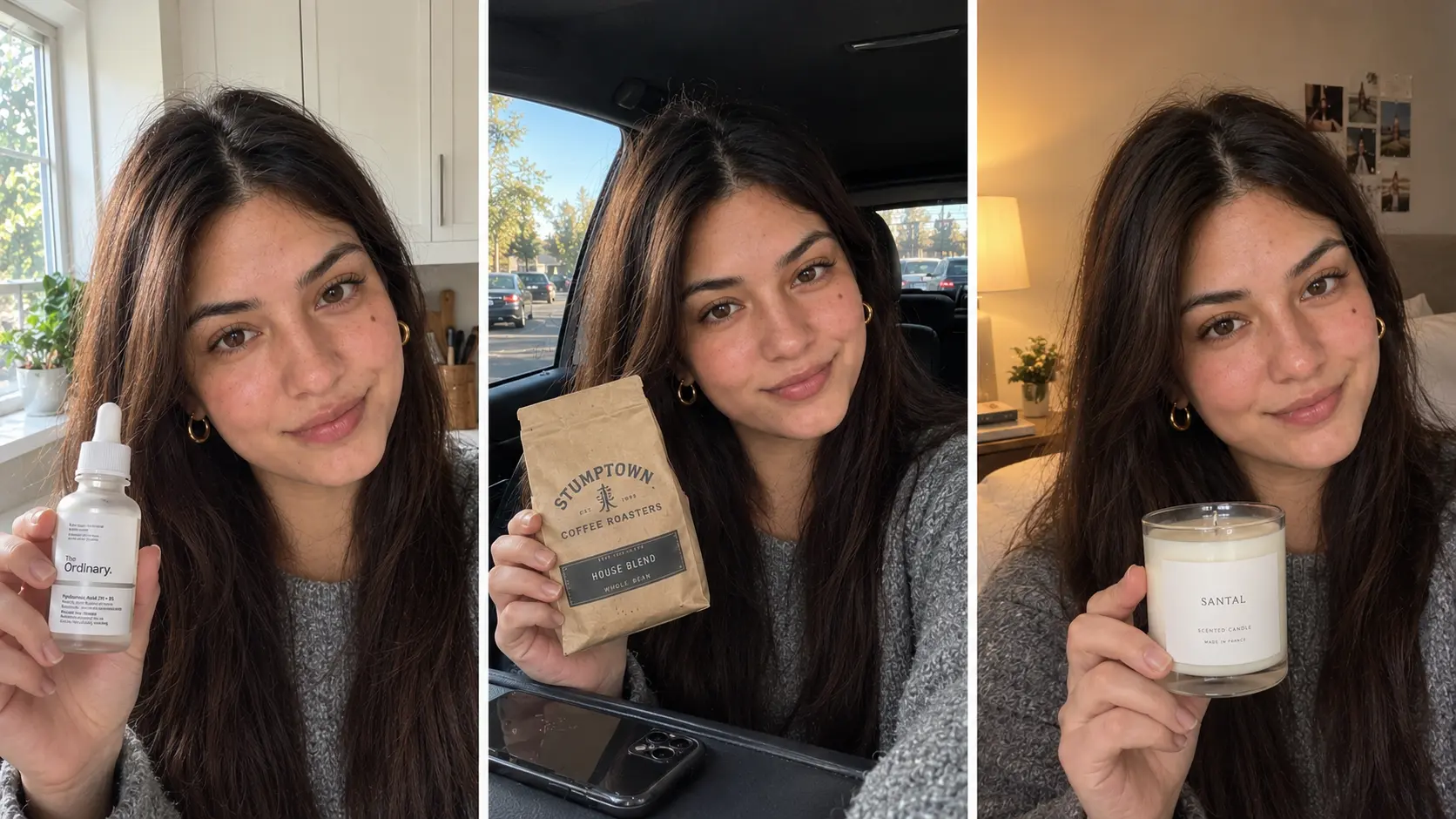
[IMAGE 1: hero, directly under the intro, full width. A 3-frame strip of the same AI creator in three different scenes (kitchen, car, bedroom) holding three different products, same face in all three. See prompt in the media notes]
The first AI product video is easy. The tenth is where brands get stuck.
You build a creator, make an ad, it works. You go to make the next one and she comes out a little different. Rounder face. Different nose. The hair is right but the eyes are not. By the fifth video your brand has five cousins presenting its products, and viewers who were starting to recognise her stop.
Consistency is the whole difference between a random AI face and an AI UGC character. A character is someone viewers see again and again, the way they see a real creator. That recognition is what UGC trades on, and it only works if the face holds.
This guide covers how to build a consistent AI UGC character with an AI UGC character generator, how to lock her so she stays the same across every product and scene, and how to fix drift when it happens.
Why consistency matters more than realism
A realistic creator who changes every video is worth less than a slightly imperfect one who never changes.
Three reasons:
Recognition is the asset. Viewers trust faces they have seen before. A creator who shows up in ad after ad builds the same familiarity a real influencer does. A different face each time resets that to zero.
It is how the brand gets a "person". One consistent character becomes the face of the store. Her name goes in the bio, her face goes on the thumbnails. That is a virtual influencer for product ads, and it is only possible with a locked face.
It is how you scale. Forty products, one creator. Three hooks per product, same creator. Seasonal refresh, same creator. Every efficiency in AI UGC depends on not rebuilding the person each time.
Realism gets the first view. Consistency gets the tenth.
Why AI characters drift
Understanding the cause makes the fix obvious.
Image and video models do not remember. Every generation starts from zero. When you type "woman in her late 20s, dark hair, natural skin" the model produces one of millions of faces that match that text. Run it again and it produces a different one of those millions. The description was the same; the face was never stored.
More description narrows the pool but never to one face. The only thing that holds a face is an image of that face, used as the reference for everything that follows.
That is the whole method. Build once from text, then never build from text again.
Step 1: Write the identity brief before the prompt
Before you generate anything, write who she is in one paragraph. This is what you check every future image against.
Cover:
Who she is for. The buyer she needs to look like. "Women 25 to 35 who buy mid-range skincare and film in their bathroom."
Age and look. A specific age, not a range. Hair colour, length and how she wears it. Skin tone. Eye colour. One or two distinctive features: a mole, a gap in the teeth, freckles, a specific brow shape.
Style. Two or three outfits she lives in. Jewellery she always wears.
Her rooms. Two or three places she films. Kitchen with the plant. Car. Bedroom with the window on the left.
Her energy. Three words. Calm and dry. Warm and chatty. Sharp and quick.
Example brief: "Nadia, 28. Dark brown hair past the shoulders, usually down with a middle part. Warm medium skin with a small mole on the left cheekbone, thick natural brows, brown eyes. Always wears small gold hoops. Grey or beige knitwear. Films in her kitchen and her car. Calm, dry, a little funny."
The distinctive features are the important part. A mole, a brow shape, a gap: these are what make a face recognisable and what you will check for when drift happens.
Step 2: Build her once in the character generator

Four AI UGC character generator outputs from one prompt with the best match highlighted as the master reference
Open the UGC character generator. Turn the brief into a prompt. Every line in the brief becomes a line in the prompt, and the distinctive features go in explicitly.
Woman, 28, dark brown hair past the shoulders, worn down with a middle
part, warm medium skin with natural texture, a small mole on the left
cheekbone, thick natural eyebrows, brown eyes, small gold hoop earrings,
calm relaxed expression with a slight dry smile. Grey knit sweater.
Bright kitchen, plant on the counter, soft window light from the left.
Phone front camera, slightly off centre. Portrait, 9:16.
No heavy retouching, no plastic skin, no perfect symmetry, no glossy
filter, not a 3D render.
Generate six to ten versions. Line them up and pick one. Not the prettiest. The one that matches the brief most exactly, mole where you put it, brows the shape you described.
Save that image. Name the file after her. This is the master reference, and from here on it is the only source of her face.
Step 3: Lock the face
This step is one rule: never generate her from text again.
Every image and every video from now on starts with the master reference attached. The character generator, the image generator, the ad generator and the video generator all accept a creator image as the reference. Use it every time, even for a quick test.
Practical setup:
One folder per character. The master reference, the prompt that made her, the identity brief. Nothing else goes in.
One master, not many. Do not keep "a few good ones" and rotate. Pick one and delete the rest. Rotating references is slow drift.
The master never changes. If you later want her with shorter hair, that is a new character with a new folder, not an edit to this one.
Step 4: Keep her stable across scenes and products
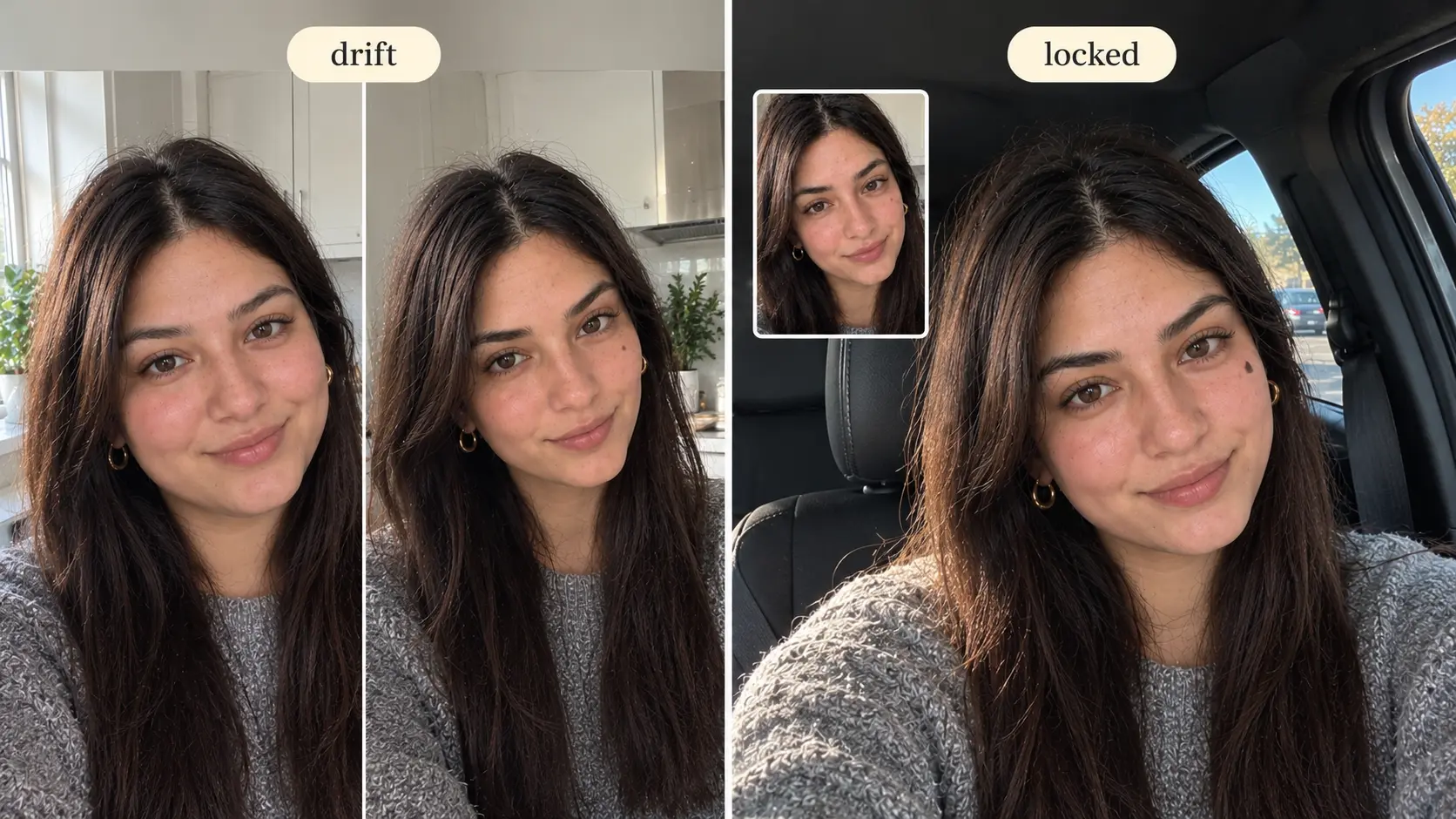
I character consistency comparison, text-prompt drift on the left versus a reference-locked face on the right
With the master attached, you can change almost everything else and she holds. The rules for what to change and what to keep:
Change freely: the room, the light, the outfit, the product in her hand, the camera angle, the expression, the script.
Keep fixed in every prompt: her age, her hair colour and length, the distinctive features. Repeat them in every prompt even though the reference carries them.
Do not fight the reference. If the prompt says "blonde" and the reference is brunette, the model splits the difference and the face drifts. Describe what you want changed, not what she already is.
A scene change prompt that holds the face:
@image1 in the driver's seat of a parked car, phone mounted on the
dashboard, afternoon light through the windscreen, grey knit sweater,
small gold hoops, holding @image2 up at chest height with the label to
camera, calm dry smile. Same face, same mole on the left cheekbone,
same thick brows. Natural skin texture, no beauty smoothing, no
studio lighting.
"Same face, same mole, same brows" at the end is the consistency anchor. It costs nothing and catches the generations that would otherwise slide.
For products, the method is identical: the creator is @image1, the product is @image2, and only @image2 changes between ads. Forty products, one face.
Step 5: Build the content around her
Once locked, she can carry everything a brand needs.
Product videos. The UGC ad generator takes the master as @image1 and any product as @image2. Same creator across the whole catalogue, with the face holding in motion as well as in stills.
Organic clips. The UGC video generator for the non-ad content between campaigns: a shelf tour, a morning routine, a reaction. The same face in the feed and in the ads makes her feel like a real creator.
Stills. The UGC image generator for thumbnails, carousels, product page images and pins, all from the master reference.
A second character. When one face is established, build a second for a different product line or buyer segment. Separate brief, separate folder, separate master. Never share references between characters.
If you do not want to build from scratch, the Community gallery has creators already built for realism. Pick one, save her image as your master, and apply the same lock rule.
Build a creator that stays the same in every video
How to spot and fix drift
Even with the reference attached, some generations slide. Here is how to catch it and what to do.
The side-by-side test. Put the new image next to the master. Check the distinctive features first: mole, brows, eye shape, the gap in the teeth. If any has moved or vanished, reject the image. Close enough compounds.
The phone test. Open the new image full screen on a phone and hand it to someone who knows the character. Ask "is this her?" Not "is this good". If they hesitate, it is drift.
Common causes and fixes:
Long prompts. The more words, the more room to reinvent her. Cut the prompt to the scene, the product and the anchors. Let the reference do the face.
Conflicting descriptions. "Blonde" against a brunette reference, "young" against a 28-year-old. Remove the conflict.
Extreme angles. Profile shots and top-down angles drift more than front-facing. Keep most content between front-on and three-quarter.
Heavy expressions. Big laughs and wide surprise stretch the face away from the reference. Keep expressions small: a smile, a nod, a raised brow.
Video drift mid-clip. If the face changes partway through a video, shorten the clip or the sentence. Long takes give the model time to wander.
Using an output as the new reference. Never. Each generation is a small step from the master; chaining them walks the face away. Always go back to the master.
The consistency checklist
Before any image or video goes live:
Master reference attached
Age, hair, and distinctive features repeated in the prompt
No conflicting description against the reference
Consistency anchor at the end ("same face, same mole, same brows")
Expression small, angle front-on to three-quarter
Side-by-side check against the master passed
Output not saved as a new reference
Seven lines. Follow them and she stays herself.
Frequently Asked Questions
What is an AI UGC character generator?
A tool that builds a reusable AI creator from a description: face, age, style, setting. The output is a reference image you then attach to every photo and video you make, so the same person appears across all your product content.
How do I keep an AI character consistent across videos?
Build her once from text, save the best output as a master reference image, and attach that image to every future generation. Never regenerate her from text, repeat her distinctive features in each prompt, and check every output against the master before using it.
Why does my AI creator look different in every video?
Because the model does not remember faces. A text prompt describes millions of possible faces, and each generation picks a different one. Only a reference image holds a specific face. If you are generating from text each time, that is the cause.
Can I use the same AI character for different products?
Yes, and you should. Keep the creator as the fixed reference and change only the product image and the script. One character across a whole catalogue is how a brand builds a recognisable face.
Is a consistent AI character the same as a virtual influencer?
A virtual influencer is a consistent AI character with a name, a personality and an audience. Consistency is the foundation; the name and the feed are what turn her into an influencer for your product ads.
How many AI characters should a brand have?
Start with one. Build a second only when you have a clearly different buyer segment or product line. Each character needs her own brief, master reference and folder, and references are never shared between them.

Usman Khalid
Usman Khalid writes Templix's design and product content, covering API workflows and team collaboration to help developers and creators build smarter, faster experiences.