Flux 3 brings substantial improvements over earlier Flux versions across prompt adherence, in-image text rendering, reference-based composition, and subject consistency, but the model only delivers its full capability when prompts are structured in ways the model can actually parse accurately. The gap between a Flux 3 prompt that produces disappointing output and one that produces delivery-quality output on the first attempt sits almost entirely in prompt structure rather than in the model's underlying capability. Creators who treat Flux 3 prompting as a discipline rather than a one-off exercise consistently produce measurably better output across every creative direction they work on.
This guide covers the practical prompting patterns that produce strong Flux 3 output on Templix. Everything in the guide applies directly to the Flux 3 version available on Templix, and the patterns transfer across the broader Templix image model catalog as general prompt discipline even when creators work with other models in the same production session alongside Flux 3 for different parts of the creative workflow.
How Flux 3 Reads a Prompt
Flux 3 works best when prompts read as natural ordered sentences describing a scene rather than as keyword lists, special symbol combinations, or stacked adjectives. The model parses natural language structure more accurately than keyword soup, which means the specific words you use and the order you place them in both carry weight toward the final output. Prompts written as plain descriptive sentences typically outperform prompts written as comma-separated keyword lists, even when both prompts contain roughly the same information.
The practical implication for creators is that time spent writing clean descriptive sentences before generating produces measurably better output than iterating through many keyword variations trying to find a combination that works. Flux 3 rewards investing in prompt structure once rather than regenerating repeatedly through casual prompt variations.
The underlying reason this matters is that natural language carries information the model uses to understand what the creator actually wants: subject identity versus setting, main action versus background detail, intentional creative direction versus incidental scene elements. Keyword lists strip out this structural information and leave the model guessing which keywords matter most.
The Priority Order Flux 3 Responds To
Priority order inside a prompt matters significantly on Flux 3. The model weighs earlier elements more heavily than later elements, which means placing your most important creative direction at the start of the prompt produces output that reflects that direction more reliably than burying it mid-prompt.
The specific priority order that works consistently across most Flux 3 projects follows this sequence:
Subject first. Name what appears in the frame and what it is doing. "A woman in her thirties mid-stride through a city crosswalk" tells the model the subject identity and action before anything else.
Setting next. Name where the subject exists. "Through a crowded Tokyo crosswalk at dusk" places the subject in its environment.
Visual style after setting. Name the aesthetic direction. "Shot in documentary photography style" sets the overall look.
Lighting specification after style. Name the specific light source and direction. "Soft side light from camera-left casting gentle shadows across her face" tells the model exactly how light behaves in the scene.
Materials and colours after lighting. Name specific textures and the colour palette. "Wearing a cream linen blouse and dark denim, warm amber and cream colour palette throughout the scene" gives the model specific visual anchors.
Technical details last. Name camera specifications, aspect ratio, and output characteristics. "Shot on 35mm lens, shallow depth of field with background softly blurred, 3:4 vertical composition" closes the prompt with delivery specs.
Burying the subject mid-prompt or at the end produces measurably weaker output because the model's attention gets distributed across the earlier elements before reaching the subject description. Prompts opening with "A photorealistic image at 4K resolution with warm lighting showing a woman..." consistently underperform prompts opening with "A woman..." and placing technical specs later.
Writing Natural Descriptive Prompts Instead of Keyword Lists
Natural language prompt structure sits at the opposite end of the spectrum from the keyword-stacking approach that worked on earlier generations of image models. Flux 3 particularly rewards descriptive sentence structure over keyword lists, and this matters more on Flux 3 than it did on previous Flux versions.
Keyword list approach that underperforms on Flux 3: "portrait, woman, 30s, curly hair, linen dress, outdoor market, herbs, morning light, documentary, 35mm, shallow depth of field, warm palette, 3:4"
Descriptive sentence approach that produces stronger output: "A woman in her early thirties with dark curly hair and a cream linen dress, examining a bundle of fresh herbs at an outdoor produce stall, morning light on her face. Shot in documentary photography style with soft side light from camera-left, warm amber and cream colour palette with green accents from the produce, 35mm lens with shallow depth of field, 3:4 vertical composition."
Both prompts contain roughly the same information, but Flux 3 produces more coherent output from the sentence version because the natural language structure helps the model understand which elements modify which other elements. "35mm lens with shallow depth of field" tells the model those two technical specs relate to the same shot setup. In the keyword version, "35mm" and "shallow depth of field" sit as separate items that might or might not be related.
For creators building stronger prompt discipline across image models generally, our AI image prompt guide covers the three-layer prompt framework (subject, craft, technical) that produces predictable output across every image model including Flux 3.
In-Image Text Rendering on Flux 3
Flux 3 handles in-image text rendering substantially better than earlier Flux versions, but the model still produces its strongest text output when prompts explicitly specify the exact words, position, style, size, and colour of the text rather than describing text requirements vaguely.
The specific pattern that works for in-image text:
Use quotation marks around exact words. Flux 3 reads text inside quotation marks as literal content to render rather than as descriptive language. "The headline reads 'MORNING RITUAL' in bold serif" produces more reliable text output than "the headline says morning ritual in bold serif font".
Describe position explicitly. "Positioned in the upper third of the composition" tells the model where to place the text. Vague position language ("somewhere on the poster") produces inconsistent placement across generations.
Specify typography characteristics. Font style (serif, sans-serif, display, handwritten), weight (bold, regular, light), and treatment (uppercase, lowercase, italic) all affect the final rendering.
Specify size relative to the composition. "Large masthead typography covering roughly 20% of the frame width" or "small callout text under the main image" gives the model specific sizing direction.
Specify colour explicitly. "Deep navy serif typography" produces more consistent colour matching than "dark coloured typography".
Example Flux 3 prompt with in-image text: "A minimalist magazine cover mockup for a fictional food publication. Top-down flat lay of seasonal autumn produce arranged on a rustic wooden surface. The masthead reads 'HARVEST' in bold deep navy serif typography covering roughly 25% of the frame width, positioned in the upper third. Subhead reads 'Fall Issue' in smaller gold letterspacing beneath. Three cover story callouts positioned along the right edge read 'Roots and Grains', 'Slow-Cooked Sundays', and 'What to Bake This Weekend'. Natural window light from the left, warm shadows across the composition. Portrait 3:4 magazine format."
Multi-language text works on Flux 3 following the same pattern, with the specific language and script named explicitly in the prompt alongside the quoted text content.
Using Reference Images Effectively on Flux 3
Flux 3's reference-based composition capability lets creators combine multiple reference images into a single generated output, with each reference assigned a specific role in the composition. The specific approach that produces reliable output involves naming the role each reference plays explicitly in the prompt rather than uploading references without context and hoping the model infers the right usage.
The pattern that works:
Upload each reference as a separate input. Multiple references uploaded separately produce more coherent output than one combined reference image containing multiple elements.
Name each reference's role in the prompt text. "The product reference establishes the exact bottle shape and label design. The style reference establishes the overall editorial photography aesthetic. The background reference establishes the kitchen counter setting." tells the model how to use each input.
Specify priority when references conflict. "The product reference takes priority over the style reference where they conflict on surface rendering" prevents the model from averaging contradictory direction.
Describe what to carry forward and what to adapt. "Carry the product's exact shape and label from the product reference. Adapt the lighting from the style reference. Use the setting from the background reference but adapt the camera angle to match the product reference" gives the model specific instructions for combining the inputs.
For creators focused on using Flux 3's reference-based approach for brand consistency specifically across marketing campaigns, our branded marketing images guide covers the five-element brand framework and reference-based generation approach that holds visual direction stable across campaign asset libraries.
Keeping Characters and Products Consistent Across Multiple Generations
Flux 3's subject consistency features support producing multiple images with the same recognisable character face, product appearance, or scene element. The specific prompt pattern that holds consistency across generations involves repeating identical subject descriptions across every prompt in the series rather than describing the subject differently in each prompt.
The pattern that holds consistency:
Write a locked subject description once. "A woman in her late twenties with shoulder-length dark hair, warm olive skin tone, and almond-shaped brown eyes, wearing a cream cable-knit sweater and dark jeans." This becomes the locked identity description.
Use the exact locked description in every prompt in the series. Even when the scene, action, or setting changes dramatically between generations, the subject description stays word-for-word identical. The model reads this consistency as a signal to hold the subject's visual identity stable.
Vary only what should actually vary. The scene, action, setting, lighting, and composition all change between generations in a series. The subject description does not change, which is what keeps the subject recognisable across the variations.
Add reference inputs alongside the locked description for stronger identity preservation. On projects where identity consistency matters most (brand spokespersons, recurring characters, product series), combining the locked prompt description with uploaded reference images produces meaningfully stronger consistency than text description alone.
The same pattern applies directly to products across catalogue imagery, mascots across brand content, and settings across location-based series.
The Single-Edit Iteration Loop
Flux 3's targeted editing capability supports changing specific elements inside an existing image without regenerating the whole composition. The practical workflow for using this capability well involves making one change per generation rather than attempting multiple simultaneous edits in a single pass.
The specific pattern that works:
Identify the one element that needs to change. If three things look wrong on the current output, address them one at a time rather than attempting all three edits in one prompt.
Describe exactly what should change and what should stay the same. "Change the background to a plain white studio backdrop. Keep the subject, pose, expression, lighting direction, and all composition elements exactly as they are in the source image." The second half of this instruction matters as much as the first.
Keep a running list of elements to preserve. Across multiple iteration rounds on the same image, the list of elements to preserve grows as more elements get validated as correct. Each subsequent edit names the preserved elements explicitly.
Generate, review, and move to the next edit. Only after one edit lands correctly should the workflow move to the next edit. Attempting multiple simultaneous edits produces output where the model's attention gets split and typically introduces drift on elements that were previously fine.
This single-edit approach beats regenerating from scratch on projects where most of the composition already works. Regeneration from scratch means gambling the parts that were already correct in exchange for fixing the one element that was wrong. Targeted editing only risks the specific element being changed.
10 Sample Prompts to Try on Flux 3
The patterns above apply across every creative direction Flux 3 handles. These ten sample prompts cover the main production profiles where Flux 3 produces strong output on Templix.
1. Lifestyle portrait (craft-layer heavy): "A woman in her mid-thirties with warm honey-blonde hair pulled back loosely, wearing a cream linen shirt, sitting at a sunlit wooden kitchen table with a ceramic coffee mug in both hands, looking contemplatively out of frame to the right. Shot in documentary editorial photography style with soft natural morning light streaming through a window from camera-right, warm amber and cream colour palette with soft green accents from a nearby plant, 50mm lens with shallow depth of field keeping focus on the subject, 3:4 vertical composition."

2. Product hero shot (technical-layer heavy): "A premium amber glass skincare serum bottle labelled 'LUMEN' centred on a clean seamless cream background. Soft directional studio lighting from camera-left with gentle shadow across the right side of the bottle, no harsh reflections on the glass surface. The label reads 'VITAMIN C BRIGHTENING SERUM' in deep navy sans-serif typography. Shot in commercial product photography style, warm cream background with subtle gradient, 85mm macro lens, sharp focus on label detail and glass refraction, 1:1 square composition suitable for ecommerce product listings."
3. Illustrated concept (style-layer heavy): "A curious red fox standing at the edge of a wildflower meadow at dusk, looking contemplatively toward the horizon. Flat vector illustration style with clean bold outlines and geometric simplified shapes. Limited colour palette of deep orange, forest green, and dusk purple with soft golden accents in the sky. Minimal shading with graphic flat colour fills, no photographic lighting. Editorial illustration aesthetic evocative of modern children's book cover art. Landscape 16:9 composition."
4. Editorial poster with heavy in-image text: "A minimalist concert poster for a fictional indie band performance. Centre composition shows a vintage microphone against a deep navy background with subtle grain texture. The headline reads 'ECHO SESSIONS' in large bold cream serif typography covering roughly 30% of the frame width, positioned in the upper third. Below the microphone, smaller text reads 'LIVE IN CONCERT' in uppercase sans-serif with wide letterspacing. Bottom third shows 'OCTOBER 15 . BROOKLYN STEEL' in handwritten script style. Portrait 2:3 poster composition."

5. Multi-reference product campaign: "A premium leather crossbody bag placed on a matte concrete surface in a sunlit modern cafe window seat. The product reference establishes the exact bag shape, leather texture, and gold hardware details. The style reference establishes the editorial lifestyle photography aesthetic. The background reference establishes the cafe setting with soft blurred patrons visible in the window. Natural afternoon light streaming through the window from camera-left, warm neutral colour palette with gold accents from the bag hardware, 50mm lens with shallow depth of field, 4:5 vertical composition."
6. Character identity across a series (locked description): "A woman in her late twenties with shoulder-length dark hair, warm olive skin tone, almond-shaped brown eyes, and a gentle smile, wearing a cream cable-knit sweater and dark jeans, standing in a sunlit bookstore holding an open book. Shot in natural documentary photography style with soft afternoon light from camera-right, warm cream and amber colour palette with muted browns from the surrounding books, 35mm lens with shallow depth of field, 3:4 vertical composition." (Use this exact subject description across every prompt in the character series, varying only the scene, action, and setting.)
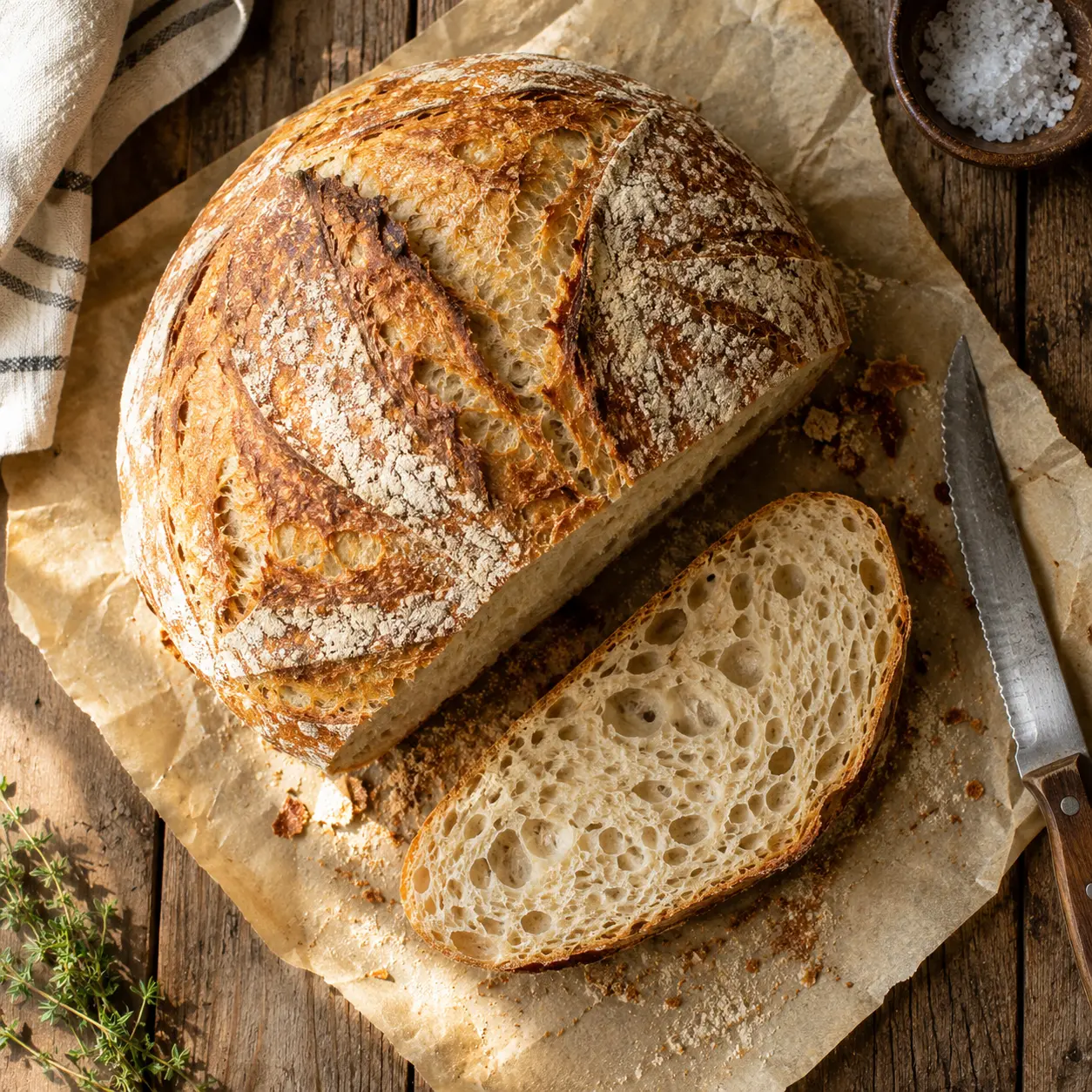
7. Food photography: "A rustic homemade sourdough loaf on parchment paper on a weathered wooden table, freshly cut with the first slice revealing an airy open crumb interior. Shot in overhead flat lay editorial food photography style, natural window light from camera-left creating soft shadows across the composition, warm cream and golden brown colour palette with deep brown accents from the crust, 50mm lens with sharp focus throughout the frame, 1:1 square composition suitable for cookbook or editorial food publication use."
8. Fashion editorial: "A tall figure in an architectural cream wool coat standing against a textured concrete wall in natural overcast daylight, hands in coat pockets, looking off-camera to the right with a thoughtful expression. Shot in high fashion editorial photography style, cool neutral colour palette with soft shadows, 85mm lens with the subject sharply focused and the concrete wall in soft focus behind, 3:4 vertical composition suitable for fashion magazine editorial spread."
9. Travel landscape with specific lighting: "A winding coastal road along a cliff edge overlooking the Mediterranean at golden hour. The road curves away from the viewer toward a distant seaside town visible in the far background. Shot in travel photography editorial style with warm golden hour lighting from camera-right casting long shadows across the road, warm amber and deep blue colour palette with soft gold highlights on the cliff rocks, 24mm wide-angle lens with sharp focus throughout, 16:9 landscape composition."
10. Targeted edit (single-element change): "Change the background from the current beach setting to a sunlit urban cafe interior with soft bokeh from indoor pendant lights. Keep the subject's exact pose, expression, hair, clothing, lighting direction on the subject's face, and all composition elements exactly as they are in the source image. Only the background environment changes."
For generated images requiring delivery at higher resolution than Flux 3's native output, the Templix Image Upscaler handles the finishing step. For most Flux 3 projects, the native 2K or 4K output ships directly without additional upscaling needed.
Common Prompt Mistakes That Weaken Flux 3 Output
Six specific mistakes account for most of the weak output creators run into on Flux 3 despite having access to a strong model.
Burying the subject later in the prompt: Opening with technical specs or style adjectives before naming the subject produces measurably weaker output than opening with the subject itself. The model's attention weights earlier elements more heavily.
Using negative language like "no" or "without": "A woman not wearing glasses" or "without any text in the frame" often produces output that still contains the excluded element. Describing what should appear instead ("a woman with clear unobscured eyes" or "a clean composition with no text overlays, just the subject against the background") works more reliably.
Adding filler quality adjectives: Words like "masterpiece", "best quality", "high detail", "8K" that worked as prompt tokens on earlier image model generations do not help Flux 3 and often distract from the actual creative direction. Flux 3 produces its best output when prompts describe the actual image rather than making abstract quality claims about it.
Attempting multiple simultaneous edits in one iteration pass: As covered above, single-edit iteration beats multi-edit attempts because the model's attention gets split across multiple competing changes.
Uploading reference images without naming their role: References without context in the prompt text produce inconsistent output because the model guesses how to use each input. Explicit role assignment per reference produces reliable output.
Describing colours in natural language instead of specific references: "Our brand blue" produces a different blue every generation. Specifying hex codes, named colour systems, or specific references (deep navy, forest green, warm cream) produces consistent colour matching across generations.
Testing Prompts Before Committing to Full Resolution
Flux 3's native output at 2K and 4K uses meaningfully more compute per generation than lower resolution output. The practical production workflow involves testing prompt variations at lower resolution during exploration, then generating final hero output at full native resolution once the prompt structure is validated.
The specific pattern that works for production efficiency:
Explore at standard resolution first: Test 3-5 prompt variations at standard resolution to find the direction that works for the project.
Refine the winning direction through 2-3 additional iterations at standard resolution: This locks the prompt structure and composition before committing to full resolution output.
Generate the final deliverable at native 2K or 4K: Only after the prompt is validated should the production workflow commit to full resolution output.
This approach saves credit spend during the exploration phase without sacrificing quality on the final deliverable. The exact coin cost of each generation displays on the button before every run on Templix, which keeps per-image budgeting predictable across the full exploration and finishing workflow.
For creators working across Flux 3 and the broader Templix image model catalog, our image generation hub covers access to Flux 3 alongside Nano Banana 2, Nano Banana Pro, Seedream 5.0 Lite, Flux 2 Pro, GPT Image 2, GPT Image 2.5, GPT Image 2.5 Pro, and Ideogram v4, all under one subscription with a shared coin balance.
Explore All Templix Image Models Free
Frequently Asked Questions
What is the best prompt structure for Flux 3?
The structure that works consistently across most Flux 3 projects follows this priority order: subject first, setting next, visual style after setting, lighting specification after style, materials and colours after lighting, and technical details last. The model weighs earlier elements more heavily, so placing the most important creative direction at the start of the prompt produces output that reflects that direction more reliably than burying it mid-prompt.
Should I write Flux 3 prompts as sentences or keyword lists?
Natural descriptive sentences work meaningfully better than keyword lists on Flux 3. The model parses sentence structure more accurately than comma-separated keyword stacks, which means prompts written as plain descriptive language typically outperform prompts written as keyword soup even when both contain roughly the same information. Flux 3 particularly rewards the sentence approach more than earlier Flux versions did.
How do I render in-image text accurately on Flux 3?
Use quotation marks around the exact words you want rendered, describe the position in the composition explicitly, specify typography characteristics (font style, weight, treatment), name the size relative to the composition, and specify colour explicitly. Flux 3 reads text inside quotation marks as literal content to render rather than as descriptive language. The specific pattern "The headline reads 'MORNING RITUAL' in bold serif, positioned in the upper third of the composition" produces reliable text output.
How do I use reference images effectively on Flux 3?
Upload each reference as a separate input rather than combining multiple elements into one reference image, name each reference's role explicitly in the prompt text, specify priority when references conflict on specific elements, and describe what to carry forward from each reference versus what to adapt. Flux 3 handles multi-reference composition well when the role assignment is explicit rather than implicit.
How do I keep the same character consistent across multiple Flux 3 generations?
Write a locked subject description once and use the exact word-for-word identical description across every prompt in the series. Vary only the scene, action, setting, lighting, and composition between generations while keeping the subject description constant. For projects where identity consistency matters most, combine the locked prompt description with uploaded reference images for stronger consistency than text description alone.
Can I make multiple edits to the same image in one Flux 3 generation?
Possible but inadvisable. Single-edit iteration (one change per generation) produces more reliable output than attempting multiple simultaneous edits because the model's attention gets split across competing changes when multiple edits run together. The practical workflow is identifying the one element that needs to change, describing exactly what should change and what should stay the same, generating, reviewing, and moving to the next edit only after the current one lands correctly.
What are the most common mistakes creators make when prompting Flux 3?
Six specific mistakes account for most weak output: burying the subject later in the prompt instead of leading with it, using negative language like "no" or "without" instead of describing what should appear, adding filler quality adjectives like "masterpiece" or "best quality", attempting multiple simultaneous edits in one iteration, uploading reference images without naming their role in the prompt, and describing colours in vague natural language instead of specific hex codes or named systems.
Should I test prompts at lower resolution before generating at 4K on Flux 3?
Yes, as a general production practice. Testing prompt variations at standard resolution during exploration and refinement saves credit spend before committing to full resolution output. The specific pattern most working creators follow is exploring at standard resolution to find the direction that works, refining through 2-3 iterations at standard resolution to lock the prompt structure, and generating final deliverables at native 2K or 4K only after validation.
Does Flux 3 support multi-language text in images?
Yes. Flux 3 handles multi-language text rendering following the same prompt pattern as English text, with the specific language and script named explicitly in the prompt alongside the quoted text content. Multi-language campaign work benefits particularly from this capability since the same base prompt can produce localised versions by changing only the quoted text content and language specification.
Which Templix image models should I use alongside Flux 3?
Depends on the specific creative direction per generation. Flux 3 sits strongest for projects combining high resolution output with in-image text rendering, reference-based composition, and subject consistency. Nano Banana Pro handles premium photoreal hero imagery. Nano Banana 2 fits high-volume iteration. GPT Image 2.5 Pro sits at the premium tier of the GPT Image family. Ideogram v4 handles typography-dominant creative. All models sit under one Templix subscription with a shared coin balance, so creators can switch between them per generation.
How much does Flux 3 cost on Templix?
Flux 3 is included in Templix's standard subscription structure alongside every other image and video model on the platform. Free credits on signup cover Flux 3 at no upfront cost for testing the model and its prompting patterns on real projects before committing to a paid subscription. The exact coin cost of each Flux 3 generation displays on the button before every run, which keeps per-image budgeting predictable across full exploration and finishing workflows.

Bushra Saeed
Bushra Saeed is a marketing writer at Templix, crafting content strategy and campaign narratives that connect AI creative tools with the audiences who need them.