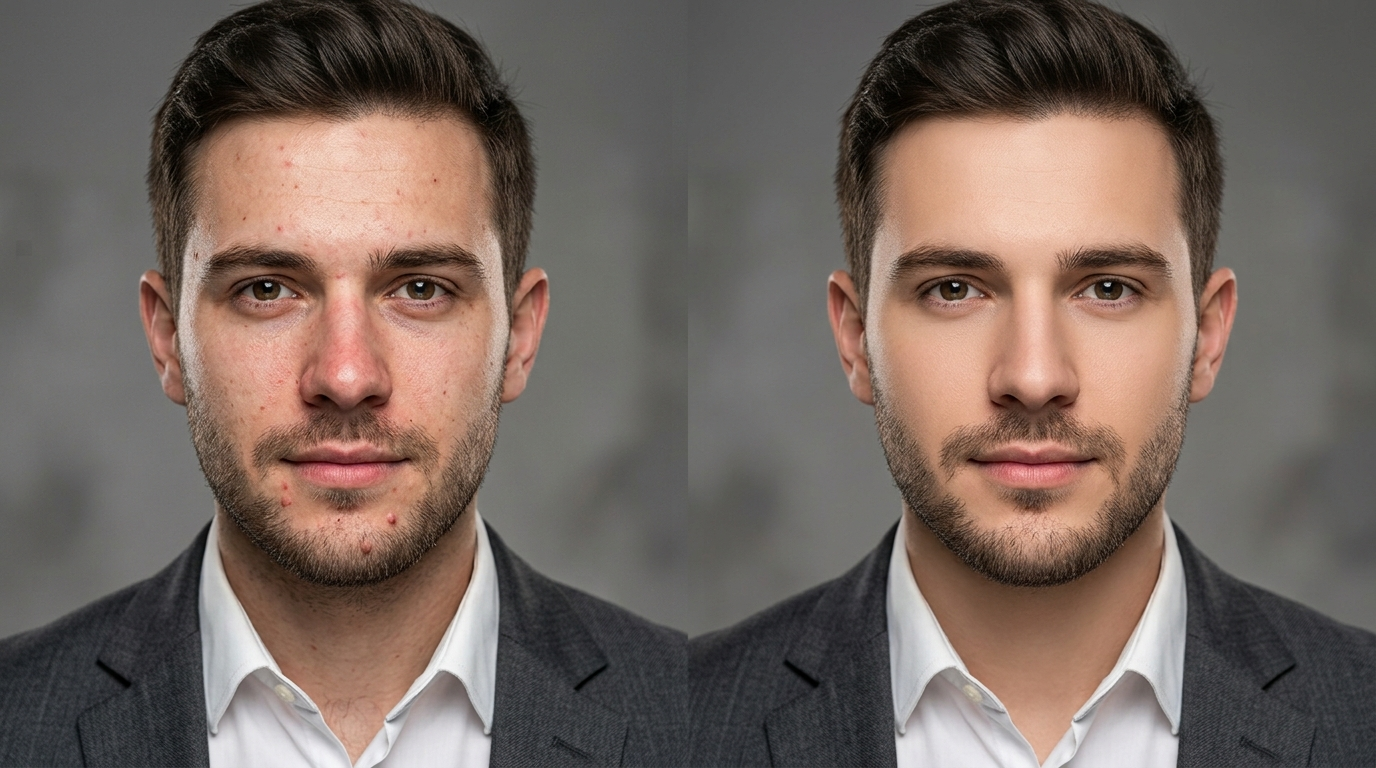
Professional portrait photography has always relied on retouching. The best studio portraits, the corporate headshots on LinkedIn, the fashion editorial in glossy magazines: none of these are unedited. They have all been through some form of skin retouching to remove momentary blemishes, even out redness from lighting, soften temporary irritation, and produce a clean, presentable final image the subject is genuinely happy to have published under their name.
Historically, that retouching required a skilled digital artist working in Photoshop for anywhere from 15 minutes to several hours per portrait, depending on the source condition and the final delivery standard. That cost meant professional retouching was reserved for the images that genuinely justified it: wedding hero shots, corporate headshots, editorial covers, ecommerce hero imagery. Everything else went out with whatever the camera captured.
AI-powered skin retouching has closed that gap. What used to take a skilled retoucher an hour now happens in seconds at a small fraction of the cost, and the results look natural enough for professional use across most commercial contexts. The Templix AI Skin Retouch tool sits at the front of that shift, and this guide covers what it does, where it fits, how to get natural results from it, and the professional and ethical considerations that matter when adding retouching to your workflow.
What Is the Templix AI Skin Retouch Tool?
The AI Skin Retouch tool is an AI-powered portrait editing app that removes temporary blemishes, evens skin tone, reduces redness, and softens minor imperfections in portraits while preserving natural skin texture. Upload a portrait, and the AI produces a professionally retouched version in seconds without the hours of manual work that traditional Photoshop retouching required.
The tool is designed specifically for professional and commercial contexts where clean, natural-looking skin matters for the final asset. Corporate headshots, LinkedIn profile photos, wedding photography deliverables, ecommerce model imagery, small business team photos, editorial portraits, and creator profile shots all benefit from the same core capability. The goal in each case is not to change how the subject looks, but to present them at their most rested, most confident, and most professionally polished.
Templix runs the Skin Retouch tool inside the wider creative suite, which means retouched portraits can flow directly into other Templix workflows without moving files between platforms. Once the skin is retouched, the same file can be upscaled to print resolution, have its background swapped for a studio look, be extracted for use in wider design work, or continue through any other production step the final asset needs.
Free credits on signup mean you can test the tool on your own portraits at no cost before committing to a paid plan. That matters especially for retouching tools because the quality depends heavily on how well the tool handles your specific portrait style, lighting conditions, and skin tones rather than how well it handles generic demo photos.
How AI Skin Retouching Actually Works
Understanding how the retouching model works helps set the right expectations for what you can and cannot ask it to do.
The AI has been trained on a large dataset of professional retouching work: source portraits paired with their professionally retouched final versions. During training, the model learned to recognise the specific patterns skilled retouchers preserve (skin texture, pore structure, natural colour variation) versus the patterns they correct (temporary blemishes, uneven redness, minor irritation, momentary lighting artifacts).
When you upload a portrait, the AI performs three main operations. First, it identifies which regions of the image contain skin, distinct from hair, eyes, clothing, and background. Second, it analyses those skin regions to identify what should be preserved (natural texture and structure) versus what should be smoothed (temporary imperfections). Third, it applies the retouching in a way that maintains the underlying skin character rather than replacing skin with a plastic-looking uniform surface.
The distinction between good and poor AI skin retouching is precisely this preservation step. Basic tools apply uniform blur across all skin regions, which produces the recognisable overly-smoothed look that reads as obviously retouched. Better tools preserve pore structure, natural tonal variation, and the small texture details that make skin actually look like skin. The Templix tool sits in the latter category, which is why the output is suitable for professional commercial contexts rather than only casual social use.
Key Features of the Templix Skin Retouch Tool
Six specific capabilities define what the tool does well:
Texture preservation: The retouching maintains natural pore structure and skin character rather than blurring everything into a uniform surface. This is what makes the output usable for professional contexts where obviously over-retouched skin would undermine the image's credibility.
Blemish and redness reduction: Temporary imperfections like small spots, minor irritation, and unevenness from lighting or fatigue are cleaned up while genuine features (freckles, birthmarks, distinctive skin character) stay intact if you want them to.
Even skin tone rendering: Uneven redness across the face, blotchy patches from lighting, and colour variation from camera white balance all get balanced to a more consistent tone across the portrait.
Support for all skin types and tones: The training data covers a wide range of skin tones, ethnicities, and skin types, so the tool produces natural results across every demographic rather than performing well only on a narrow subset of subjects.
Fast processing: Most retouches complete within seconds per portrait, which makes the tool practical for processing batches of images from a portrait session rather than only individual hero shots.
Commercial-use output: Retouched portraits are available for commercial use across editorial content, brand campaigns, headshots for professional profiles, and any other commercial application. Users retain full ownership of both the original portrait and the retouched version.
Use Cases for the Templix Skin Retouch Tool
Six specific professional use cases consistently produce strong results.
Corporate headshots and professional profile photos: LinkedIn profile photos, executive team pages, and professional biography images all benefit from clean, natural retouching that presents the subject at their most professional. The goal here is a polished but recognisable final image, not an aggressive transformation, and the AI's texture preservation makes the output suitable for direct professional use.
Wedding and portrait photography deliverables: Professional wedding and portrait photographers deliver retouched files to clients as part of the standard service. AI skin retouching accelerates this workflow significantly, letting photographers deliver retouched galleries in hours rather than weeks. The subjects still look like themselves, just at their best.
Ecommerce model imagery: Product-page model photography benefits from clean, consistent retouching across a full catalogue. This matters most for fashion, beauty, and lifestyle brands where the model photography carries the brand's visual identity across dozens or hundreds of product pages. Consistent retouching across the whole catalogue produces stronger brand presentation than mixed edited and unedited imagery.
Small business team photography: Team pages, About Us imagery, and marketing content featuring the team all benefit from the same polished retouching that used to be exclusive to larger businesses with dedicated retoucher budgets. This closes a genuine visual quality gap between small businesses and larger competitors.
Content creator profile and thumbnail work: YouTube thumbnails, podcast cover art, and creator profile photography across social platforms all benefit from professional retouching. For creators building personal brand recognition, the quality of the profile imagery directly affects perceived professionalism, and clean AI retouching removes one of the more expensive bottlenecks in production.
Editorial and campaign portrait work.
Magazine-style portraits, brand campaign photography, and any editorial context where the portrait needs to hold up at magazine or billboard scale benefit from AI retouching as a starting point, often finished with light manual polish. This hybrid approach cuts total retouching time significantly while preserving the fine control that top editorial work requires.
How to Use the Templix Skin Retouch Tool
The workflow is straightforward. Most retouches complete end to end in under a minute.
Step 1.
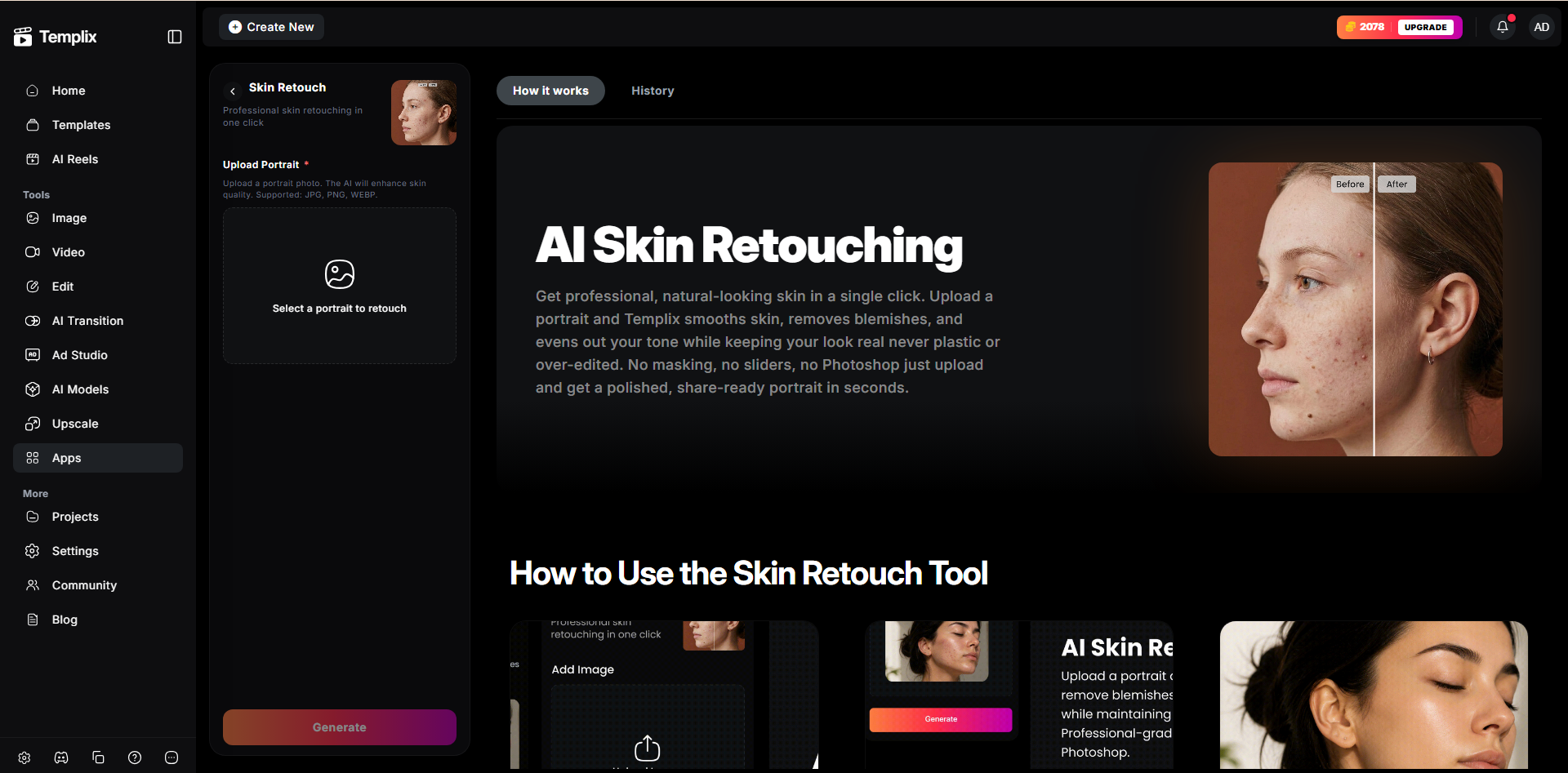
Open the Templix Skin Retouch app: Head to Templix and select Skin Retouch from the app directory. New users can sign up for free credits without needing a card. Existing users can head straight to the app and start uploading.
Step 2.
Upload the portrait: Templix accepts common image formats including JPG, PNG, and WebP. Higher-resolution source images consistently produce noticeably better retouching results than compressed or low-resolution versions. If you have the original from your photographer or camera, use that version rather than a downsized copy.
Step 3.
Generate the retouched version: Click generate and let the AI process the portrait. Most retouches complete within seconds. The tool returns the retouched version alongside the original so you can compare side by side and confirm the result reads the way you want it to.
Step 4.
Review and refine: Compare the retouched version to the original at the actual publishing size, not just at 200 percent zoom. Retouching that looks appropriate at publishing size is what matters. If the result is too heavy or too light for your specific context, you can regenerate with different settings or use the Image Editor for finer manual adjustments on specific regions.
Step 5.
Continue the workflow: Once the retouching is complete, the same file can flow into other Templix tools without downloading and re-uploading. Upscale to print resolution, extract the subject, adjust the background, or continue any other cleanup work the final asset needs.
Tips for Natural, Professional-Looking Results
The single biggest mistake in AI skin retouching is going too far. The best professional retouching is invisible: the subject looks like themselves, just at their best. Over-retouched skin looks obviously edited and undermines the credibility of the final image. A few habits produce noticeably more natural results.
Match retouching intensity to the final use context: A LinkedIn profile photo needs different treatment than a beauty campaign hero shot. Corporate contexts benefit from lighter, more natural retouching that preserves character. Editorial and beauty contexts can carry more polish because the audience expects a stylised final image. Match the treatment to the delivery.
Preserve identifying features when possible: Freckles, birthmarks, distinctive skin character, and other features that make the subject look like themselves usually should stay. Removing these makes the person look less like themselves in the final image, which defeats the purpose of a portrait. When the subject asks for these to stay, honour the request.
Compare at actual publishing size: Retouching that looks over-processed at 400 percent zoom often reads completely natural at the actual size the image will be published. Match your review zoom to how the image will actually be seen by your audience rather than to how it looks in the editing tool.
Review skin texture carefully: The most common failure mode of AI retouching is the "plastic skin" effect: skin that has been smoothed to the point of looking artificial. Zoom in on the retouched output and confirm the skin still has visible pore structure and natural tonal variation. If the skin looks too uniform, the retouching went too far.
Keep the original source file: Always save the original portrait before retouching. Having the unedited version preserved lets you re-retouch later with different settings, compare against the finished version, or provide the original if the subject prefers a lighter treatment than the initial retouch produced.
Get the subject's approval before publishing: For any portrait that will be published under a specific person's name (professional headshots, personal branding photos), send them the retouched version and let them approve it before it goes live. This is both good ethical practice and good client management. Retouching preferences are genuinely personal, and what feels natural to one person feels either overly heavy or overly light to another.
Ethical Considerations for AI Skin Retouching
Skin retouching sits close to some sensitive territory around body image, beauty standards, and how portraits get used, and it is worth being direct about how the tool should and should not be used.
Use the tool for temporary imperfections, not for changing who someone is: Removing a spot that appeared the morning of the shoot is different from digitally altering the fundamental structure of someone's face or body. The former is standard professional practice. The latter creates images that misrepresent the subject and, when applied to yourself, can contribute to unhealthy comparisons and body image issues.
Never use skin retouching on portraits of minors: Professional retouching of images of children is a different category from adult professional headshots and carries additional safeguarding considerations that fall outside the scope of what this general-purpose tool is designed for.
Be honest in contexts where honesty matters: Dating profile photos, medical documentation, identity verification, and journalistic photography are all contexts where retouching can be misleading. For those uses, either skip retouching entirely or apply only the lightest cleanup that preserves how the subject actually looks in person.
Respect the subject's preferences: If someone specifically asks for their freckles, birthmarks, or other identifying features to stay in the final image, honour that. Retouching is a service to the subject, not an override of their preferences.
The tool is built for professional cleanup work that presents subjects at their genuine best. Used that way, it saves real production time and produces output that photographers, subjects, and clients are all genuinely happy with. Used for aggressive digital body modification or to misrepresent how someone looks, it produces exactly the kind of images the professional retouching community has spent years pushing back against.
Final Thoughts
AI skin retouching is one of the most practically useful additions to a professional portrait workflow in years. What used to require an experienced digital artist and hours of manual work now happens in seconds at a small fraction of the cost, and the results look natural enough for professional use across corporate, editorial, ecommerce, and personal branding contexts.
The Templix AI Skin Retouch tool produces output realistic enough for direct professional use, and it sits inside a wider creative suite that handles the upscaling, background work, and continued image cleanup that most professional portraits need after the initial retouch. For deeper prompt structure that produces cleaner results across every AI image workflow, our JSON Prompting for AI Image Generation covers the structured approach that outperforms free-text prompts consistently.
Start with one portrait that has an obvious use case (a corporate headshot needing polish, a wedding image ready for delivery, an ecommerce model photo ready for the product page). Retouch it. Look at the result at actual publishing size. If it holds up, you already have your answer about whether the tool fits your workflow.
Start Retouching Portraits Free on Templix
Frequently Asked Questions
What is the Templix AI Skin Retouch tool?
The Templix AI Skin Retouch tool is an AI-powered portrait editing app that removes temporary blemishes, evens skin tone, and reduces redness on portraits while preserving natural skin texture. It is designed for professional use in corporate headshots, wedding and portrait photography, ecommerce model imagery, and editorial portrait work.
Is the Templix Skin Retouch tool free to use?
Yes. Templix offers free credits on signup so you can test the Skin Retouch tool and every other tool on the platform at no cost. Paid plans unlock higher credit volumes and priority processing for users retouching larger portrait batches or working on ongoing photography projects.
Can I use retouched images commercially?
Yes. Portraits retouched through Templix are available for commercial use across corporate profiles, brand campaigns, ecommerce product pages, editorial content, and any other commercial application. You retain full ownership of both the original portrait and the retouched version.
Does the tool work on all skin types and tones?
Yes. The training data covers a wide range of skin tones, ethnicities, and skin types, so the tool produces natural results across every demographic rather than performing well only on a narrow subset of subjects. If you find the results consistently underperforming on a specific skin type, upload the highest-resolution source available and reduce the intensity in the settings rather than accepting a weaker default result.
Will the retouching look artificial or "plastic"?
Not if you use the tool as intended. The AI is specifically designed to preserve natural pore structure, skin texture, and tonal variation while cleaning up temporary imperfections. The "plastic skin" effect that reads as obviously edited comes from over-processed retouching, and can be avoided by matching the retouching intensity to the specific use context and reviewing the result at actual publishing size rather than at heavy zoom.
What image formats does the Skin Retouch tool accept?
Templix accepts common image formats including JPG, PNG, and WebP. Higher-resolution source images consistently produce noticeably better retouching results than compressed or low-resolution versions, so upload the highest-quality copy of the portrait you have available.
How does AI skin retouching compare to manual retouching in Photoshop?
AI retouching is dramatically faster and cheaper than manual work by a skilled retoucher. Manual retouching in Photoshop produces highly customised results tailored to specific creative direction but takes 15 minutes to several hours per portrait and costs meaningful money. For most professional workflows where consistency matters more than exact per-image creative direction, AI retouching is the better default. For high-value editorial or campaign work, AI retouching often serves as the starting point followed by light manual polish for the final image.
Can I combine skin retouching with other Templix tools for a complete portrait workflow?
Yes. Once retouching is complete, the file can flow into other Templix tools without moving between platforms. Pair with the Templix Image Upscaler for print-resolution output, the Background Remover for extracting the subject for product-page use, or the wider creative suite for a full portrait production pipeline in one subscription.
Should I retouch photos of minors?
No. Professional retouching of images of children is a different category from adult professional portrait work and carries additional safeguarding considerations that fall outside the scope of what this general-purpose tool is designed for. For portraits of children, either publish the original image or work with a specialist who follows appropriate safeguarding guidelines.
What is the biggest advantage of AI skin retouching over doing it manually?
Speed and consistency across batches. What used to take a skilled retoucher an hour per portrait now happens in seconds, and the same retouching approach applies consistently across every image in a batch rather than varying by which retoucher handled which file. For portrait photographers delivering client galleries, ecommerce teams processing catalogue imagery, or businesses producing team headshots at scale, this consistency and speed compound meaningfully across every project the tool touches.

Eman Raza
Eman Raza is Templix's prompt engineering expert, writing practical guides on image and video generation that help users turn ideas into striking visuals