
Changing the background of a photo is something almost everyone needs at some point. You may want a clean background for a profile picture, a professional look for a product image, or a creative scene for social media. A few years ago, this meant learning complex editing software or paying a designer. Today, things are much simpler.
Thanks to AI-powered tools, changing a photo background now takes just a few clicks. You upload a photo, let the AI detect the subject, and replace the background with something better. These tools are built for regular people, not just professionals. You do not need design skills, and you do not need expensive software.
In this guide, we will walk through the best apps to change the background in a picture, focusing on tools that are easy to use, reliable, and suitable for everyday needs. We will also explain how these tools work, who they are best for, and how to choose the right one for you.
Why AI Background Changer Apps Are Everywhere Now
AI background changers have become popular because they solve a real problem. People want good-looking photos, but they do not want to spend hours editing them.
Most AI background replacer tools work by identifying the main subject in a photo. This could be a person, a product, or an object. The AI separates that subject from the background and allows you to remove or replace it. What used to take careful manual work is now handled automatically.
These apps are widely used for social media posts, online stores, resumes, presentations, and even family photos. The biggest reason people like them is simplicity. You do not have to understand layers, masks, or editing tools. You just upload and choose what you want.
Another reason for their popularity is accessibility. Many tools offer free versions, browser-based access, or mobile apps. This makes them practical for everyday use, not just professional projects. The shift over the last two years has also been quality-driven. Where earlier AI background tools left obvious edge artefacts and inconsistent lighting between subject and new background, modern tools produce output realistic enough for professional use without a manual cleanup pass.
1. Templix AI Background Changer
The AI Background Changer stands out as one of the best AI apps to change background because it focuses on creativity as much as accuracy. Instead of only removing a background and replacing it with a plain colour, Templix allows you to create a new background using text.
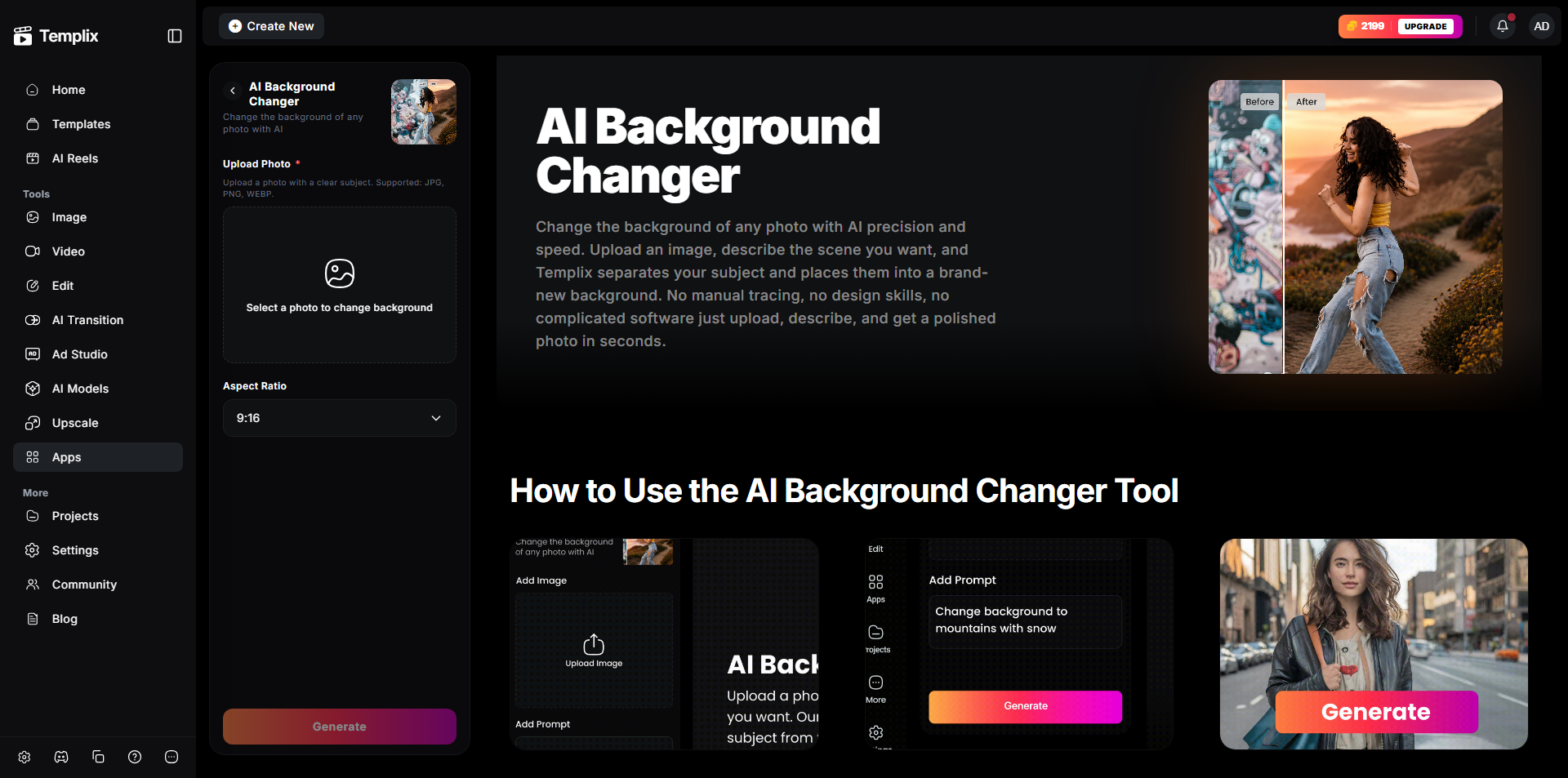
AI Background Changer
Using the AI Background Changer app is straightforward. You upload your photo, and then you describe the background you want in plain language. You might write something like a bright studio setup, a modern office, or a soft outdoor scene. The AI understands this description and generates a background that matches your subject naturally, blending edges, lighting, and shadow direction so the result reads as a single cohesive photograph rather than a visible composite.
This approach is especially useful for people who want more than a basic background change. If you are creating product photos, marketing images, or profile pictures, the ability to control the look through words makes a big difference. You are not limited to preset backgrounds. You can be as creative or as simple as you want.
Another strong point of Templix is ease of use. The interface is clean and beginner-friendly. You do not feel overwhelmed when you open it. Even someone using an AI background replacer for the first time can get good results quickly. Free credits on signup mean you can test everything before committing to a paid plan.
Templix also offers the wider creative suite alongside the Background Changer, so users who need image editing, video generation, or ad packaging after the background swap can continue their workflow in the same subscription rather than moving files between multiple tools. This is ideal for content creators, online sellers, small business owners, and anyone who wants professional-looking images without professional tools.
Change Photo Backgrounds Free With Templix
2. Templix Nano Banana 2, Best for Photorealistic Background Changes
Templix Nano Banana 2 changes photo backgrounds through text prompts and handles the hardest part of realistic composition automatically: matching the subject's lighting to the new environment.
Most background-change tools swap the background without touching the lighting, leaving a composite that reads as edited because the subject is lit for the original scene. Nano Banana 2 on Templix infers the light sources from your prompt description and adjusts shadows and ambient light on the subject to match. The result reads as a single, cohesive photograph rather than an obvious edit.
Key features for background changes:
Text-prompt background description and replacement
Automatic ambient lighting and shadow adjustment for subject-scene consistency
Best-in-class text rendering for any on-screen elements in the new background
Photorealistic composition output at premium quality
Free credits on signup, no credit card required
Best for: Product photography, portrait retouching, marketing assets, and social media content where photoreal consistency between subject and new background matters more than casual quick edits.
3. Photoroom
Photoroom is one of the most well-known apps for background removal and replacement. It is especially popular among people who sell products online or create social media content regularly.

Instant Background Swap
The main strength of Photoroom is speed. You upload a photo, and the background is removed almost instantly. The AI does a good job of detecting edges, which is important for product images and portraits. Once the background is removed, you can replace it with a clean background or choose from different styles.
A photoroom is designed to keep things simple. You do not have to adjust many settings to get a decent result. This makes it useful for people who need to edit many images quickly. The free version allows basic background changes, which is enough for many users. Paid features add more customisation and export options, but the core functionality works well without upgrading.
A photoroom is best for people who value speed and consistency. If you want clean images without spending time experimenting, this app is a solid choice for high-volume ecommerce and social work.
4. Canva AI Background Changer
Canva is known for making design simple, and its AI background changer follows the same idea. This tool is part of a larger design platform, which makes it useful for more than just background changes.
With Canva, you can remove the background from a photo and then place the subject into a new design. This might include adding text, graphics, or layouts. The background changer itself is easy to use and works well for everyday images.
One advantage of Canva is that everything happens in one place. You do not need to change tools after editing the background. This is helpful if you are creating social media posts, presentations, or marketing materials.
The AI background changer works best with clear subjects and good lighting. For most casual and professional needs, the results are clean and usable. Canva is ideal for people who want a balance between background editing and overall design. It is especially useful for small businesses and individuals who create visual content regularly.
5. Picsart AI Background Replace
Picsart offers a more creative approach to background changing. While it does remove and replace backgrounds accurately, its real strength is visual style.
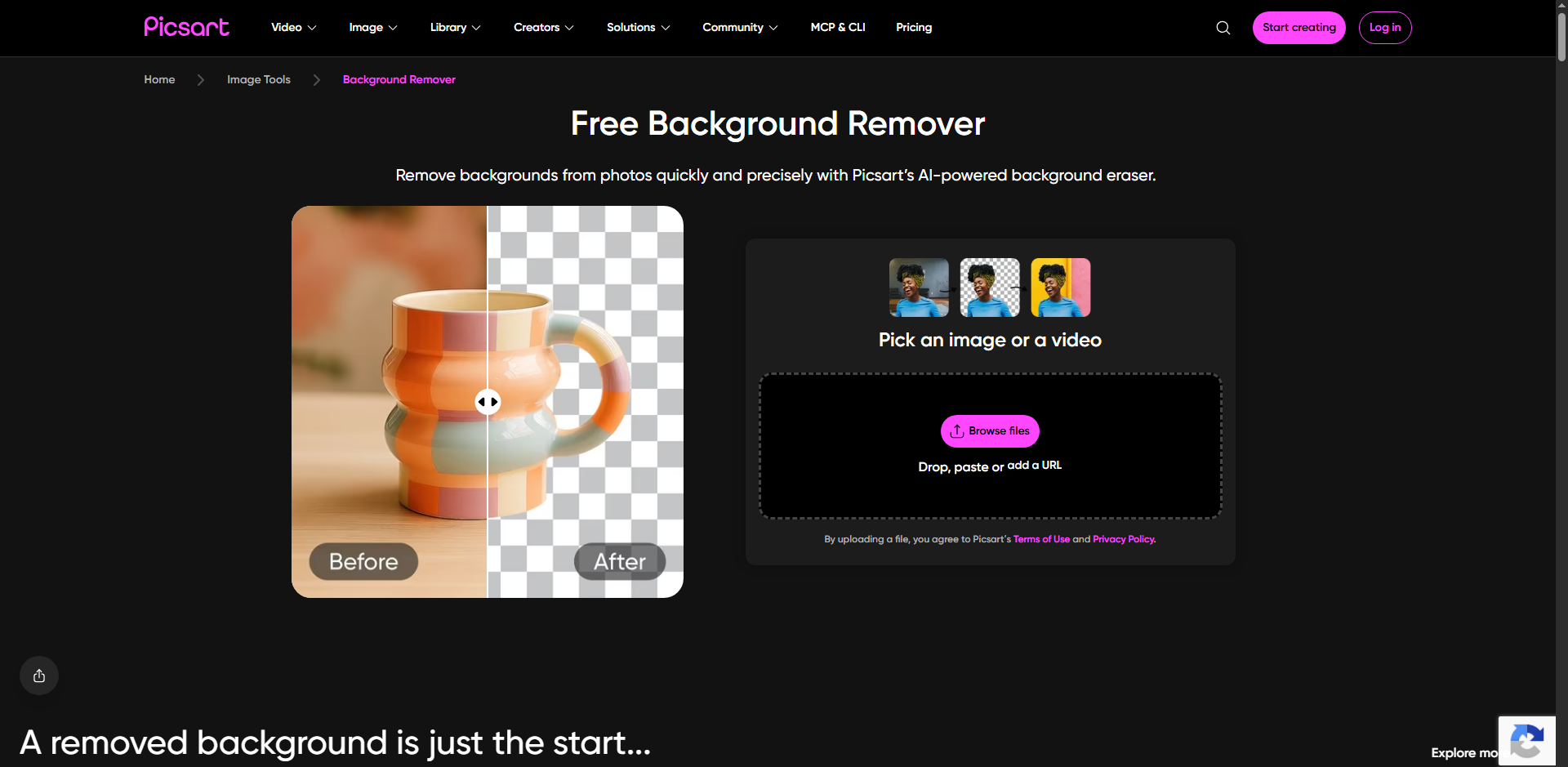
Transform your photos with stunning AI-powered background replacements instantly.
The AI background replacer in Picsart lets you experiment with different looks. You can choose artistic backgrounds, textured scenes, or colourful environments. This makes it popular among social media users who want their photos to stand out.
The app is designed for creativity rather than strict realism. If you are editing photos for fun, personal projects, or eye-catching posts, Picsart gives you many options to explore. The free version includes basic background replacement features. Advanced styles and effects are available in paid plans, but casual users can still achieve interesting results without spending money.
Picsart is best for people who enjoy experimenting and want their images to feel expressive rather than plain. It leans more into aesthetic freedom than photoreal precision, which suits some workflows perfectly and others less well.
6. Adobe Express Background Changer
Adobe Express is built for people who want reliable results without learning complex software. It brings Adobe quality into a much simpler environment.
The background changer works quickly and accurately. You upload a photo, remove the background, and choose a replacement. The tool is designed to feel straightforward, even for beginners. One benefit of Adobe Express is trust. Adobe has long been associated with professional design, and this tool carries that reputation into a simpler format. The results are clean and suitable for both personal and professional use.
Adobe Express also includes basic design tools, so you can add text or graphics after changing the background. Many features are available for free, which makes it accessible to a wide audience. This tool is ideal for users who want dependable background changes without extra complexity, particularly if they already use other Adobe products and prefer to stay in that ecosystem.
7. Pixelcut

Create professional photos with fast, powerful AI background changes.
Pixelcut focuses on simplicity and speed. It is designed to help users remove and replace backgrounds with minimal effort.
The AI does a good job of identifying the main subject and separating it from the background. You can then replace the background with a solid colour or a simple image. The interface is clean and easy to understand. Pixelcut works well for quick edits and basic needs. It is especially useful for people who want to improve product photos or profile pictures without spending time learning features.
The free version covers basic background changes, making it a good option for casual users. Pixelcut is best for fast edits when you want clean results without extra tools or an extensive learning curve.
How to Choose the Best App to Change Background in Photo
Choosing the right background changer depends on how you plan to use it. Not every tool is built for the same purpose.
If you want creative control and realistic AI-generated scenes, Templix is a strong choice for both prompt-driven creativity and photoreal composition. If you need to clean product photos quickly at high volume, Photoroom or Pixelcut works well. If you want to combine background editing with design, Canva or Adobe Express is more practical because you can complete the whole visual in one place.
You should also think about whether you need a free option, mobile access, or high-quality downloads. Some tools focus on creativity, while others focus on speed or simplicity. For creators combining background changes with wider ad production work, our 7 Best AI Ad Tools for Creative Content Creation covers the wider Templix toolkit that pairs directly with background editing output.
There is no single best tool for everyone. The right choice depends on your goals, how often you plan to use it, and whether background editing sits as a standalone task or fits into a larger content workflow.
How AI Background Replacers Work in Simple Terms
Most AI background replacers follow a similar process. First, the AI scans the image to identify the main subject. This could be a person, product, or object. Then it separates that subject from the background.
Once the subject is isolated, the background can be removed or replaced. Some tools allow you to upload a background image, while others generate one using AI. The AI then blends the subject into the new background so it looks natural. This process happens very quickly, often in just seconds. The technology behind it is complex, but the user experience is designed to feel simple.
The part that separates strong tools from average ones is the blending step. Basic background changes stop at the removal and replacement. Better ones also match the lighting on the subject to the new background, adjust the shadow direction so it points consistently with the new scene's light source, and clean up the edges where the subject meets the new background so no visible artefacts remain.
For deeper prompt structure that produces the cleanest AI-generated backgrounds every time, our JSON Prompting for AI Image Generation covers the structured approach that outperforms free-text prompts consistently.
Final Thoughts
Changing the background of a photo is no longer a technical task meant only for designers. With AI tools, it has become something anyone can do in minutes, even if they have never edited a photo before. Whether your goal is to make your images look clean, professional, creative, or eye-catching, the tools covered in this guide give you plenty of options.
That said, if you want one tool that truly stands out, Templix AI Background Changer and Nano Banana 2 both deserve special attention. What makes them different is how natural and flexible they feel to use. Instead of forcing you to choose from limited presets, they let you describe what you want in normal, everyday language. You can turn a simple photo into a studio-quality image, a lifestyle shot, or a creative scene just by typing a few words.
For people creating product photos, marketing visuals, profile pictures, or social media content, this level of control saves time and removes frustration. You are not just changing a background, you are shaping the entire look and feel of your image. The results look realistic, polished, and professional without feeling artificial.
Another big advantage is accessibility. You do not need advanced editing skills, and you do not need expensive software. Free credits on signup mean you can test everything before committing to a paid plan. This lowers the barrier for beginners while still supporting serious creators. For workflows that combine background editing with old photo restoration, upscaling, and other visual work, our Best Apps to Restore Old Photos covers the wider Templix image toolkit.
If you are serious about finding the best AI app to change background, one that balances simplicity, creativity, and real-world usability, Templix is an excellent place to start. It feels less like a tool and more like a smart assistant that understands what you want your photo to look like, and delivers results ready to publish without an additional editing pass.
Start Using Templix Background Changer Free
Frequently Asked Questions
What is the Templix AI Background Changer?
The Templix AI Background Changer is an AI-powered tool that removes and replaces the background of any photo using a text prompt. Upload your photo, describe the background you want (studio setup, outdoor scene, office environment, or anything else), and the AI generates a new background that blends naturally with your subject. It handles edges, lighting, and shadow direction automatically.
Is the Templix Background Changer free to use?
Yes. Templix offers free credits on signup so you can test the Background Changer and every other tool on the platform at no cost. Paid plans unlock higher credit volumes and priority processing for users editing higher volumes of images.
What image formats does Templix Background Changer accept?
Templix accepts common image formats including JPG, PNG, and WebP. Higher-resolution source images consistently produce noticeably better background replacement results than compressed or low-quality photos, so upload the highest quality version of your source image available.
Can I use Templix Background Changer output commercially?
Yes. Images edited through Templix are available for commercial use across product pages, marketing campaigns, social content, print materials, and any other commercial application. This applies to output from every tool available on the platform including the Background Changer and Nano Banana 2.
How does Templix compare to Photoroom for product photography?
Both handle product photography well. Photoroom is stronger for high-volume batch processing where speed matters more than creative variation. Templix is stronger when you want to describe custom scene backgrounds rather than choose from presets, particularly for lifestyle product imagery where the background needs to communicate something specific about the product's use context.
What kind of photos work best with AI background changers?
Photos with clear subject separation from the original background produce the cleanest results. Well-lit photos, portraits with defined edges, and product images against relatively simple original backgrounds all convert well. Extremely low-light photos, blurry images, or photos where the subject blends closely with the original background are the hardest cases for any AI background changer.
Can I generate a custom background with Templix instead of choosing from presets?
Yes. This is one of Templix's strongest features. Instead of selecting a preset background, you describe the scene you want in plain language: "modern bright office with natural window light" or "outdoor golden hour beach setting" or "clean white studio backdrop with soft top lighting." The AI generates a matching background and blends it with your subject.
Does Templix Background Changer preserve the subject's lighting correctly?
Yes. Both the Background Changer and Nano Banana 2 adjust the subject's lighting to match the new background's light sources. This is important because most cheap background swap tools leave a subject lit for the original scene and paste them into a new one, producing an obvious composite. Templix handles the ambient light and shadow matching automatically.
Can I use Templix Background Changer on my phone?
Yes. Templix works in the browser on both desktop and mobile, so you can change backgrounds from your phone without installing a separate app. Free credits on signup apply the same way on mobile as on desktop.
What is the biggest advantage of using an AI background changer?
Speed and cost. What used to require hiring a designer, learning Photoshop, or arranging a proper photography setup can now happen in seconds from a browser tab. For creators, the compounding advantage is being able to test five or ten background variations in the time it used to take to produce one, which improves both the quality of the final visual and the amount of content you can publish per week.

Sana Iqbal
Sana Iqbal writes on marketing and design for Templix, focusing on AI-powered apps and campaigns that help creators grow audiences and scale their content.