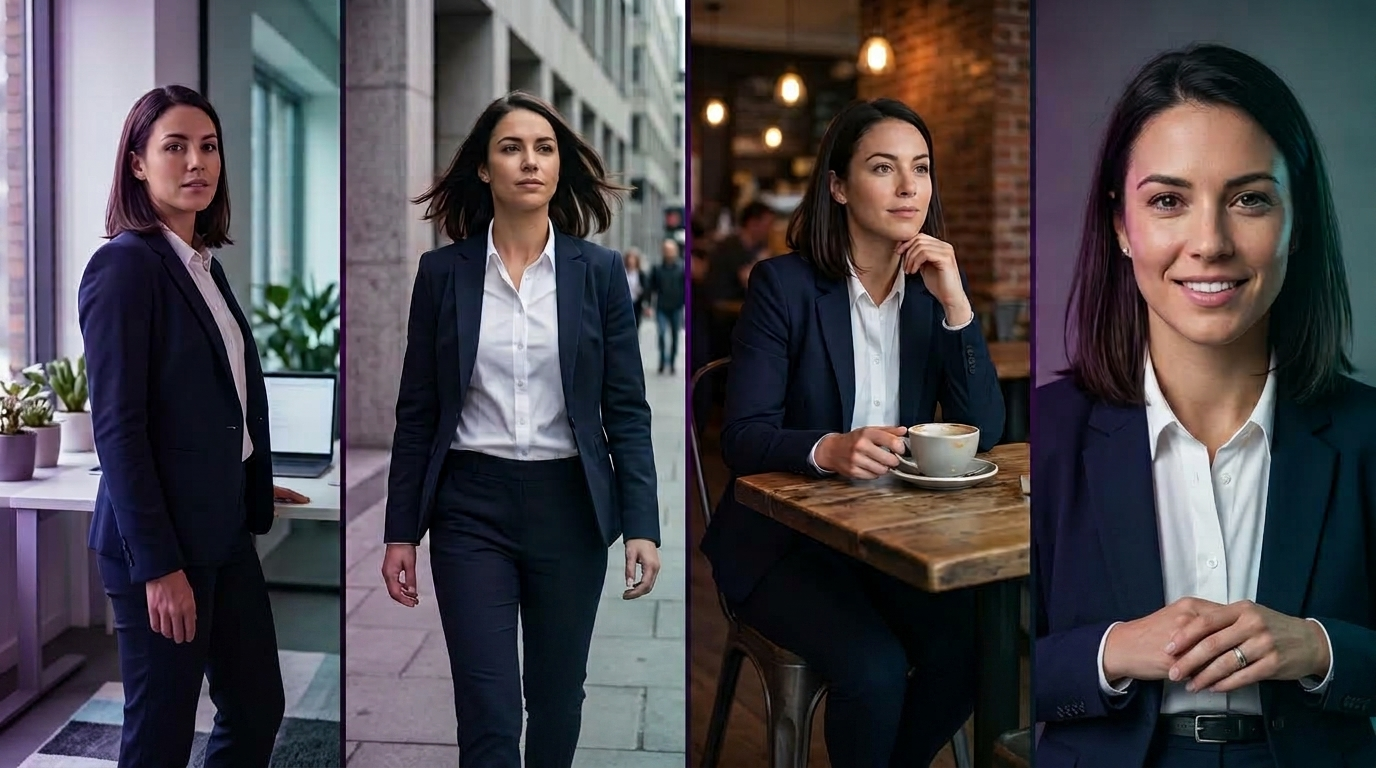
The single hardest problem in AI video production right now is not generation quality. It is character consistency. You can generate a stunning fifteen-second shot of a specific character in one scene, then regenerate the same character in a second scene, and end up with what looks like a completely different person wearing similar clothes. Same prompt, same model, different face. That gap is why so much AI video content still feels like a collection of unrelated clips rather than a coherent piece of visual storytelling.
Character consistency is genuinely solvable in current AI video tools, but only if you understand where the model actually loses the character between generations and which specific techniques hold it steady. This guide covers the mechanics of why consistency breaks, the three core techniques that fix it (reference-image locking, detailed repeatable prompts, and motion transfer), how to apply each technique in the Templix video suite using Nano Banana 2, Kling 3.0, and Seedance 2.5, and the common mistakes that keep character-driven AI video projects from ever locking a stable identity.
If you are producing narrative content, product-demonstration videos with a recurring on-camera presenter, ad creative featuring a specific character across multiple placements, or any project where the audience needs to recognise the same character across every scene, the workflow below is the one that actually holds up in production.
Generate Consistent Characters Free
What Is Character Consistency in AI Video?
Character consistency refers to how reliably an AI video model reproduces the same character (facial features, body proportions, wardrobe, distinguishing details, and identifying character-specific elements) across separate generations. Perfect consistency means the character looks like the same specific person in every scene. Poor consistency means the character looks like a rough approximation of the same person, or worse, like a different person entirely.
The distinction matters because most narrative video, ad creative, product demonstration content, and character-driven storytelling only works if the character is recognisable as the same character across every scene. A ten-second product ad where the on-camera presenter looks like three different people across three shots is not just weaker than a consistent one. It is unusable in professional production.
Different AI video models handle character consistency at different quality levels, and the same model handles consistency differently depending on the workflow you use around it. Templix's model lineup includes strong picks for each of the three main consistency techniques covered in this guide, so the practical answer to "which model handles consistency best" depends more on which technique you are using than on picking one model as the universal winner.
Why Character Consistency Breaks Across AI Video Scenes
Understanding why consistency breaks is the fastest path to fixing it. There are four main failure modes that account for almost every case of character drift.
Prompt variation between generations: Even small differences in prompt wording produce meaningfully different character output. "A confident woman in her early thirties, athletic build, shoulder-length dark hair" and "A confident dark-haired woman, thirty, athletic" describe roughly the same person, but the AI treats them as different inputs and generates different characters. The most common cause of character drift across scenes is unintentional prompt variation between generations that the creator did not consciously introduce.
Model interpretation drift: Even with identical prompts, AI video models produce meaningfully different output across generations. The models are probabilistic rather than deterministic, so the same input can produce a range of outputs. Without additional constraints, the range of outputs for a given prompt is often wide enough to include several distinct-looking characters.
Reference image absence: When no reference image is provided, the model has no anchor for what the character should look like. It generates a character that fits the prompt description but has no obligation to match any specific real appearance. The result is a character that feels approximately right but that never quite locks to a specific identity.
Cross-model generation: Different AI models produce meaningfully different character interpretations of the same prompt and reference. Generating one scene on Kling 3.0 and the next on Seedance 2.5 will almost always produce visibly different characters even with identical inputs. Mixing models mid-project is one of the most common self-inflicted consistency failures in AI video production.
Any of these four failure modes can produce visible character drift. Two or more happening simultaneously usually produces the "who is this new person" reaction that breaks the illusion of continuity entirely.
Core Techniques for Character Consistency
Three specific techniques hold character consistency across generations. Each addresses a specific failure mode above, and the strongest character-driven AI video projects use all three in combination rather than relying on any one alone.
Technique 1: Reference-Image Locking
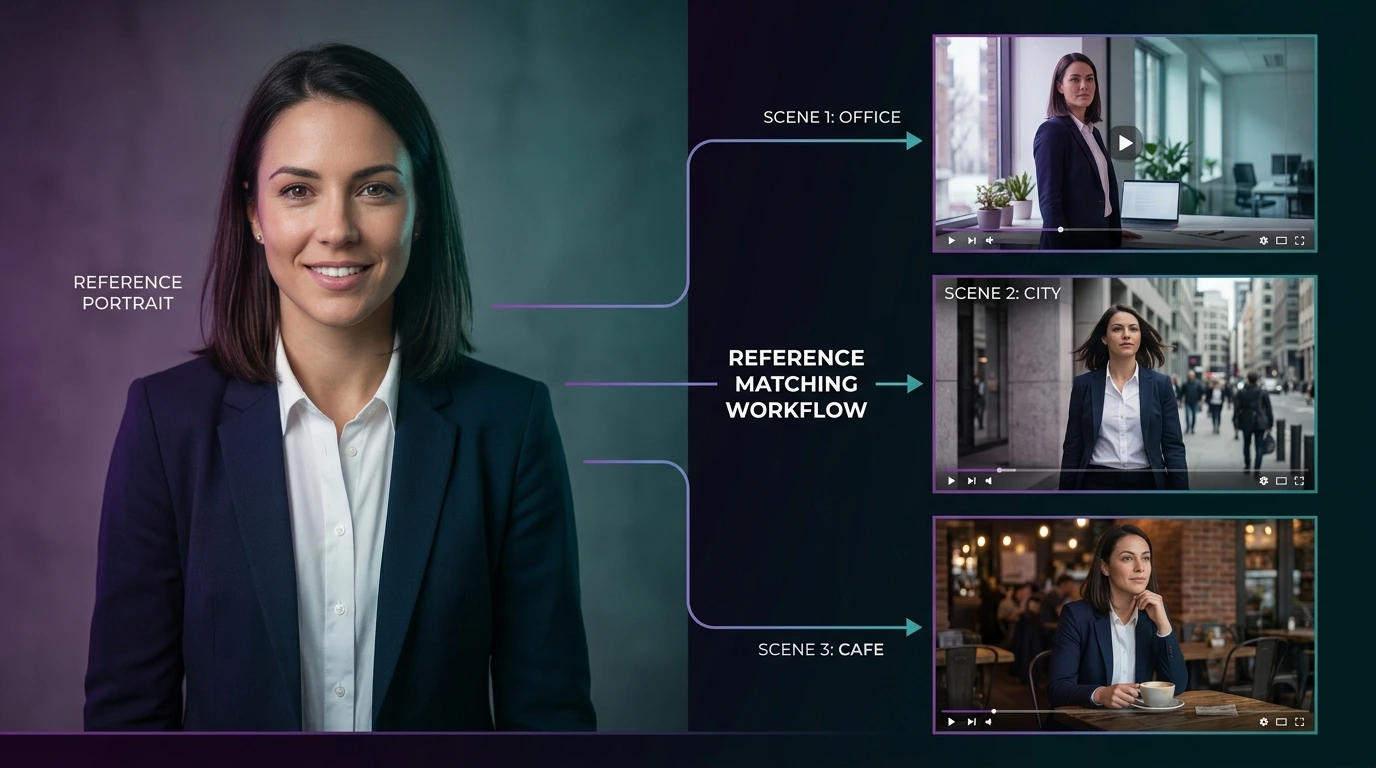
Reference-image locking is the single most powerful technique for character consistency. Instead of describing the character in prose and hoping the model interprets the description consistently, you provide the model with an actual image of the character and instruct it to match that image across every generation.
The workflow: generate the character once with a highly detailed prompt, review multiple variations, pick the strongest character image, and then use that image as a reference input on every subsequent generation. The model treats the reference image as the ground truth for character identity and works to preserve those specific facial features, body proportions, and identifying details across new scenes and new actions.
For maximum consistency, generate the reference image at high resolution using a model specifically strong at photorealistic character rendering. Nano Banana 2 is the strongest choice on Templix for locking a photorealistic character identity, because the model handles facial detail and skin-tone consistency at the quality bar that reference-locked video generation needs. For stylised or illustrated characters, Nano Banana Pro handles higher-fidelity output where premium character detail matters most.
Multiple reference images improve consistency further. Provide the model with front-facing, three-quarter, and profile reference images of the same character to lock the identity across a wider range of angles. This is particularly important for narrative video where the character appears in shots from many different perspectives.
Technique 2: Detailed Repeatable Prompts
Prompts are the second consistency anchor. The goal is to produce a single canonical character description that you reuse verbatim across every generation, adjusting only the scene and action while keeping the character description exactly the same.
Write out the character once with maximum specificity. Include physical build, age, ethnicity, hair colour and style, eye colour, distinguishing features (freckles, scars, tattoos, glasses), wardrobe elements, and any character-specific details that make the person recognisable. This canonical description becomes your locked character prompt.
For every subsequent scene generation, paste the exact canonical description at the start of the prompt, then add the scene-specific action, environment, and camera direction as separate additional prompt content. The model sees the character description as a stable input across generations, which produces measurably more consistent output than describing the character slightly differently each time.
The discipline matters more than most creators expect. Even small changes to the canonical description ("wearing a navy blazer" versus "wearing a dark blue blazer") produce visible character drift. Once you have a canonical description that produces a character you like, do not change any of it between generations. Keep it as a saved snippet you paste in verbatim.
For structural approaches to writing prompts that consistently produce cleaner results across every generation, our JSON Prompting for AI Image Generation guide covers the format that outperforms free-text prompts. The same discipline applies directly to character-consistency work on video.
Technique 3: Motion Transfer From Reference Video
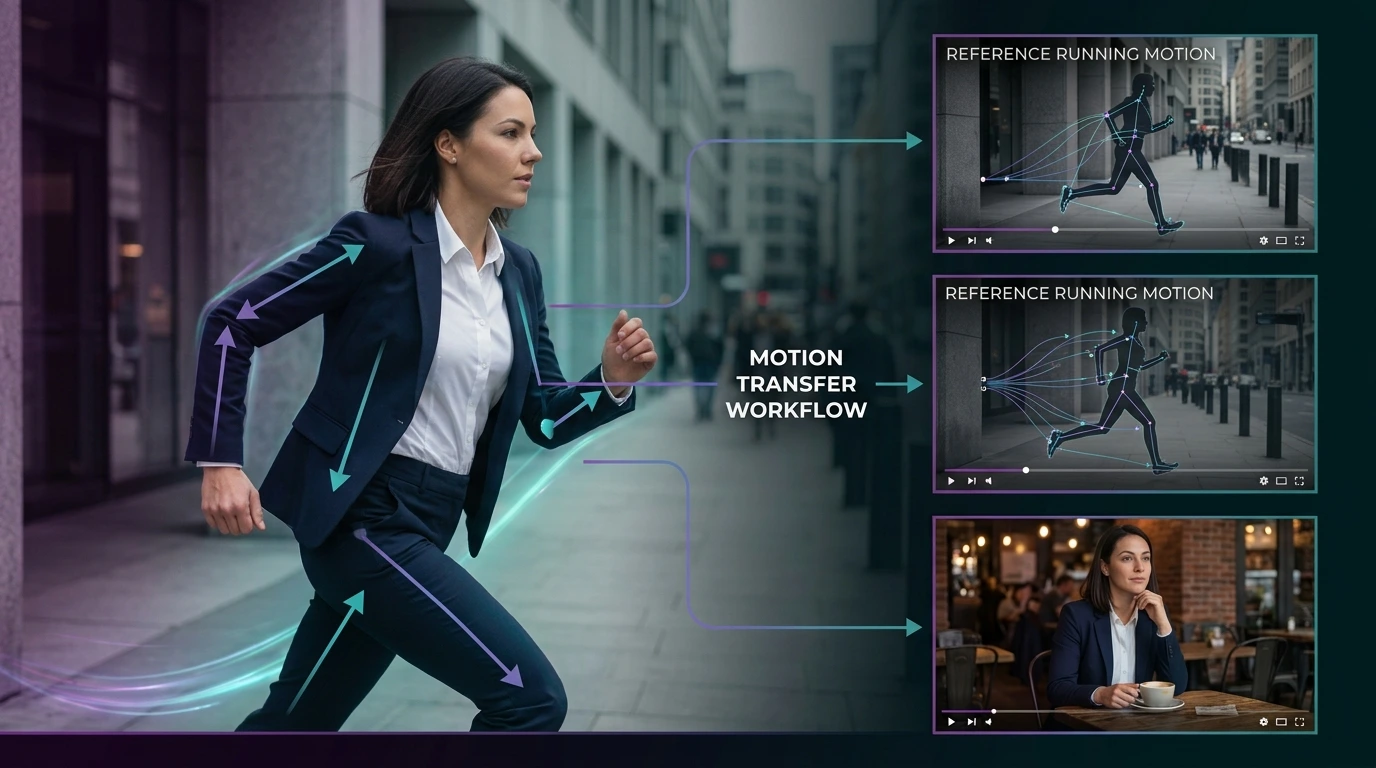
Motion transfer is the third consistency technique and the one most creators overlook. Instead of describing an action in text and hoping the model interprets it consistently, you provide the model with a reference video of the desired motion (a walk, a turn, a gesture, a specific camera path) and instruct the model to transfer that motion onto your locked character.
This technique produces two significant consistency benefits. First, the character's identity stays locked because the reference character image continues to anchor the visual identity. Second, the character's motion stays consistent because the reference motion video provides a specific movement pattern that removes the ambiguity of describing motion in text.
Kling 3.0 handles motion transfer particularly well among the Templix video models. The model was designed with strong reference-based motion capabilities, which makes it the default pick for scenes where a specific character needs to execute a specific movement pattern that would be hard to describe reliably in words alone.
For workflows that pair character generation with camera-movement direction, our camera movements guide covers the specific cinematographic vocabulary that produces predictable camera work in AI video prompts. Consistent characters plus consistent camera language is what separates strong character-driven AI video from footage that reads as a series of unrelated experiments.
Animate a Locked Character with Motion Control
Applying Character Consistency in Templix Workflows
Character Consistency in Templix
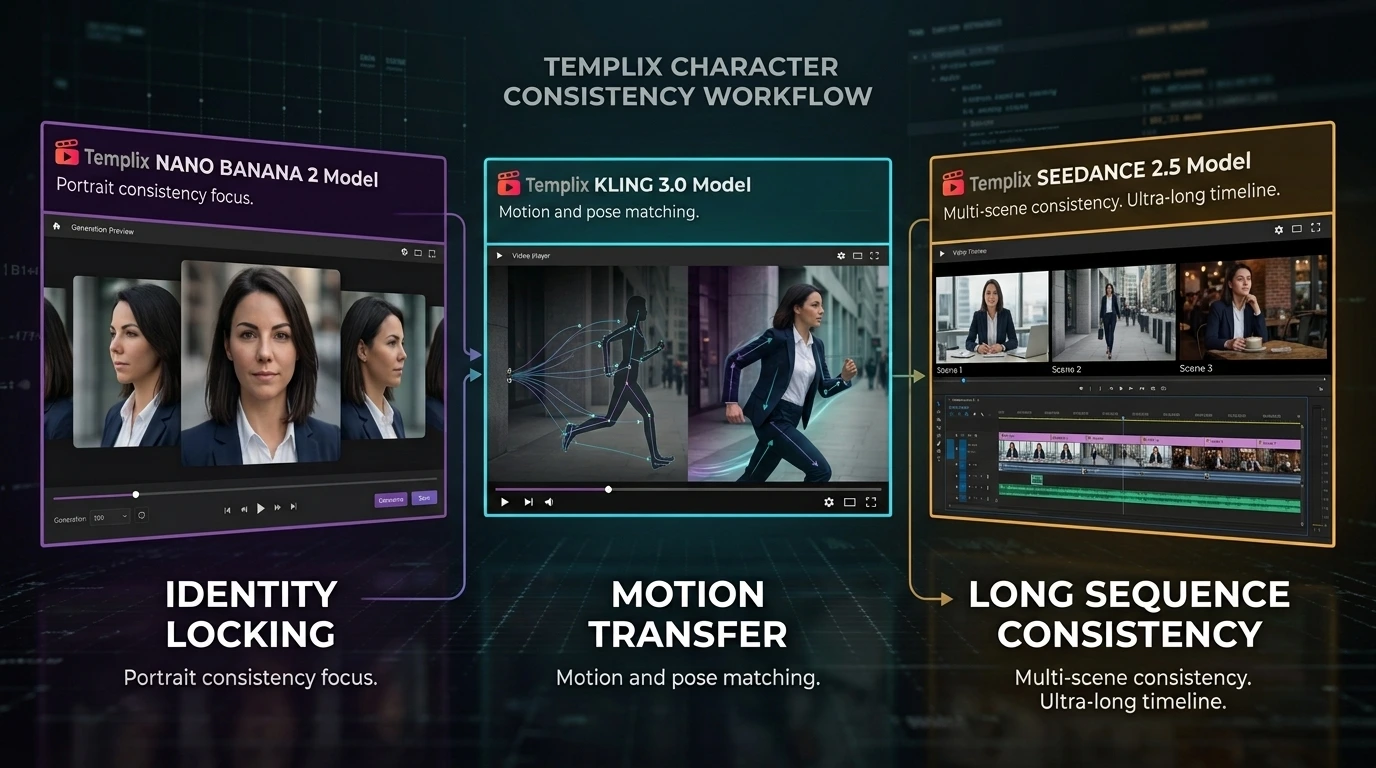
Each Templix video model handles character consistency slightly differently, and picking the right model for a specific consistency challenge matters as much as the technique itself.
Nano Banana 2 and Nano Banana Pro: Locking Character Identity
Nano Banana 2 is the strongest starting point for any character-consistency project because it is where you generate your locked character reference image. The model handles photorealistic character rendering with the facial detail, skin tone accuracy, and identifying-feature preservation that reference-locked video work depends on. Generate your canonical character image on Nano Banana 2, verify it captures the identity you want, save it as your reference, and use it across every subsequent video generation.
Nano Banana Pro is a higher-fidelity variant worth considering for premium hero character work. Higher per-generation cost than Nano Banana 2, but tighter detail rendering on facial features and complex character designs. For characters that will appear at large delivery sizes (print, cinematic, large-format campaign work), the additional fidelity is worth the extra credit cost.
The workflow: generate three to five variations of the character on Nano Banana 2 using a highly detailed prompt. Pick the strongest single image. Optionally generate matching three-quarter and profile views. Save the reference image or images to a stable file location. Use them as reference inputs on every subsequent video generation across Kling, Seedance, and any other Templix video model.
Kling 3.0: Motion Transfer and Reference-Based Action
Kling 3.0 is the strongest Templix pick when the character needs to perform specific motions that would be hard to describe reliably in words. The model handles motion transfer from reference videos particularly well, which means you can film or generate a reference clip of the desired motion and then transfer that motion onto your locked character.
For character-driven action content, dance sequences, expressive gestures, and any scene where the specific quality of movement matters as much as the character's identity, Kling 3.0 combined with reference-image locking on Nano Banana 2 produces the strongest consistency. The character stays visually locked, and the motion stays cleanly executed rather than drifting into generic AI approximation.
The workflow: provide Kling 3.0 with the locked character reference image from Nano Banana 2, plus a reference video of the desired motion. Include a detailed canonical character description in the prompt. Generate the scene. The character identity holds through the reference-image lock, the motion holds through the reference-video transfer, and the scene composition follows the prompt.
Seedance 2.5: Long Single-Pass Consistency
Seedance 2.5 solves a different consistency problem: character consistency within a single long clip. The model supports native 30-second single-pass generation with scene changes and tempo shifts built in, and up to 50 multimodal reference inputs combining images, video, and audio in one generation.
For scenes where the character needs to appear consistently across multiple shots within one 30-second sequence (a wide establishing shot into a medium follow into a close-up push-in, for instance), Seedance 2.5 is the strongest single-model choice. The character identity carries through the entire generation rather than needing to be re-anchored across separate clips. This is a genuine advantage over stitching-based approaches where each cut point introduces another opportunity for character drift.
For the deepest consistency across a full narrative sequence, layer the techniques: use Nano Banana 2 to generate the locked character reference, use Seedance 2.5's multimodal reference input to feed that character image into the 30-second generation, and use the canonical prompt description to anchor the character identity in the text prompt as well. The three-layer anchor produces the strongest character continuity currently possible in AI video.
Step-by-Step Templix Character Consistency Workflow
The workflow below produces consistent character output across a multi-scene AI video project. Most projects using this approach see meaningful improvement in character consistency compared to prompt-only approaches.
Step 1.
Generate the canonical character reference image on Nano Banana 2. Write a maximally detailed prompt covering every identifying element (build, age, hair, eyes, wardrobe, distinguishing features). Generate several variations. Pick the single strongest image. Save it as your locked character reference.
Step 2.
Optionally generate additional reference angles: For narrative work where the character appears from many angles, generate matching three-quarter and profile views using the same canonical prompt on Nano Banana 2. Save all reference images together.
Step 3.
Write the canonical character description as a reusable prompt snippet: Extract the character description from the successful generation and save it as a text snippet you can paste into every subsequent prompt. Do not modify this description between generations.
Step 4.
For each new scene, combine three inputs consistently: The canonical character reference image goes in as a visual reference. The canonical character description goes into the prompt verbatim. The scene-specific content (action, environment, camera direction, mood) gets added to the prompt as separate content that changes per scene while the character description stays fixed.
Step 5.
Choose the video model that fits the specific scene requirement: Use Kling 3.0 for scenes with specific motion transfer requirements. Use Seedance 2.5 for longer single-pass sequences with multiple shots inside one clip. Use Seedance 2.5 with multiple reference inputs for maximum consistency on longer narrative sequences.
Beyond the base workflow, review each generation for character drift immediately after production and regenerate before moving to the next scene if the character has shifted. Catching drift early is much easier than discovering it in the final edit after ten scenes are already generated.
Common Mistakes That Break Character Consistency
Five specific mistakes account for most character drift in AI video projects. Avoiding them is more than half the battle.
Changing the character description between generations: Even small wording changes ("dark hair" versus "brown hair" versus "chestnut hair") produce visible character drift. Save the canonical description and paste it verbatim every time.
Skipping reference-image input: Text-only character prompts almost always drift across generations because the model has no visual anchor for identity. Always generate a reference image first and use it across every subsequent generation.
Mixing models mid-project: Different AI models interpret the same character prompt differently. Even with reference images and canonical descriptions, switching from Kling 3.0 to Seedance 2.5 mid-project usually produces visible character shifts. Pick one model per project when consistency matters most, and only mix models when the scene requirements genuinely demand it.
Ignoring wardrobe as a consistency anchor: Wardrobe elements are often the most visible identity signal in a wide shot where facial detail is small. A character in a specific jacket reads as the same character across scenes even when facial detail is not fully resolved. Include wardrobe in the canonical description with the same specificity as facial features.
Not reviewing the actual delivery size: Character consistency that looks perfect at heavy zoom often reveals drift at actual publishing size. Review generations at the size the final video will be published at, not at development zoom levels that hide medium-scale identity variation.
Master Character Consistency, Then Ship Character-Driven AI Video
Character consistency in AI video is genuinely solvable in current tools, but only if you treat it as a discipline rather than something the model handles automatically. Reference-image locking anchors identity. Canonical character descriptions anchor text-based interpretation. Motion transfer anchors action patterns. Model selection anchors interpretation consistency. Each technique addresses one specific failure mode, and combining them produces character work that holds across full narrative sequences.
The creators producing genuinely strong character-driven AI video are almost always the ones who invested in setting up the character reference infrastructure once, then reused it across every subsequent generation rather than starting from scratch each time. That upfront setup pays back within the first few scenes and compounds meaningfully across full projects. Free credits on signup let you build and lock your first character at no cost before committing to a paid plan.
Start Creating Consistent Characters Free
Frequently Asked Questions
Why does the same character look different across AI video scenes?
AI video models are probabilistic rather than deterministic, so the same prompt produces different output across generations. Without reference images and canonical character descriptions locked across generations, the model treats each new prompt as an opportunity to reinterpret the character rather than reproduce the previous one. Consistency requires explicit anchors that constrain the model's interpretation to match a specific stable identity.
What is the best Templix model for locking character identity?
Nano Banana 2 is the strongest starting point for photorealistic character work because it produces the facial detail and skin-tone consistency that reference-locked video generation depends on. Nano Banana Pro is the higher-fidelity variant for premium hero character work where the extra detail matters. Both are ideal for generating the initial reference image that then anchors every subsequent video generation across Kling 3.0 and Seedance 2.5.
How does motion transfer work for character consistency?
Motion transfer uses a reference video of a specific motion pattern (walking, gesturing, dancing) and applies that motion to your locked character. This preserves both the character identity (through the reference image) and the specific motion quality (through the reference video), which is more consistent than describing motion in text alone. Kling 3.0 handles motion transfer particularly well among the Templix video models.
Can Seedance 2.5 handle character consistency across long sequences?
Yes. Seedance 2.5 generates single video clips up to 30 seconds long with scene changes and tempo shifts built into one pass, and supports up to 50 multimodal reference inputs (images, video, audio combined in one generation). For character work that needs multiple shots within one continuous 30-second clip, Seedance 2.5 is the strongest single-model choice because character identity carries through the entire generation rather than needing to be re-anchored across separate clips.
Should I stick to one model or mix models across scenes in the same project?
Stick to one model per project when character consistency is the priority. Different AI models interpret the same character prompt and reference differently, so mixing models mid-project usually produces visible character shift even with identical inputs. Only mix models when the scene-specific requirements genuinely demand it (Kling for a specific motion, Seedance for a longer sequence), and expect to spend more time on consistency review when doing so.
How many reference images should I generate for a character?
At minimum one high-quality front-facing image. For narrative work where the character appears from multiple angles, three reference images (front-facing, three-quarter, profile) all generated from the same canonical prompt produce meaningfully better consistency across a wider range of scene angles. More reference images beyond three rarely improve consistency further and can sometimes confuse the model on complex scenes.
Is character consistency solved for AI video?
Not fully. Current tools produce genuinely usable character consistency when the workflow above is applied deliberately, but full pixel-perfect consistency across dozens of scenes remains an active research area. For most production work (narrative content, ad creative, character-driven storytelling), the current techniques produce consistency strong enough to hold viewer attention on the story rather than the drift. For extremely high-stakes commercial work, manual review and occasional regeneration are still part of the workflow.
Can I use these techniques for animated or stylised characters?
Yes. The same reference-image locking, canonical prompt, and motion transfer techniques apply to animated and stylised character work. Nano Banana Pro handles higher-fidelity stylised character generation particularly well. Generate the stylised character reference once, then use it as reference input across every subsequent video generation exactly as you would for photorealistic character work.
Can I use characters generated on Templix commercially?
Yes. Character work generated on Templix is available for commercial use across narrative content, ad creative, product demonstrations, editorial video, brand campaigns, and any other commercial application. This applies to output from every model on the platform including Nano Banana 2, Nano Banana Pro, Kling 3.0, and Seedance 2.5. For original character designs specifically, verify the design does not incorporate elements from copyrighted characters before commercial distribution.
What is the single biggest thing I can do to improve character consistency today?
Generate one high-quality reference image on Nano Banana 2 before starting any video work, save the exact prompt you used, and reuse both the reference image and the canonical prompt description across every subsequent video generation. This single discipline produces measurably better consistency than any other change to your workflow, and it costs nothing beyond the upfront time investment in getting the reference character right.

Hamza Tariq
Digital advertising specialist focused on AI-powered marketing, paid campaigns, audience targeting, ad optimization, performance analytics, and data-driven growth strategies.