Halloween is the single biggest annual content spike on social feeds after Christmas, and AI photo prompts have become the dominant workflow for creators producing Halloween content without the time and cost of physical costumes, makeup kits, and traditional photo shoots. A strong Halloween prompt names three specific elements: the costume with enough detail that the model knows exactly what to render, the setting with environmental cues that build the Halloween atmosphere, and the lighting direction that produces the dramatic mood Halloween content needs. For selfie-based prompts transforming your own photo, every prompt also needs to lock the face and recognisable features so the output still reads as you in a costume rather than a different person entirely.
This guide covers the complete Halloween prompt workflow on Templix across selfies, persona content, cosplays, viral trend formats, and platform-specific output ratios. Every prompt below is ready to paste directly into the Templix AI Halloween Generator, which runs the full image model catalog including Google Gemini AI's Nano Banana variants, OpenAI's GPT Image 2 and GPT Image 2.5, Flux 3, Ideogram v4, and Seedream 5.0 Lite under one subscription with a shared coin balance.
Key Takeaways
A strong Halloween prompt names costume, setting, and light source explicitly.
Selfie prompts open with an explicit instruction to keep your face, features, and expression the same.
Templix carries Google's Gemini AI image models under the Nano Banana name, with Nano Banana 2 for standard output and Nano Banana Pro for premium hero work.
GPT Image 2 and GPT Image 2.5 handle Halloween content with in-image text (party flyers, labelled costumes) better than Nano Banana handles text natively.
Aspect ratios: Instagram feed 4:5, TikTok and Reels 9:16, YouTube thumbnails 16:9.
How to Use Halloween Prompts on Templix
The core workflow for running Halloween prompts covers three steps regardless of which specific prompt category you're producing.
Step 1: Upload your source photo. Open the Templix AI Halloween Generator and upload a clear, well-lit selfie. Source photo quality matters significantly for Halloween output because the model relies on recognisable facial features to produce costume transformations that still look like you. Blurry or poorly lit source images produce weaker Halloween output than sharp selfies with good lighting.
Step 2: Pick a model and paste your prompt. Different Halloween prompt types benefit from different models. Selfie and persona transformations default to Nano Banana Pro or Nano Banana 2 for identity preservation. Prompts with meaningful in-image text (party flyers, event posters) run on GPT Image 2 or GPT Image 2.5 for cleaner text rendering. The specific model recommendation for each prompt below covers the right choice per prompt type.
Step 3: Set the aspect ratio for your target platform and generate. Match the aspect ratio to where the content will post: 4:5 vertical for Instagram feed, 9:16 vertical for TikTok and Reels, 1:1 square for LinkedIn, 16:9 landscape for YouTube thumbnails. The platform-specific ratios section below covers the full list.
Halloween Selfie Prompts by Persona
Three selfie prompts covering different Halloween persona directions. Each prompt opens with an explicit face-preservation line, which is the specific technical requirement that makes selfie Halloween output work.
Forest Witch Selfie
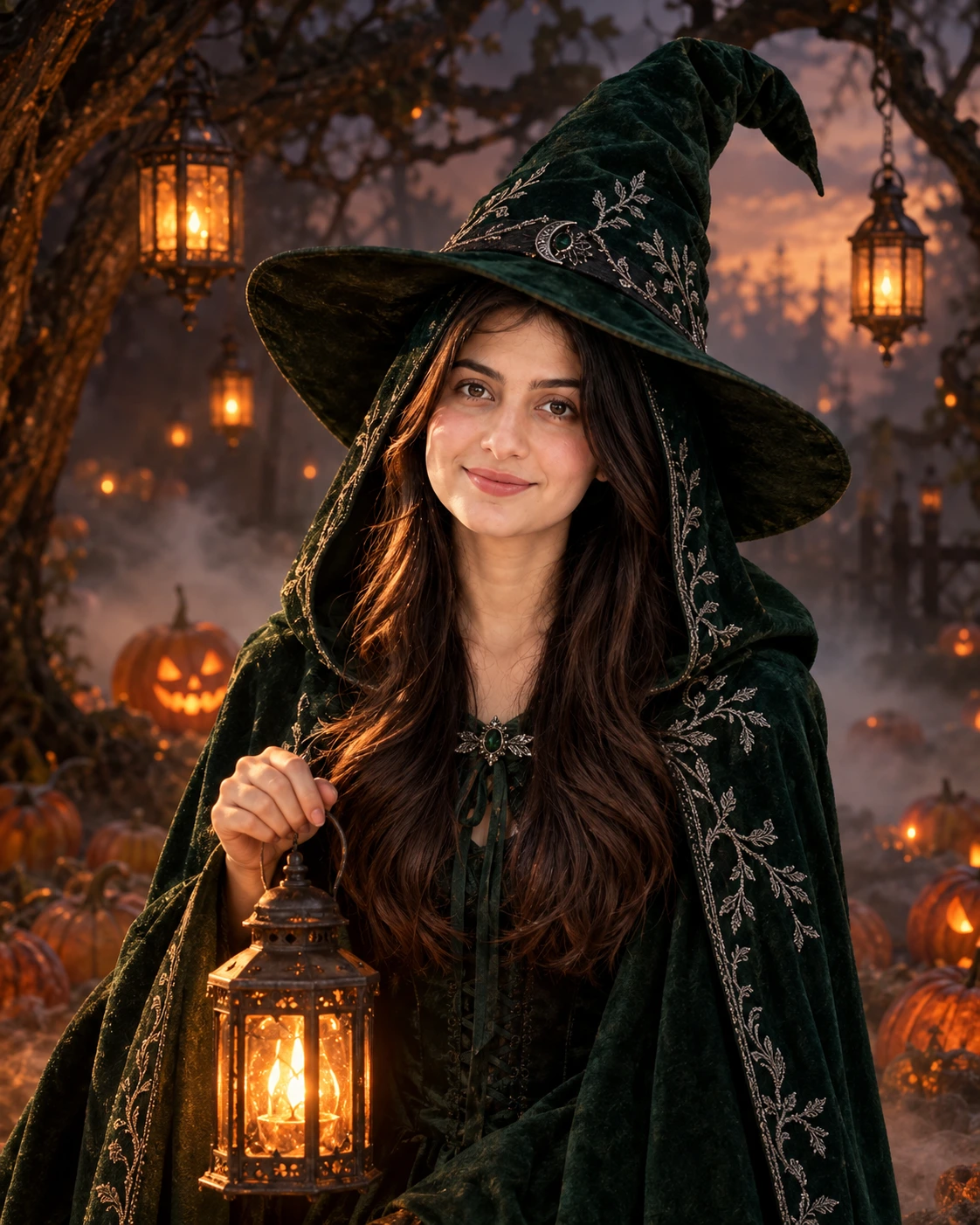
Keep my face, features, and expression exactly the same. Transform
the uploaded photo into a Halloween portrait as a mystical forest
witch wearing a deep emerald green hooded cloak with silver
embroidery details and a tall pointed hat with a wide brim. Standing
in a misty pumpkin patch at dusk with glowing orange lanterns hanging
from gnarled tree branches. Warm amber lantern light illuminating the
face from below, creating atmospheric shadows. Soft fog rolling
across the ground. Portrait 4:5 aspect ratio.
Recommended model: Nano Banana Pro for premium selfie fidelity, Nano Banana 2 for standard output.
1920s Ghost Hunter Couple Selfie
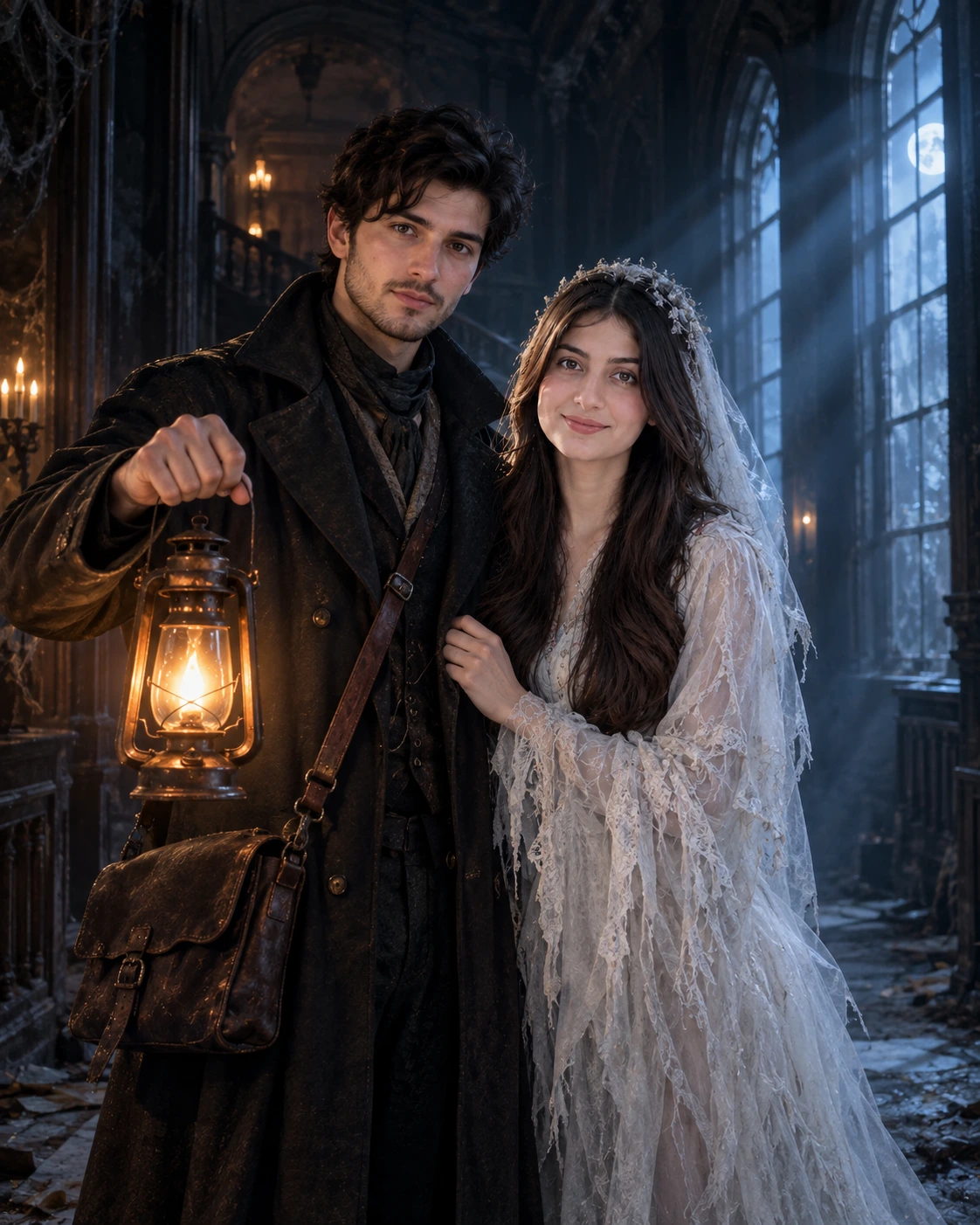
Keep both faces, features, and expressions exactly the same for both
subjects. Do not blend the two faces together. Transform the uploaded
couple photo into a Halloween portrait with one subject dressed as a
1920s ghost hunter wearing a long dark trench coat, leather satchel,
and holding a vintage lantern, while the other subject appears as a
pale ethereal ghost in a flowing white lace gown with torn edges.
Standing in a dusty abandoned Victorian mansion hallway with cold
blue moonlight streaming through tall arched windows. Dramatic
atmospheric shadows. Portrait 4:5 aspect ratio.
Recommended model: Nano Banana Pro for stronger multi-subject identity preservation.
Small Business Owner Halloween Shop Transformation
Transform the uploaded shop photo into a Halloween-decorated version
of the exact same business. Keep the building architecture, business
sign, window displays, visible products, and layout exactly as in the
original source photo. Add Halloween decorations including a cluster
of carved jack-o'-lanterns at the entrance, warm orange string lights
across the storefront, fake cobwebs across corners, and a Halloween
welcome mat at the door. Soft dusk lighting with warm pumpkin glow
from the carved jack-o'-lanterns. Landscape 16:9 aspect ratio.
Recommended model: Nano Banana Pro for preserving business details alongside Halloween overlay.
Halloween AI Photo Prompts by Look
1920s Vintage Spirit Photography
Keep my face, features, and expression exactly the same. Transform
the uploaded photo into a 1920s vintage spirit photograph with sepia
black-and-white tone, faded aged edges, light surface scratches
suggesting an authentic antique print, and a faint ethereal translucent
ghost figure visible beside the subject that appears to be hovering
slightly. Period-accurate 1920s wardrobe (dark woolen dress or suit
with high collar). Dusty vintage photography studio background.
Portrait 4:5 aspect ratio.
Recommended model: Nano Banana Pro for authentic era aesthetic plus ghost rendering.
For creators building stronger prompt technique on Templix's flagship Nano Banana model specifically, our Nano Banana 2 prompt guide covers the specific prompting patterns that produce consistently clean Halloween output across creative directions, including the identity preservation vocabulary that makes selfie Halloween prompts work reliably.
Halloween Prompts for GPT Image 2 and GPT Image 2.5
Three prompts specifically designed to run on GPT Image 2 or GPT Image 2.5 where in-image text rendering is central to the Halloween output. These models handle readable typography inside the generated image meaningfully better than Nano Banana handles text natively.
Halloween Party Flyer
Create a vertical Halloween party flyer design with a deep purple
atmospheric gradient background filled with silhouettes of carved
pumpkins at the bottom and black bats scattered across the top.
Large bold Halloween headline typography reading "Monster Mash Party"
in bright orange serif font across the center. Smaller date line below
reading "Saturday October 31st at 8PM" in clean white sans-serif.
Decorative Halloween border with cobwebs in the corners. Portrait
4:5 aspect ratio.
Recommended model: GPT Image 2.5 for cleanest text rendering, Ideogram v4 as alternative for stronger typography.
Single-Change Vampire Costume Edit
Change ONLY the subject's outfit in the uploaded photo to a dramatic
black velvet vampire cape with a tall sharp red interior collar and
silver cross medallion. Keep the subject's face, hair, pose,
background, lighting direction, and surrounding environment exactly
as in the source image. Natural fabric texture on the cape, realistic
velvet material rendering. Portrait 4:5 aspect ratio.
Recommended model: GPT Image 2.5 for targeted single-element editing with precision.
Transparent Halloween Sticker

Create a cute cartoon Halloween sticker design of a friendly chubby
ghost holding a small smiling pumpkin, drawn with clean bold black
outlines in a thick white outer border for sticker-style cutout
appearance. The ghost should have simple round eyes and a small
smile. Flat vector illustration style with minimal shading.
Transparent background suitable for direct sticker printing or
digital overlay use. Square 1:1 aspect ratio.
Recommended model: GPT Image 2.5 for transparent background and clean sticker-ready output.
Model Recommendations Summary
Four model families on Templix handle different parts of the Halloween prompt workflow with specific strengths worth matching to the prompt category.
Nano Banana Pro and Nano Banana 2 handle selfie and persona Halloween prompts best where identity preservation through costume transformation is the central technical requirement. The Google Gemini AI family's specific strength in holding facial features recognisable through dramatic restyling makes it the default choice for any Halloween prompt based on an uploaded selfie. Nano Banana 2 handles standard selfie prompts efficiently, Nano Banana Pro produces stronger output on premium hero content and multi-subject Halloween photoshoots (couples, families, friend groups).
GPT Image 2 and GPT Image 2.5 handle Halloween prompts with meaningful in-image text particularly well. Party flyers with event text, costume photos with name tags, Halloween cards with greetings, and any Halloween output requiring readable typography inside the generated image benefit from running on these GPT Image variants rather than Nano Banana. GPT Image 2.5 Pro covers the premium tier for maximum text and photoreal fidelity on commercial Halloween deliverables.
Flux 3 fits Halloween prompts requiring reference-based composition and native 4K output quality. For marketing campaigns, premium hero shots, and Halloween content that will be printed or displayed at large size, Flux 3 produces delivery-quality output without requiring separate upscaling steps for most projects.
Ideogram v4 handles typography-dominant Halloween creative where custom lettering is central to the output. Halloween event posters, Halloween brand identity work, and any Halloween design where elaborate custom typography carries the content weight benefits from Ideogram v4 specifically.
Halloween Prompts by Social Platform
Different social platforms require different aspect ratios and composition considerations. The table below covers the specific adaptations that make Halloween prompts work on each platform.
Platform | Aspect Ratio | Prompt Addition |
Instagram feed | 4:5 vertical | Position face in upper third of frame |
TikTok and Reels | 9:16 vertical | Leave negative space at top and bottom for caption overlay |
YouTube thumbnails | 16:9 landscape | Face on left side, open space on right for title text |
X (Twitter) | 16:9 landscape | One clear central subject, no competing elements |
1:1 square | Simple clean background, professional-appropriate Halloween costume |
For LinkedIn specifically, Halloween content needs more professional restraint than other platforms. Costume prompts for LinkedIn should favour subtle Halloween elements (classic witch hat, elegant vampire aesthetic) over heavily themed costumes (zombie, gore, dark horror) that fit casual social platforms better than professional networking contexts.
Getting Started With Templix AI Halloween Generator
The Templix AI Halloween Generator sits alongside the broader Templix AI Image Generator catalog under the standard subscription structure. Free credits on signup cover the Halloween Generator workflow at no upfront cost, which lets creators test the complete Halloween prompt library on real selfies before committing to a paid subscription. The exact coin cost of each Halloween generation displays on the button before every run, keeping per-image budgeting predictable across batch sessions where you produce multiple Halloween variations throughout the season.
The typical workflow is uploading your source selfie first, selecting the recommended model for your specific Halloween prompt category (Nano Banana for selfie transformations, GPT Image 2.5 for text-heavy Halloween designs), pasting the chosen prompt, setting the aspect ratio for your target platform, and generating. For creators producing Halloween content at volume across the full October season, running batch sessions with multiple costume variations from the same source selfie produces more consistent character identity across the content series than generating individual pieces ad-hoc across weeks.
Frequently Asked Questions
How do I write a good Halloween AI prompt?
Name three specific elements explicitly: the costume with enough detail that the model knows exactly what to render (fabric type, colour, specific style elements), the setting with environmental cues that build Halloween atmosphere (pumpkin patch, Victorian mansion, graveyard), and the lighting direction that produces the dramatic Halloween mood (warm pumpkin glow, cold blue moonlight, candlelight). For selfie prompts transforming your own uploaded photo, always open with an explicit instruction to keep your face, features, and expression exactly the same so the output still reads as you in costume.
How do I use the Templix AI Halloween Generator?
Open the Templix AI Halloween Generator, upload a clear well-lit selfie, select the recommended image model for your specific Halloween prompt type (Nano Banana Pro for selfie transformations, GPT Image 2.5 for text-heavy Halloween designs), paste your chosen prompt from the library above, set the aspect ratio for your target platform (4:5 for Instagram, 9:16 for TikTok/Reels, 16:9 for YouTube), and generate. Free credits on signup cover the complete workflow at no upfront cost for testing before any paid subscription commitment.
Which Templix model works best for Halloween selfies?
Google Gemini AI's Nano Banana Pro and Nano Banana 2 both handle Halloween selfie transformations best because of the specific identity preservation strength that keeps your face recognisable through heavy costume transformations. Nano Banana Pro produces premium fidelity on hero content and multi-subject Halloween photoshoots (couples, families), while Nano Banana 2 handles standard individual selfie prompts efficiently at balanced cost.
Do Halloween prompts work with GPT Image 2 and GPT Image 2.5?
Yes, and GPT Image 2 and GPT Image 2.5 are particularly strong for Halloween content involving meaningful in-image text (party flyers with event details, Halloween cards with greetings, costume photos with name tags), transparent-background Halloween stickers for digital overlay use, and precision single-element edits where you want to change only one specific thing (like the costume) without affecting the rest of the composition.
Can I use celebrity or movie character costumes in prompts?
Avoid prompts explicitly naming celebrities or copyrighted movie characters. Instead, describe an original Halloween character through costume elements, colours, and setting. For example, instead of naming a specific movie villain, describe "a tall figure in a long black hooded cloak holding a scythe standing in a graveyard at midnight" which captures a classic Halloween aesthetic without infringing on specific IP. This produces stronger output legally and often creatively than prompts tied to specific copyrighted characters.
What aspect ratio should Halloween photos be?
Match the aspect ratio to where the content will post: Instagram feed uses 4:5 vertical, TikTok and Instagram Reels use 9:16 vertical, YouTube thumbnails use 16:9 landscape, X posts work best at 16:9 landscape with a single clear subject, and LinkedIn uses 1:1 square with professionally restrained Halloween elements. Setting the correct aspect ratio in the Templix AI Halloween Generator before generating saves the manual cropping that otherwise cuts into the specific composition the prompt designed.
How many Halloween photos can I generate on Templix?
Templix uses a coin-based subscription structure where each Halloween generation consumes coins from your shared balance. The exact coin cost displays on the generation button before every run, which keeps per-image budgeting predictable. Free credits on signup cover the complete Halloween workflow at no upfront cost for testing before committing to a paid subscription, which lets creators produce several Halloween variations across the season to find the specific prompt directions that work for their content.
Can I use Templix Halloween photos commercially?
Yes at paid subscription tiers. Content generated on Templix at paid tiers is available for commercial use across brand campaigns, paid Halloween advertising, client Halloween work, UGC-style sponsored Halloween content, and other commercial applications. This covers Halloween Generator output alongside every other image generation workflow on the platform. For agencies producing Halloween content for client campaigns, the commercial-use rights make Templix suitable for client deliverables without additional licensing requirements per generation.
Do I need a selfie to use the Halloween Generator?
Not for every prompt. Selfie-based prompts transforming your own uploaded photo require a source selfie as input (and work best with a clear well-lit frontal photo). Pure generation prompts like Halloween party flyers, transparent Halloween stickers, or atmospheric Halloween scene creation work from text prompts alone without requiring any source image. The library above covers both types across the different prompt categories.
How do I keep the same character across multiple Halloween photos?
For creators producing a Halloween content series where the same character appears across multiple pieces (consistent personal Halloween brand, recurring persona), using the same source selfie as the reference across every generation holds character identity stable. Nano Banana Pro produces measurably stronger identity preservation across costume variations than most other image models, which makes it the right default for serial Halloween content built around a specific recurring character throughout the season.

Ayesha Malik
Ayesha Malik covers marketing and product at Templix, translating new features and releases into clear, engaging stories that keep users informed and inspired.