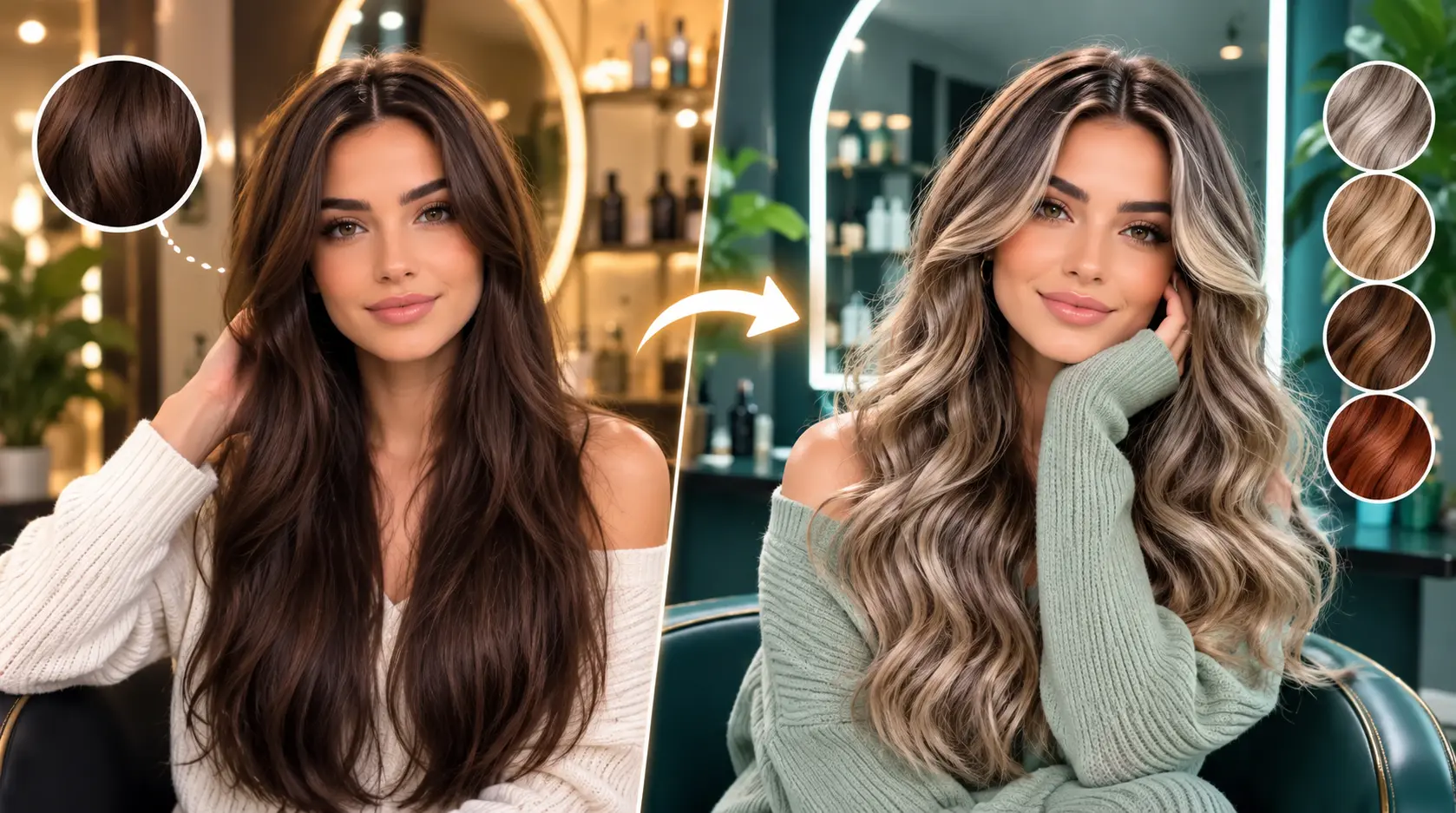
You have a Pinterest board with a whole section for: hair colours. Cool, but you do know you cannot try them all back to back without frying your hair and costing a small fortune. At the end of the day, you are looking for "the" colour, the one that makes you feel incredible and not like a bad decision.
Yeah. We have all been there.
Hair colour is one of those things that feels super personal. A bad dye job does not just affect your hair. It affects your whole mood for weeks. And that is before you factor in the cost of a corrective appointment, the time waiting for it to fade, and the general low-key stress every time you catch yourself in a mirror.
Here is the good news: you can now try on any hair colour before you touch a single drop of dye. This guide walks you through exactly how to try on hair colour virtually, step by step, using a tool that makes the whole thing genuinely simple.
The category has genuinely moved on from the early days of filter-style hair colour try-on apps. Where those tools produced obviously fake overlays that looked nothing like real dyed hair, modern AI-powered tools generate previews realistic enough that stylists actually accept them as reference photos for salon consultations. That is the shift this guide is written around.
Let us dive right into it.
Why Try Hair Colour Virtually First?
Look, committing to a hair colour is a big deal. It is not like buying a top you can return. Here is why trying it virtually first is the smart move:
Avoid a Bad Hair Colour With Permanent Dye
Permanent dye does not budge easily. If you go wrong, you are looking at:
Colour correction appointments that add up fast at most salons
Toners and bond-repair treatments to fix the damage
Weeks of awkward in-between hair while it fades
Potential breakage from over-processing
Learning how to try on hair colour before you commit means you walk into the salon with actual confidence. It also means you are not that person texting their stylist three days later saying "so I am not totally sure about this." Nobody wants to be in that situation.
The cost is only part of the story. The bigger issue with a bad dye job is that it lingers. Hair takes months to grow out, colour takes weeks to fade properly, and the correction process itself often adds more damage on top of the original issue. Virtual try-on completely sidesteps that entire cycle by letting you find your winning colour before any dye touches your hair.
Experiment With Shades That Actually Suit Your Skin Tone
Not every colour works on every skin tone, and that is just facts. For example:
Cool ash blonde looks great on pink or cool undertones but can wash out warm or olive skin
Warm copper or auburn pops on medium and warm skin tones but can clash with very cool complexions
Rich chocolate brown flatters almost everyone but the exact shade still makes a big difference
Platinum reads differently on fair skin versus deeper skin tones. Both can be stunning, but the exact tone matters a lot
Virtual try-on lets you test all of this on your actual face with your actual undertones. Not on a model. Not on your friend. On you. That is the difference between guessing based on someone else's hair and actually seeing how a specific shade reads against your specific skin tone under your specific everyday lighting.
Preview Bold Colours Risk-Free
Always wanted to go to a fire engine red or silver fox? Same. But going bold is terrifying when it is permanent. Virtual try-on gives you zero-stakes permission to go full experimental with your colour choices. Test the weird ones. Test all of them. It costs nothing.
Honestly? Sometimes the colour you assumed would look wild ends up being the one that looks the most flattering on you. You would never know unless you tried it first. That is exactly why knowing how to try on hair colour virtually is such a game-changer.
The reverse also matters: sometimes the colour you have been planning for months turns out to look completely wrong on your actual face, and finding that out virtually before your appointment saves you from a disappointing salon visit that a preview would have avoided entirely. Both outcomes are wins because both mean you make an informed decision instead of a hopeful guess.
What Is the Templix AI Hair Colour Changer?
The Templix AI Hair Colour Changer is an AI-powered tool that lets you try on hair colour online without filters, guesswork, or a stylist. You upload a photo, type in the colour you want, and the AI shows you a realistic preview in seconds.
Here is what makes it different from the random filter apps you have probably already tried:
Feature | Basic Filter Apps | Templix AI |
Colour accuracy | Generic colour overlay | Adapts to your actual hair texture and lighting |
Colour options | Limited presets | Any colour you can describe in words |
Realism | Looks like an obvious filter | Looks like an actual photo of you |
Photo types | Selfies only | Any photo format works |
Speed | Instant but inaccurate | A few seconds and genuinely realistic |
The short version: Templix uses real AI, not just a colour tint layer. The result looks like a real photo of you with that hair colour, not a screenshot with a filter dragged over it.
How to Try On Hair Colour in 4 Simple Steps
This is the part you came here for. Here is exactly how to try on hair colour using Templix, broken down into four steps that take less than two minutes total.
Step 1: Upload Your Photo
Head to Templix and open the AI Hair Colour Changer app. Upload a clear photo of yourself.
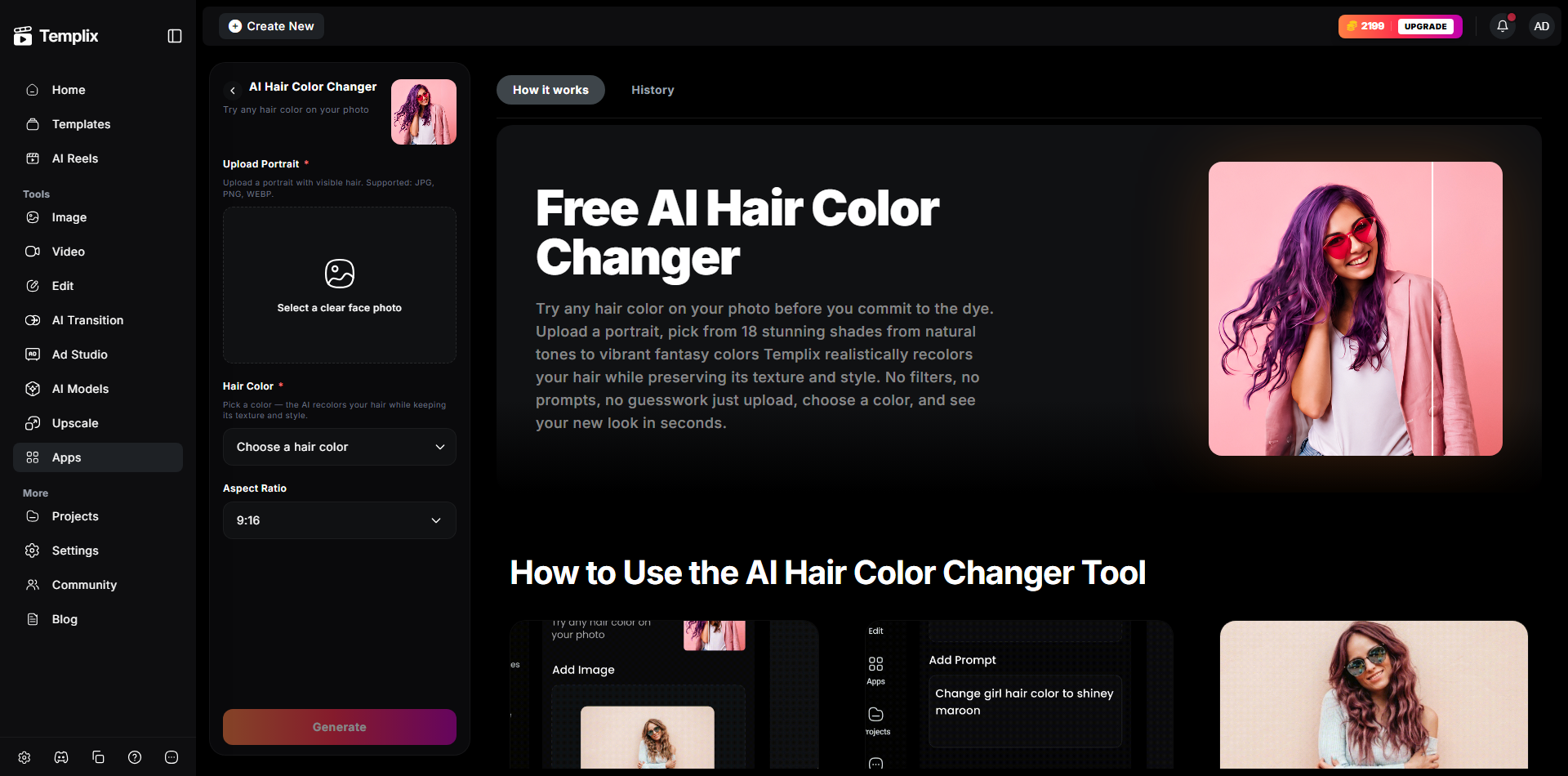
AI Hair Color Changer
What makes a good photo:
Front-facing or three-quarter angle
Hair is down and clearly visible (not in a bun or under a hat)
Good lighting, ideally natural light near a window
Clean background helps but is not required
Photos that work well:
A selfie taken near a window on a bright day
A candid from brunch where your hair is down and loose
An older photo from when your hair was a different length
Photos that do not work as well:
Hair fully tied up, braided, or under a hood
Heavy shadows across your hair
Very blurry or low-resolution images
The AI needs to clearly see your hair to change it. Better input equals better output. Simple as that.
Step 2: Type In Your Desired Hair Colour
This is where it gets fun. In the prompt box, type the hair colour you want to preview. The AI understands natural language, so just describe what you are picturing.
Example prompts to get you started:
"platinum blonde with icy silver tones"
"deep burgundy red with dark brown roots"
"warm honey blonde with caramel highlights"
"jet black with a subtle blue sheen"
"pastel lavender, soft and faded"
"bright copper red, like a new penny"
"natural dark brown with chunky face-framing highlights"
"dark teal with black roots growing in"
The more detail you add, the more customised the result will be. Want to know how to try out different hair colour ideas in one session? Just adjust your prompt each time and compare the outputs side by side.
For deeper prompt structure that produces the cleanest, most predictable colour results across every generation, our JSON Prompting for AI Image Generation covers the structured approach that outperforms free-text prompts.
Step 3: Hit Generate and Wait a Few Seconds
Click generate and let the AI do its thing. In just a few seconds you will see yourself with the new colour. The AI processes your actual hair structure so the result looks realistic, not like a cartoony overlay.
If the first result is not quite right, tweak your prompt:
Too dark? Add "lighter" or "soft" to your description
Too flat looking? Add "dimensional" or "with subtle highlights"
Too intense? Add "muted," "natural," or "toned down"
Want visible roots? Specify "with [colour] roots showing through"
Too warm? Add "cool-toned" or "ashy"
Every small adjustment gets you closer. Think of it like giving directions to a very talented stylist who can only hear you and cannot see your inspiration pic yet.
Try Different Hair Colours Free
Step 4: Save or Share Your Favourite Looks
Found a colour that has you saying "okay yes"? Save it. Download the image and take it straight to your stylist as a reference photo. No more describing your dream colour as "beachy but not too blonde" and hoping they get it.
Ways to use your saved results:
Show your stylist directly so there is zero miscommunication at your appointment
Send to friends for a second opinion before you commit
Post on Instagram or TikTok as a "which one should I do?" poll
Save a few options in a folder and sit with them for a day before deciding
Use alongside Pinterest inspo pics when building your mood board for the appointment
Stylists genuinely love when clients come in with a clear reference image. It sets expectations, cuts the back-and-forth, and means everyone is on the same page before a single foil goes in.
Why Choose the Templix AI Hair Colour Changer
There are a few virtual try-on tools out there but Templix hits different for a few solid reasons.
Simple and fast: Upload, type, generate. That is the entire process. You do not need a tutorial or twenty minutes to figure it out. Even if you are not tech-savvy at all, you will not get stuck.
Massive colour range: Because you describe colours in natural language, you can try literally anything:
"Dark forest green with black roots": yes
"Warm golden brown with red undertones and soft highlights": yes
"Faded teal that looks like it has been growing out for two months": yes
No preset limitation. No colour wheel hunting. Just describe it and see it.
Works on any device: Phone, tablet, laptop. You can try on hair colour online from wherever you are. Standing in the drugstore aisle trying to decide between two box dye shades? Pull up Templix right there and test both before you buy either.
Realistic enough to use as a stylist reference: The output quality is high enough that you can genuinely take the result to your colourist as a reference photo. That is how accurate it is.
Part of a wider creative suite. Once you have your colour locked in, you can preview a whole new look by pairing the Hair Colour Changer with the AI Hairstyle Changer to test different cuts alongside your chosen colour. For a full head-to-toe styling preview, add the AI Clothes Changer into the mix to test outfits with your new colour and style before your appointment.
Tips for the Best Virtual Hair Colour Try-On Results
You want the most accurate preview possible. These small tweaks make a big difference.
Use Natural Light for Accurate Results
Photos taken in artificial light, especially yellow indoor lighting or harsh overhead bulbs, can throw off how the AI reads your hair and skin tone. Natural light gives the AI the clearest information to work with.
Best lighting for your photo:
Near a window during the day
Outside in open shade (not harsh direct sunlight)
Overcast days actually give really even, flattering light
Lighting to avoid:
Yellow or warm-toned indoor bulbs
Dim rooms with heavy shadows across your hair
Ring light only (can flatten texture and give odd reflections)
Make Sure Your Hair Is Clearly Visible
If your hair is tied up, tucked away, or covered by anything, the AI does not have much to work with. Use a photo where your hair is down or styled in a way that shows its full shape. The more hair the AI can see, the more accurate the colour change will be.
Test Multiple Prompts Before You Decide
Do not stop at one result. Run the same photo with three or four different colour prompts and compare them. You might think you want one thing and then see something completely different on yourself and immediately know that is it.
A quick comparison workflow to try:
Test your first choice colour as-is
Try one shade lighter and one shade darker
Try a warm version versus a cool version of the same colour
Pick your top two and look at them again tomorrow with fresh eyes
Use Multiple Photos for a Fuller Picture
The same colour can look totally different depending on the angle and how your hair falls. Run the tool on both a front-facing photo and a three-quarter profile shot. That way you get a realistic sense of how the colour will look on you day to day, not just straight-on.
Hair Colours Worth Testing Virtually Right Now
Not sure where to start? Here are some hair colour ideas worth trying on your own photo before you commit to any of them in real life.
For dark hair:
Espresso brown with mahogany undertones
Dark cherry red (looks almost black indoors, deep red in sunlight)
Midnight blue black
Soft balayage starting at chin level
For medium brown hair:
Warm chestnut with copper highlights
Toffee blonde balayage
Rich auburn all-over colour
Dimensional bronde (the brown-blonde mix that looks effortlessly natural)
For lighter or already blonde hair:
Platinum with cool ash tones
Strawberry blonde with peachy ends
Buttery golden blonde
Sandy beige blonde with darker roots
For the bold and unbothered:
Vivid red or fire orange
Pastel pink or lilac
Intentional grey or silver (yes, it is having a massive moment right now)
Split dye with two contrasting colours on each half
The best part? You can test every single one of these on your actual face using Templix without picking up a single box of dye. That is exactly what learning how to try on hair colour online is made for. For a wider look at AI-powered image editing tools that pair with hair colour previews for full-look experimentation, our Best Apps for Changing Background in Photo covers the wider Templix image toolkit that fits into a complete personal styling workflow.
Ready to Try On Hair Colour Virtually?
Trying a new hair colour does not have to feel like a scary, irreversible commitment anymore. With the Templix AI Hair Colour Changer, you get to play, experiment, and figure out exactly what you want before spending a single dollar on dye.
The days of crossing your fingers at the salon and hoping the result matches the inspo pic are done. You can now see the future version of your hair before it even exists, and share it with everyone whose opinion you actually trust. Free credits on signup mean you can test as many colour options as you want at no cost before committing to a paid plan.
So go ahead. Try the colour you have been lowkey obsessing over for months. Test three in a row. Build a little colour mood board from your results. Then walk into your appointment knowing exactly what you want and ready to say "this, exactly this," with the reference photo already saved on your phone.
You might just love it. And even if you end up sticking with your current colour, at least now you know for sure instead of always wondering "what if."
Start Trying On Hair Colours Free
Frequently Asked Questions
Can I use Templix to try on hair colour if I have very dark hair?
Yes, absolutely. The AI works on all hair colours including dark brown and black hair. Keep in mind that going from a very dark base to a very light colour like platinum requires bleaching in real life, which the AI does not simulate. The virtual preview shows you the target colour accurately, but your stylist will walk you through what it actually takes to get there from your starting point.
How do I try out different hair colours on pictures I already have?
This is exactly what Templix is built for. Upload any existing photo of yourself, type in the colour you want to test, and hit generate. You can run the same photo multiple times with different colour prompts to compare looks. There is no limit to how many options you can preview.
Will the virtual hair colour match the real dye result exactly?
Very close but not pixel perfect. Real results depend on your starting hair colour, the dye brand, and how your hair processes colour. For example, the AI can show you what copper red looks like on you, but the exact warmth and saturation will also depend on your natural undertones and whether pre-lightening is needed.
Think of the virtual try-on as a high-accuracy preview, not a guarantee. It is far more useful than imagining it in your head or relying on a photo of someone with completely different hair.
Can I try bold or unconventional hair colours virtually?
Yes, and you should. That is one of the best parts about knowing how to virtually try on hair colour. Zero risk means zero reason to hold back. Try neon green. Try lavender. Try a two-toned split dye. You might discover a bold colour looks incredible on you, and you would never have known without trying it first.
Is the Templix Hair Colour Changer free to use?
Yes. Templix offers free credits on signup so you can test the Hair Colour Changer and every other tool on the platform at no cost. Paid plans unlock higher credit volumes and priority processing for users experimenting with more options at scale.
What image formats does the Templix Hair Colour Changer accept?
Templix accepts common image formats including JPG, PNG, and WebP. Higher-resolution source images consistently produce noticeably better hair colour change results than compressed or low-quality photos, so upload the highest-quality photo you have.
Can I use the Hair Colour Changer output commercially?
Yes. Images generated through Templix are available for commercial use across social content, salon marketing, product pages, editorial content, and any other commercial application. This applies to output from the Hair Colour Changer and every other tool on the platform.
Does the Templix Hair Colour Changer work on men's hair?
Yes. The tool works on any hair, regardless of length or style, as long as the AI can clearly see it in your uploaded photo. Short hair, long hair, curly, straight, textured, or thinning: it all works. Men experimenting with a new colour before committing to a salon visit get the same accuracy as anyone else.
Can I combine the Hair Colour Changer with other Templix tools for a full makeover preview?
Yes. Pair the Hair Colour Changer with the Templix AI Hairstyle Changer to test different cuts alongside your new colour, and add the AI Clothes Changer to preview outfits that match the whole new look. All three tools run inside the same Templix subscription without moving files between platforms.
What is the biggest advantage of using an AI hair colour changer over just going to the salon?
Zero risk, zero cost, and unlimited iterations. What used to require a consultation appointment plus a full colour service (potentially followed by a corrective appointment if you did not love the result) can now happen entirely in your browser before you book anything. For creators and stylists specifically, being able to test looks visually before they exist also means better client consultations and fewer post-appointment surprises.

Sana Iqbal
Sana Iqbal writes on marketing and design for Templix, focusing on AI-powered apps and campaigns that help creators grow audiences and scale their content.