
Watermarks serve a real purpose. They protect previews. They mark sample versions before a client signs off. They keep internal drafts from being used prematurely. They stop concept work from leaking into the wild before it is finished. But once you own the final image, or once you have permission to edit it, that same mark becomes the last thing standing between a work-in-progress file and a polished deliverable you can actually publish.
This guide is written for that specific moment: you have an image you are legally allowed to edit, and you need to remove a watermark, sample label, date stamp, logo overlay, or review mark without rebuilding the whole file from scratch.
A clear boundary before we start: Only remove watermarks from images you own, generated assets you created, internal drafts, licensed files where the licence permits removal, or assets you are explicitly authorised to edit. Do not remove copyright marks, artist signatures, stock-photo preview watermarks, brand marks from someone else's product imagery, or any third-party attribution mark without documented permission. This is not a hedging disclaimer. It is the actual line between legitimate cleanup work and content theft, and the tool covered in this guide is built for the first case only.
Why Watermark Removal Is Genuinely Hard
In most image files, a watermark is not a separate object floating on a layer you can toggle off. It is baked directly into the pixels of the underlying image.
That means a traditional editor gives you a set of bad choices:
Crop the image and lose part of the composition you actually need
Blur or smudge the mark and leave a visible scar where the watermark used to sit
Cover it with a shape that reads even more obviously than the original watermark
Recreate the image from scratch in a new design file, which defeats the purpose of the source photo
Ask a designer to repair the file manually, which takes hours and costs meaningful money
None of these produce a clean final result. Cropping loses composition. Blurring is obvious. The cover is worse than the original. Recreation is impractical for photos. Manual repair works but does not scale.
The real goal is simpler and different from all of the above: remove the unwanted mark and preserve the surrounding texture, lighting, shadow direction, and structure of what was behind the watermark. That is what AI watermark removal actually does, and why it produces better results than any traditional editing approach when the underlying image is worth preserving.
A Better Workflow: Remove, Review, Keep Editing
The AI Watermark Remover handles this workflow end to end. Upload an image, mark or describe the watermark area you need cleaned, let the AI generate the cleaned version, and continue editing inside the wider Templix creative suite without moving files between platforms.
This matters because watermark removal is almost never the final step. After the mark is gone, you usually still need to crop the image for a specific export size, adjust surrounding text, prepare a social version at a different aspect ratio, generate a product thumbnail, or combine the cleaned image with other design layers for a broader campaign. Downloading a one-off cleaned file and opening a separate design tool wastes time and often loses quality through repeated compression cycles.
Templix keeps everything in one environment. Once the watermark is removed, the same file flows directly into background removal, upscaling, colour adjustment, or any other cleanup work the asset needs before publishing. That end-to-end workflow is what makes AI watermark removal genuinely useful rather than just technically possible.
This end-to-end approach matters more than it might initially seem. Every time you move a file between separate tools, you introduce risk. Compression artifacts accumulate. Colour profiles shift subtly between different apps. Files get accidentally saved at the wrong resolution or format. Keeping the full cleanup and refinement workflow inside one platform eliminates each of those risk points, which matters most when you are producing assets at volume across multiple projects per week.
When AI Watermark Removal Genuinely Helps
Use AI watermark removal when the mark is visually interfering with an otherwise useful image you are allowed to publish. The strongest legitimate use cases fall into six specific patterns:
Draft overlays on your own campaign visuals: Marketing teams often add "DRAFT" or "REVIEW" overlays to work-in-progress files. Once the campaign is approved, those marks need to come off cleanly before the asset ships.
Sample labels on internal product mockups: Product teams frequently receive prototype photography with sample labels or version stamps. Once the product is real and the assets are approved for public use, the labels need removing.
Timestamp or camera marks on your own photos: Cameras and phones sometimes burn timestamps or watermarks into captured images. If the image is yours and you want it clean for personal use or a family album, this is exactly what the tool is for.
Client review round overlays: Agencies working through review cycles often add client-facing marks or approval stamps during the feedback loop. Once approved, those marks need cleaning before the final version delivers.
Test watermarks on AI-generated concept work: Concept art produced with sample watermarks needs the marks removed once you commit to the final version and want to use it in a real project.
Temporary approval marks on design exports: Approval workflows sometimes add stamps like "APPROVED" or "READY FOR PRINT" on top of design exports. These marks are not part of the design itself and need to come off for the actual production version.
The common thread across all six: you already have the right to publish the clean version, but the file you have still carries a review, draft, or production mark that needs removing for the asset to be usable.
For creators combining watermark removal with other image cleanup work, our Best Apps to Restore Old Photos covers the full restoration workflow for older or damaged imagery.
Clean Up Draft and Review Overlays Free on Templix
Step-by-Step: Remove a Watermark With Templix
The workflow below covers the full removal process. Most straightforward watermarks are gone in under two minutes total.
Step 1: Open the Templix AI Watermark Remover
Head to Templix and select the AI Watermark Remover from the app directory. New users can sign up for free credits without needing a card. Existing users can head straight to the app and start uploading.
Step 2: Upload the Image
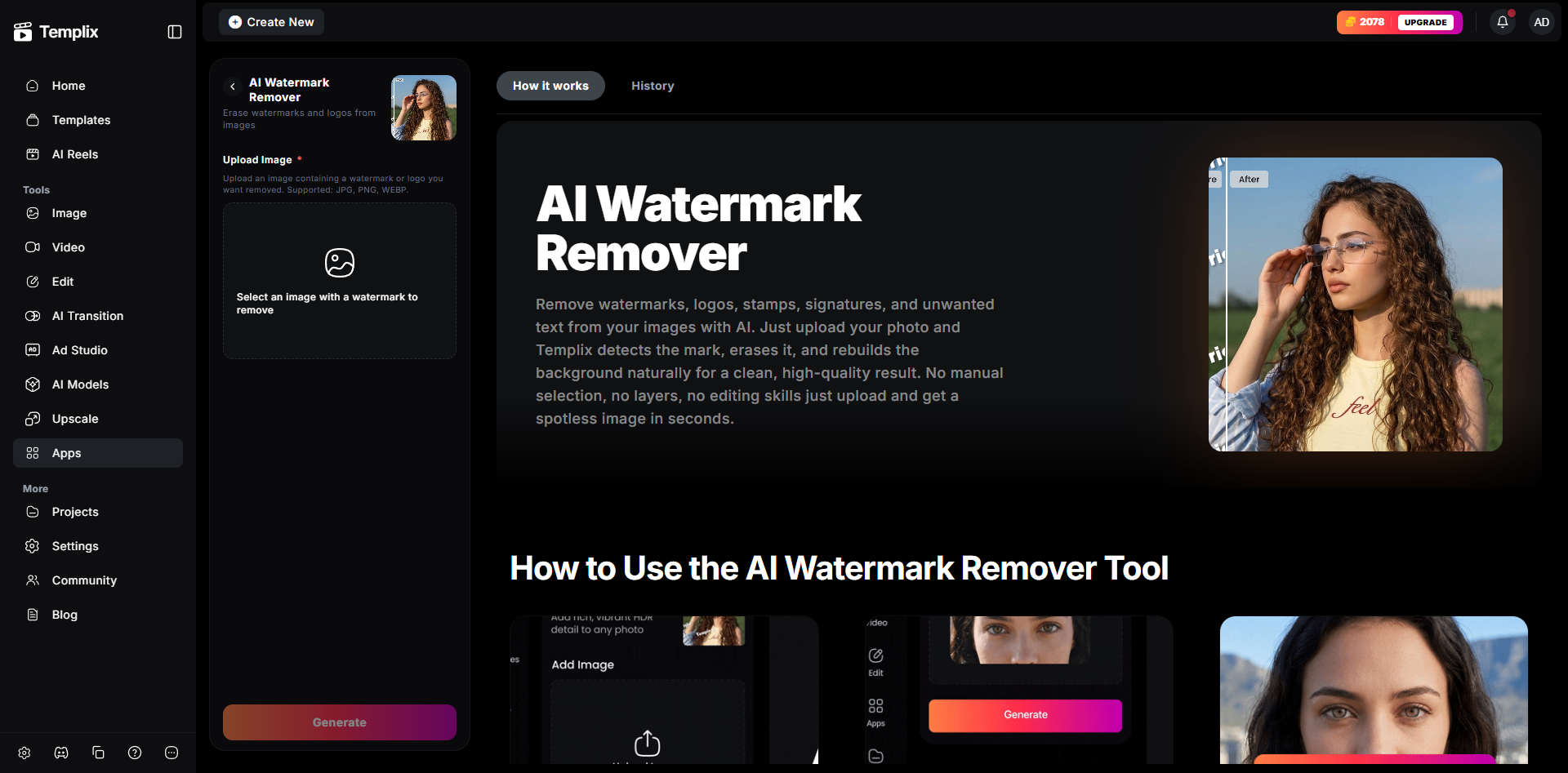
Templix Ai Watermark Remover
Templix accepts common image formats including JPG, PNG, and WebP. Product photos, screenshots, design exports, and AI-generated images all work. For best results, upload the highest-resolution version of the image you have available. Higher-quality source files consistently produce noticeably cleaner watermark removal results than compressed or low-resolution versions.
Step 3: Identify the Watermark Area
Once the image opens in Templix, focus the tool on the specific mark you need cleaned. If the watermark crosses important details like faces, text, product edges, hair, or complex textures, work in smaller regions and review the result carefully after each pass. A watermark that spans a subject's face is harder to clean than one sitting on flat sky or a plain background, so approach complex regions in shorter sections rather than one large selection.
Step 4: Generate and Inspect the Result
Click generate and let the AI process the cleaned version. When the result loads, zoom in and inspect the repaired area carefully. Look for common failure signals: repeated texture patterns where the AI has stamped the same fill twice, soft halos around where the watermark used to be, broken lines through structural elements like table edges or window frames, and mismatched shadows on the surface behind the removed mark. A genuinely clean result should disappear into the image rather than call attention to itself.
If the first result has visible issues, try a smaller selection covering just the problem area, or refine your prompt if the tool accepts a text description of what should replace the watermark. Small adjustments often produce noticeably cleaner second-pass results.
Step 5: Continue Editing in the Templix Suite
Now that the watermark is gone, finish preparing the asset for its actual use. Crop the image to the target aspect ratio, add text if needed for the design context, generate export variants for different platforms, or bring the cleaned image into a broader Templix workflow. The AI Image Upscaler delivers print-ready 4K output when your cleaned image needs higher resolution than the source file provided, and the Background Remover handles the next cleanup step when the image also needs to be extracted from its background for product-page use.
How to Get Cleaner Results
A few habits produce significantly better watermark removal results than the default approach.
Start with the best source image available: AI cleanup works with the context around the watermark, so the more visual detail the AI has to work from, the better the fill will be. A sharp, high-resolution source produces measurably cleaner results than a compressed or low-resolution version of the same image. If you have access to both a print-resolution and a web-resolution version of the same file, use the print-resolution version even if the final output will be web-sized.
Remove one mark at a time if the image has multiple overlays: A focused selection gives the model a clearer job than trying to remove multiple watermarks in a single pass. If your image has a corner logo overlay plus a diagonal draft stamp plus a footer timestamp, process each one separately and inspect the result after each pass rather than attempting to clean all three at once.
Review at the final publishing size: A repair that looks visible at 400 percent zoom may be completely invisible at the actual size the image will be published at, and a flaw that appears at normal viewing size should be fixed before the file ships. Match your review zoom to how the image will actually be seen by your audience, not to how it looks in the editing tool.
Keep the original file: Save the source version before editing. If you need to compare, redo the removal with different settings, or prove where the asset came from, the untouched source is genuinely useful to have. It also lets you rerun the workflow later with different settings without losing the original quality.
Work with clean backgrounds where possible: Watermarks sitting on flat colour, sky, or simple gradient backgrounds clean up almost invisibly. Watermarks crossing complex textures like foliage, hair, patterned fabric, or reflective surfaces are genuinely harder to remove cleanly. Set expectations accordingly and, where possible, choose the image with the simpler background as your source when you have multiple versions to work from.
What Not to Use AI Watermark Removal For
This section matters more than any technical tip. AI watermark removal should never be used to strip ownership from work that is not yours.
Do not use the Templix AI Watermark Remover, or any similar tool, to:
Remove stock-photo watermarks from unpaid previews: Stock photo watermarks on preview images exist specifically to protect the photographer's licensing rights. If you need a clean commercial version of a stock image, buy the licence.
Erase photographer signatures or artist attribution marks: These are the creator's identification of their own work. Removing them is a copyright violation regardless of how technically easy it is to do.
Hide brand marks or logos from someone else's product imagery: If you did not create the product or the photography and do not have licensing rights, the watermarks are not yours to remove.
Present third-party content as your own: Removing identifying marks to pass someone else's work off as yours is straightforwardly plagiarism and, depending on the content, copyright infringement.
Circumvent paywalls or preview restrictions: on paid content platforms.
If you need a clean commercial version of an image, the right path is always to buy the licence, get permission from the rights holder, or generate your own original image using tools like the AI Image Generator. AI generation gives you completely original imagery with no third-party ownership issues, and it costs a small fraction of what most licensed stock photography costs. For deeper prompt structure that consistently produces cleaner AI-generated images across every generation, our JSON Prompting for AI Image Generation covers the structured approach that outperforms free-text prompts.
The Templix AI Watermark Remover is built for legitimate cleanup: your images, your drafts, your authorised assets, and files where you have documented permission to remove the mark. Use it that way and it saves you real production time. Use it any other way and you are creating legal and ethical problems the tool was never intended to solve.
Try the Templix AI Watermark Remover
If you have a draft image, a review-round file, or a licensed asset that is ready to publish except for a watermark or sample overlay, open the Templix AI Watermark Remover, upload the image, and process the cleanup in the workflow above. Free credits on signup mean you can test the tool end to end at no cost before committing to a paid plan.
The best test is a real asset you already need to publish. Clean it once, then use the same Templix workspace to finish the production version, extract the subject, upscale to the final output resolution, or extend the cleaned image into whatever wider creative work needs it next.
Start Removing Watermarks Free on Templix
Frequently Asked Questions
Can AI actually remove a watermark from a photo?
Yes. AI watermark removal tools like Templix analyse the image around the watermark and generate a clean replacement that matches the surrounding lighting, texture, and structure. The quality depends on image resolution, watermark size, and how complex the background behind the watermark is. Simple watermarks on flat backgrounds clean up almost invisibly. Complex watermarks crossing textured backgrounds are harder to remove perfectly but usually still produce a usable result.
Is it legal to remove a watermark from an image?
It depends entirely on your rights to the image. Removing draft marks, review overlays, timestamps, or sample stamps from your own images or from files you are authorised to edit is generally fine. Removing copyright marks, photographer signatures, stock-photo watermarks, or third-party attribution from images you do not own is copyright infringement and often plagiarism. Only use the tool when you have documented rights or permission to edit the specific image.
Is the Templix AI Watermark Remover free to use?
Yes. Templix offers free credits on signup so you can test the AI Watermark Remover and every other tool on the platform at no cost. Paid plans unlock higher credit volumes and priority processing for users cleaning larger volumes of images.
What image formats does the Templix Watermark Remover accept?
Templix accepts common image formats including JPG, PNG, and WebP. Higher-resolution source images consistently produce noticeably better removal results than compressed or low-quality versions, so upload the highest quality copy of the file you have available.
What kinds of watermarks work best with AI removal?
Simple text overlays, semi-transparent logos, corner stamps, and diagonal draft marks on flat or lightly textured backgrounds produce the cleanest results. Watermarks crossing complex textures like faces, patterned fabric, hair, foliage, or reflective surfaces are harder for any AI removal tool to handle perfectly. For difficult cases, working in smaller regions and processing separately usually produces cleaner output than trying to clean everything in one pass.
Can I use the cleaned image commercially?
Yes, provided your rights to the original image already covered commercial use. Removing a watermark does not create commercial rights that did not exist before. If you owned the image or held a commercial licence to it before the watermark was removed, you can use the cleaned version commercially. If you did not have those rights, the cleaned version is still not yours to use commercially.
How does the Templix Watermark Remover compare to Photoshop's content-aware fill?
Both are legitimate approaches. Content-aware fill-in Photoshop requires manual selection, a working knowledge of the tool, and often takes multiple passes to produce a clean result on complex backgrounds. Templix's AI approach handles the selection and fills in one guided workflow with less manual editing required. For occasional use, Templix is faster. For high-volume batch work where you already own a Photoshop workflow, both approaches produce usable output.
What should I do if the first removal attempt leaves visible artefacts?
Try a smaller selection covering just the problem area, or refine the prompt if the tool accepts a description of what should replace the watermark. Small prompt or selection adjustments often produce noticeably cleaner second-pass results. For persistent artefacts on complex backgrounds, splitting the watermark into two or three smaller regions and cleaning each separately usually produces better output than trying to clean the whole watermark in one pass.
Can I combine watermark removal with other Templix tools?
Yes. Once the watermark is gone, the cleaned image flows directly into the wider Templix workflow. Pair with the Templix Background Remover to extract the subject for product-page use, the AI Image Upscaler to produce a print-ready 4K version, or the Templix Photo Restoration tool if the image also needs colour correction and damage repair alongside the watermark removal.
What is the biggest advantage of AI watermark removal over manual editing?
Speed and accessibility. What used to require an hour of careful Photoshop work by someone comfortable with content-aware fill, layer masks, and clone stamps can now happen in under two minutes for most legitimate cleanup jobs. For teams handling review-cycle overlays, draft marks, or sample labels across multiple assets per week, AI removal turns a slow specialist task into a quick self-serve step that anyone on the team can handle without design training.

Sana Iqbal
Sana Iqbal writes on marketing and design for Templix, focusing on AI-powered apps and campaigns that help creators grow audiences and scale their content.