Every December, feeds fill up with the same kind of picture: a friend in a cozy sweater by a glowing tree, a family in matching pajamas on Christmas morning, a dog in reindeer antlers looking completely unimpressed. Most of those photos were never taken in a studio. They started as an ordinary selfie or family snapshot, and an AI image model turned them into a holiday scene.
This guide shows you how to do the same with your own photos. You will find 35 copy-ready AI Christmas photo prompts for selfies and portraits, families, couples, kids and babies, pets, products, holiday cards, and Christmas backgrounds, plus a few prompts that do not need a photo at all. Every prompt is written for Nano Banana 2 on Templix, where you can upload your photo, paste a prompt, and get a festive picture in a few seconds.
Key Takeaways
Start every prompt for your own photo with a face lock line, such as "Keep my face exactly the same," so the result still looks like you.
Use a clear, front-facing photo with good light. The better the source photo, the more natural the Christmas picture.
Build each prompt in the same order: face lock, outfit, setting, light, and format.
Pick your format before you generate: 4:5 for Instagram, 9:16 for Stories, 1:1 for profile pictures, and 2:3 for printed cards.
Keep any text on a card short, put it in quotation marks, and check the spelling before you print.
Change only one detail at a time when a result is close, instead of rewriting the whole prompt.
Why AI Christmas Photos Are So Popular
Holiday photos have always been part of the season, but getting a good one is harder than it looks. Everyone needs to be in the same place, dressed in coordinated outfits, in a decorated room, with good light, and with every person smiling at the same moment. Professional holiday photo sessions book up early and can be expensive, and a quick phone photo by the tree rarely looks the way you pictured it.
AI changes that. You can use a photo you already have, choose any setting you like, and try as many versions as you want until one feels right. You can put your family in a snowy cabin without leaving the city, give your pet a Santa hat without a struggle, or make a vintage card without a darkroom. It is also an easy way to include people who cannot be there in person, by combining clear photos of each person into one holiday picture.
What You Need Before You Start
You only need three things to get started:
A clear photo. One sharp, well lit photo of yourself, your family, your partner, your child, your pet, or your product.
A prompt. Any of the 35 prompts in this guide, with the details in square brackets swapped for your own.
A Templix account. Sign up, open Nano Banana 2, and you are ready to generate.
It also helps to decide where the photo will be used before you start, since that decides the format. An Instagram post, a printed card, and a website banner all need different shapes.
How to Do the AI Christmas Photo Trend
The AI Christmas photo trend is simple. You take a photo you already have, upload it to an AI image model, and describe the holiday scene you want to appear in. The model keeps your face and swaps everything else: your outfit, the room, the light, and the decorations.
Here is the full process on Templix:
Pick your photo. Choose a sharp photo where your face is clear, well lit, and facing the camera. Avoid sunglasses, heavy shadows, and very small faces in group shots.
Open Nano Banana 2. Go to Nano Banana 2 on Templix and upload your photo. For family or couple shots, you can add more than one photo so the model can see every face clearly.
Paste a prompt. Copy one of the prompts below and replace anything in square brackets, such as [number] or [name], with your own details.
Choose the format. Pick the aspect ratio that fits where the image will go, such as 4:5 for an Instagram post or 2:3 for a printed card.
Generate and review. Look closely at the face, hands, and any text. If something is off, change one line of the prompt and generate again.
That is the whole workflow. The rest is choosing the right scene for the right photo.
The Christmas Photo Prompt Formula
Every prompt in this guide follows the same five-part structure:
Face lock: "Keep my face exactly the same." For groups, "Keep all [number] faces exactly the same." For pets, "Keep my dog's face and fur exactly the same."
Outfit or subject: what you or your subject should wear or hold.
Setting: where the scene takes place.
Light and style: the time of day, the light source, and the photo style.
Format: the framing and aspect ratio.
Writing prompts in this order keeps the most important instruction, your face, at the top where the model weighs it most heavily. It also makes revisions easy. If the room is wrong, you only change the setting sentence. If the light is too harsh, you only change the light sentence.
Christmas AI Photo Prompts for Your Own Photo
Upload your photo to Nano Banana 2 on Templix before you paste any of the prompts in this section. Each prompt starts with a face lock line so the result still looks like you.
Selfie and Portrait Prompts
Selfie and portrait prompts are the easiest place to start. You only need one clear photo of yourself, and the result works as a profile picture, an Instagram post, or a single-person holiday card.
1. Cozy Sweater by the Tree
"Keep my face exactly the same. Dress me in a chunky red and white
knitted Christmas sweater. Place me on a sofa in a cozy living room
next to a tall Christmas tree covered in warm white lights and red
ornaments. Soft lamp light and the glow of the tree on my face, warm
and inviting mood. Natural smile, realistic photo. Vertical 4:5 format."
Best for: Instagram posts and profile pictures. The warm tree glow flatters almost any skin tone.
2. Snowy Street at Dusk
"Keep my face exactly the same. Dress me in a long camel wool coat and
a soft red scarf. Place me on a snowy city street at dusk, with lit
shop windows and string lights hanging above the street behind me.
Light snow falling, cool blue evening light mixed with warm window
glow. Cinematic, realistic photo with a shallow depth of field.
Vertical 4:5 format."
Best for: A moody, movie-like holiday portrait. The mix of cool and warm light gives it real depth.
3. Add a Santa Hat to Your Photo
"Keep my face, expression, clothing, and background exactly the same.
Add a red Santa hat with a white fur trim and a fluffy white pom pom,
tilted slightly to one side on my head. Make the hat sit naturally on
my hair, with matching light and shadows. Do not change anything else
in the photo."
Best for: A quick festive touch on a photo you already love. The prompt tells the model to change only the hat.
4. Velvet Glam With Fairy Lights
"Keep my face exactly the same. Dress me in an elegant deep green velvet
outfit. Place me standing in front of a wall of warm fairy lights and
hanging gold ornaments. Soft glamorous lighting with a gentle glow on
my face, festive party mood. Full-body shot, realistic fashion photo.
Vertical 2:3 format."
Best for: Holiday party announcements and glam portraits.
5. Golden Hour in a Snowy Forest
"Keep my face exactly the same. Dress me in a dark wool coat over a
cream turtleneck sweater. Place me in a snowy pine forest at golden
hour, with soft sunlight filtering through the trees and snow on the
branches. Natural warm light on my face, calm and peaceful mood.
Realistic outdoor portrait photo. Vertical 4:5 format."
Best for: A softer, more natural winter look that works well beyond Christmas Day.
AI Christmas Family Photo Prompts
Family prompts work best when every face in your photo is clear and roughly the same size. If one person is far away or turned to the side, take or choose a different photo, or upload a separate close photo of that person alongside the group shot.
6. Matching Pajamas by the Fireplace
"Keep all [number] faces exactly the same. Dress everyone in matching
red and green plaid Christmas pajamas. Place the family sitting
together on a soft rug in front of a crackling fireplace with knitted
stockings hanging from the mantel. Warm firelight on every face, cozy
and joyful mood. Natural smiles, realistic family photo. Vertical 4:5
format."
Best for: The classic family Christmas photo. Matching pajamas make even a casual snapshot feel planned.
7. Snowy Log Cabin Portrait
"Keep all [number] faces exactly the same. Dress everyone in warm
winter coats and knitted hats. Place the family standing together in
front of a wooden log cabin with warm light glowing in the windows and
snow falling gently around them. Wide family portrait, soft winter
light, realistic photo. Horizontal 3:2 format."
Best for: Wide family shots for a website banner, a card, or a Facebook cover.
8. Christmas Morning Gift Opening
"Keep all [number] faces exactly the same. Show the family sitting on
the floor under a tall decorated Christmas tree, opening wrapped gifts
with ribbons and torn wrapping paper around them. Bright natural
morning light through the window, candid and happy moment. Realistic
lifestyle photo. Vertical 4:5 format."
Best for: A candid, natural feel instead of a posed portrait.
9. Christmas Dinner Table
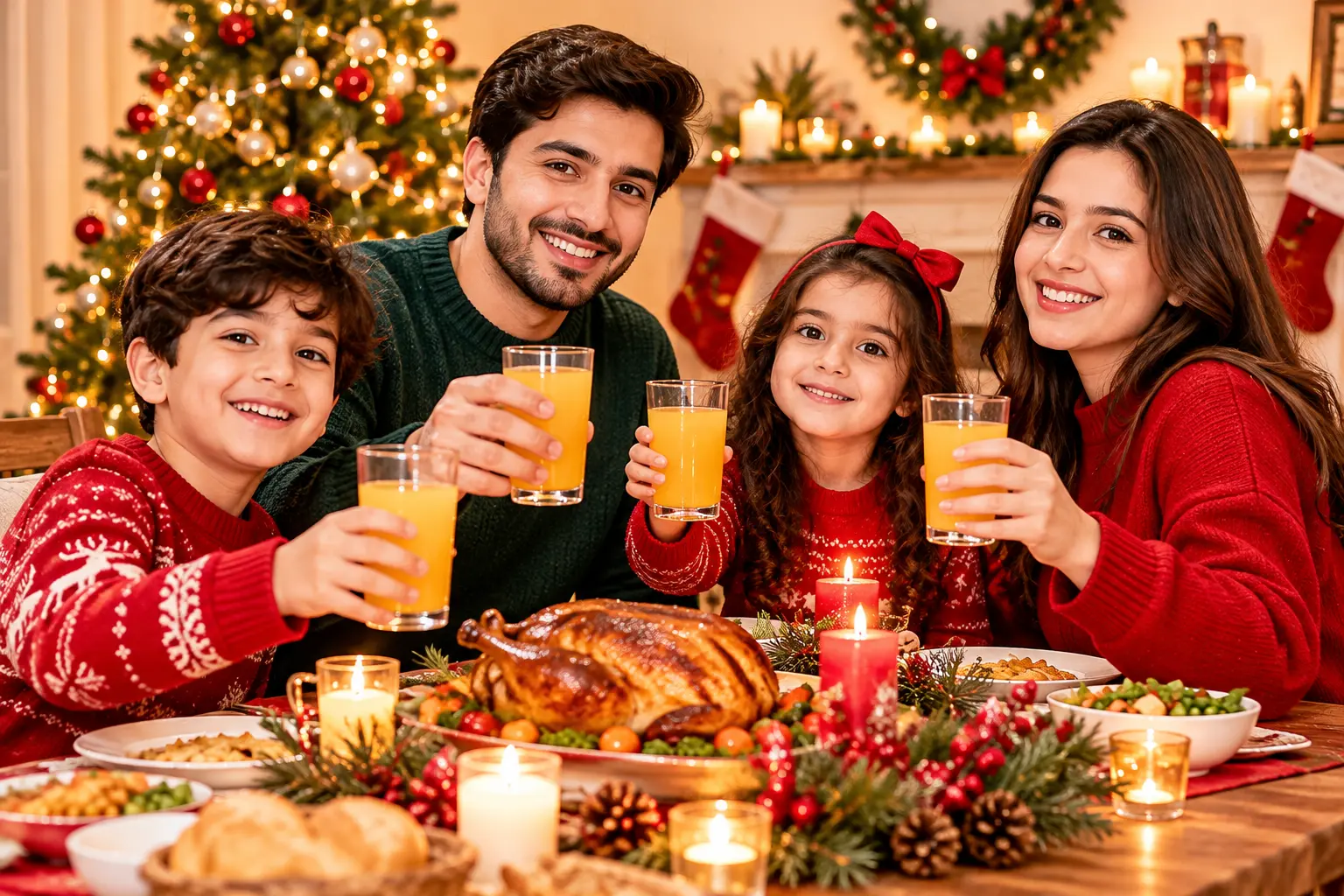
"Keep all [number] faces exactly the same. Seat the family around a
festive Christmas dinner table with a roast, side dishes, candles, and
a pine and berry centerpiece. Warm candlelight on every face, everyone
laughing and raising their glasses. Realistic photo with a warm,
festive mood. Horizontal 3:2 format."
Best for: Families who celebrate around the table more than the tree.
Couple Christmas Photo Prompts
Couple prompts are perfect for a shared holiday card, an anniversary post, or a cute announcement. Upload a photo where both faces are clearly visible.
10. Under the Mistletoe
"Keep both faces exactly the same. Place the couple standing close
together under a sprig of mistletoe hanging in a decorated doorway,
with soft blurred Christmas lights behind them. Warm romantic tones,
gentle smiles. Realistic photo. Vertical 4:5 format."
Best for: A romantic holiday post or a couple's Christmas card.
11. Ice Skating Under String Lights
"Keep both faces exactly the same. Dress the couple in cozy scarves,
mittens, and winter coats. Show them ice skating hand in hand on an
outdoor rink at night, with string lights overhead and light snow
falling. Joyful, playful mood, realistic photo. Vertical 4:5 format."
Best for: A fun, active winter date look.
12. Matching Sweaters and Hot Cocoa
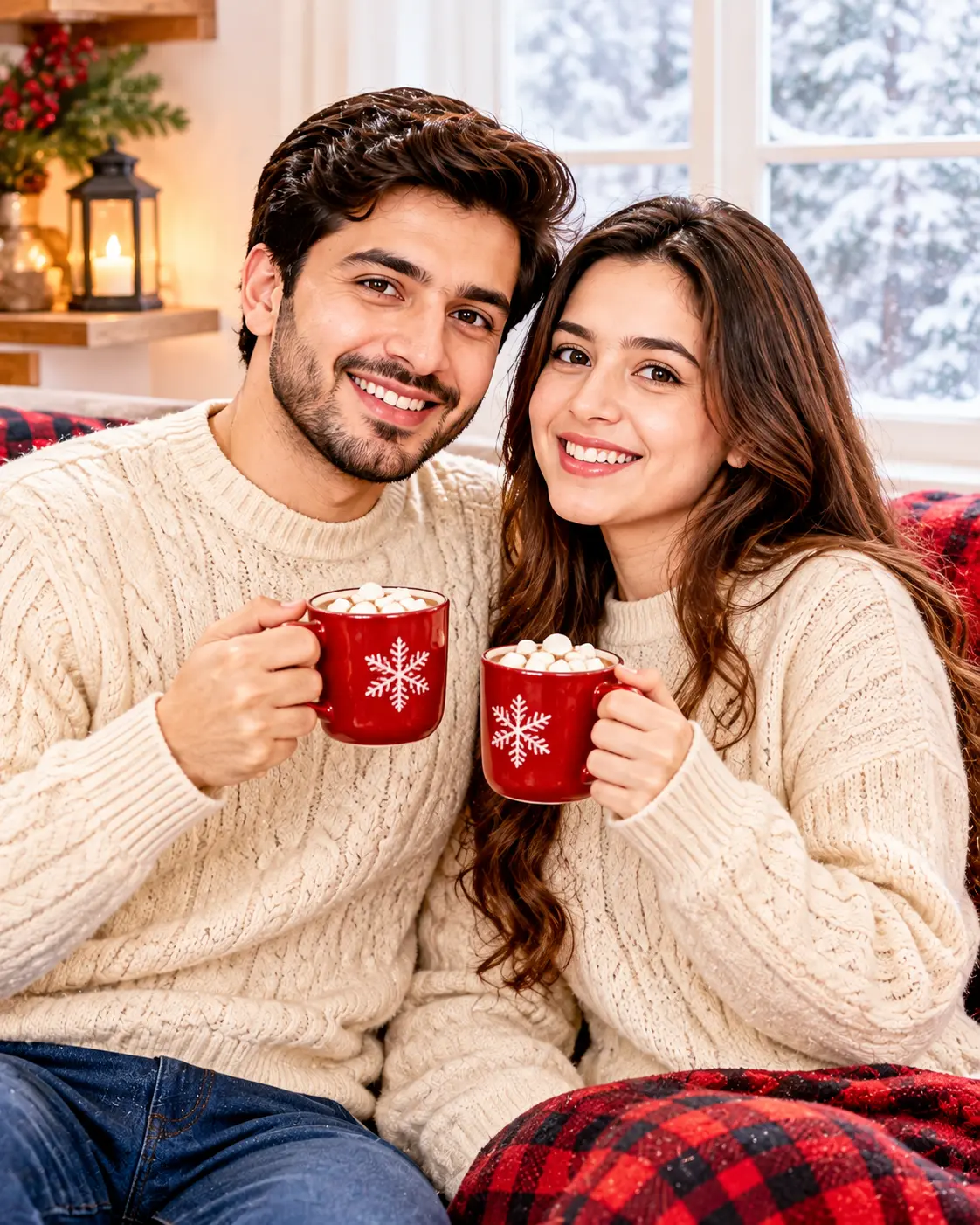
"Keep both faces exactly the same. Dress the couple in matching cream
knitted sweaters. Show them sitting close together on a couch by a
frosty window, each holding a mug of hot cocoa with marshmallows. Soft
daylight from the window, cozy and relaxed mood. Realistic photo.
Vertical 4:5 format."
Best for: A calm, cozy couple portrait for a holiday card.
13. Christmas Market Night Out
"Keep both faces exactly the same. Place the couple at an outdoor
Christmas market at night, holding cups of mulled wine, with wooden
stalls and warm hanging lights behind them. Warm golden glow, happy
and festive mood. Realistic photo with a shallow depth of field.
Vertical 4:5 format."
Best for: A travel-style holiday photo that feels like a winter trip.
Kids and Baby Christmas Photo Prompts
Kids and baby prompts are some of the most popular holiday edits, especially for a baby's first Christmas. Use a recent photo with the child's face clearly visible and well lit.
14. Baby in a Santa Outfit
"Keep the baby's face exactly the same. Dress the baby in a tiny red
Santa outfit with a white fur trim and a matching hat. Place the baby
lying on a soft cream knitted blanket surrounded by pine branches and
a few red ornaments. Soft studio light, gentle and sweet mood.
Realistic newborn-style photo. Vertical 4:5 format."
Best for: Baby's first Christmas announcements.
15. Peeking Out of a Gift Box
"Keep the baby's face exactly the same. Show the baby sitting inside a
large open gift box with a big red bow, peeking out with a happy
expression, surrounded by colorful wrapping paper. Bright, playful
lighting. Realistic photo. Square 1:1 format."
Best for: A playful, shareable photo that works well as a square post.
16. Little Elf on a Wooden Sled
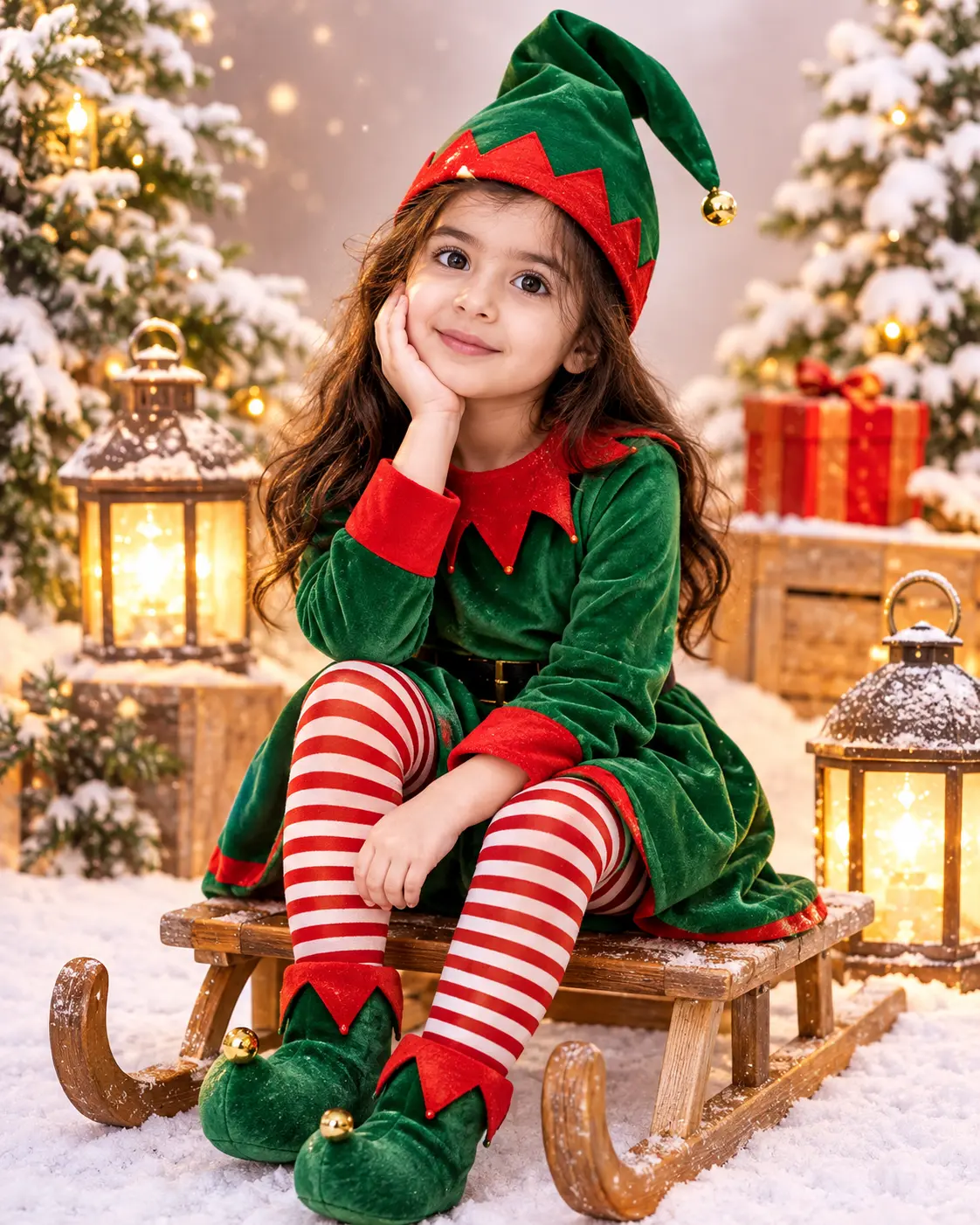
"Keep the child's face exactly the same. Dress the child in a green elf
outfit with a pointed hat and striped stockings. Show the child
sitting on a small wooden sled in a snowy studio setting with glowing
lanterns around. Soft warm light, magical mood. Realistic photo.
Vertical 4:5 format."
Best for: A storybook-style holiday portrait.
17. Kids Opening Presents
"Keep all [number] children's faces exactly the same. Dress them in
matching striped Christmas pajamas. Show them sitting under the tree
opening presents, with excited faces and wrapping paper everywhere.
Natural morning window light, candid and joyful moment. Realistic
photo. Horizontal 3:2 format."
Best for: Capturing the excitement of Christmas morning with siblings.
Pet Christmas Photo Prompts
Pet prompts work best with a photo where your pet is looking toward the camera, with its whole face and ears visible. Use "Keep my [dog/cat]'s face and fur exactly the same" so the model preserves markings and coat color.
18. Dog With Reindeer Antlers
"Keep my dog's face and fur exactly the same. Add a pair of soft brown
reindeer antlers on my dog's head. Place my dog sitting in front of a
lit Christmas tree with wrapped presents around. Warm cozy light.
Realistic pet photo. Vertical 4:5 format."
Best for: The most classic pet Christmas photo.
19. Grumpy Santa Pup
"Keep my dog's face and fur exactly the same. Add a red Santa hat and a
red bow collar. Show my dog sitting with an unimpressed, grumpy
expression, tangled in a string of Christmas lights. Bright, funny
holiday card style. Realistic photo. Square 1:1 format."
Best for: A funny pet card that always gets a laugh.
20. Cat in a Christmas Stocking
"Keep my cat's face and fur exactly the same. Show my cat curled up
inside a red knitted Christmas stocking with only its head peeking
out, hanging by a fireplace. Warm firelight, cozy mood. Realistic pet
photo. Vertical 4:5 format."
Best for: Cat owners who want a cozy, cute holiday picture.
21. Pet in a Holiday Sweater by the Window
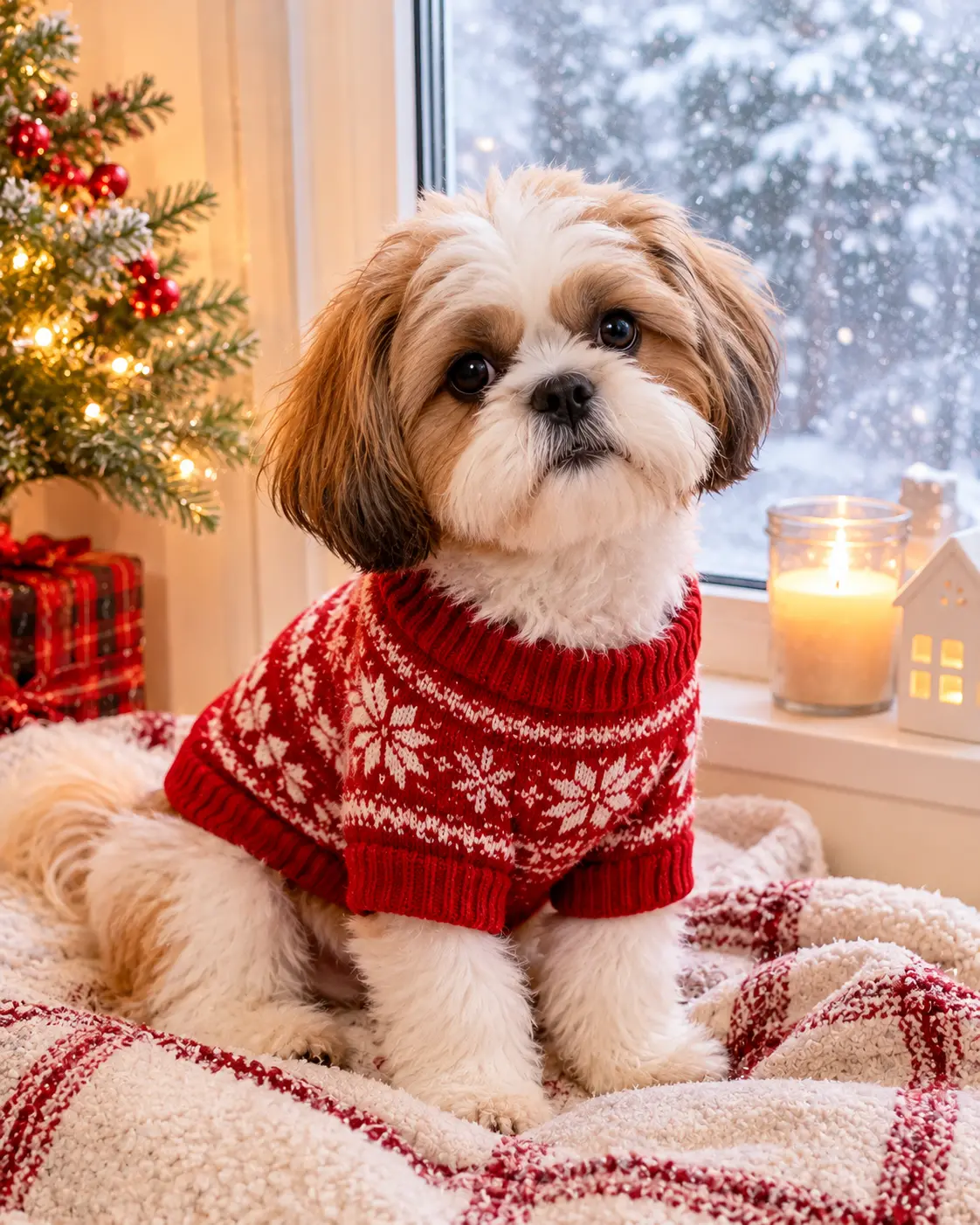
"Keep my pet's face and fur exactly the same. Dress my pet in a small
red and white knitted holiday sweater. Place my pet sitting by a frosty
window with snow falling outside and a lit candle on the windowsill.
Calm, quiet winter mood. Realistic photo. Vertical 4:5 format."
Best for: A softer, more peaceful pet portrait.
Christmas Product Photo Prompts for Shops and Brands
If you sell physical products, the same approach turns a plain product photo into a holiday-ready image for your shop, ads, and social posts. Upload a clear photo of the real product and change the face lock line to a product lock line. For more product scene ideas, see our AI jewelry prompts for product photos, ads, and design.
22. Product Among Wrapped Gifts
"Keep the uploaded product exactly the same, including its shape,
colors, and label. Place it on a wooden table among wrapped Christmas
gifts tied with red and gold ribbons. Warm cozy light with blurred
fairy lights in the background. Realistic product photo. Square 1:1
format."
Best for: Shop listings and gift guide posts.
23. Festive Flat Lay
"Keep the uploaded product exactly the same. Arrange it in a top-down
flat lay on white linen, surrounded by pine sprigs, pinecones, and
small gold ornaments. Bright, clean natural light. Realistic product
photo. Square 1:1 format, no text."
Best for: Clean, bright holiday product posts.
24. Holiday Banner With Space for Text
"Keep the uploaded product exactly the same. Place it on the right side
of the frame against a deep red background with soft falling snow and
gold sparkles. Keep the left side of the frame empty for text. Rich,
warm holiday lighting. Wide 16:9 format, no text."
Best for: Website banners and email headers. Add your headline in a design tool afterward.
Christmas Card Prompts
Christmas card prompts add a border, a frame, or a short greeting around your photo. Keep the text to a few words in quotation marks, and check the spelling letter by letter before you print.
25. Classic Family Card
"Keep all [number] faces exactly the same. Turn the photo into a
Christmas card with a soft cream border and small pine and berry
details in the corners. At the bottom, elegant gold script text reads
"Merry Christmas from the [Name] Family". Warm, classic style.
Vertical 2:3 format, no other text."
Best for: The traditional family card to mail or share.
26. Funny Pet Card
"Keep my pet's face and fur exactly the same. Turn the photo into a
playful Christmas card with a red plaid border. At the bottom, bold
white text reads "Meowy Christmas". Fun, bright style. Vertical 2:3
format, no other text."
Best for: Pet owners. Swap the greeting for "Happy Howlidays" for a dog.
27. Vintage 1950s Card
"Keep all faces exactly the same. Turn the photo into a vintage 1950s
Christmas card with faded film colors, a light paper texture, and a
small illustrated snowy village along the bottom. At the top, retro
red lettering reads "Season's Greetings". Nostalgic style. Vertical
2:3 format, no other text."
Best for: A nostalgic, retro look that stands out from modern cards.
Christmas Background Prompts
Background prompts keep you exactly as you are and only change what is behind you. They are the fastest way to make an existing photo feel festive.
28. Decorated Living Room Background
"Keep my face, body, pose, and clothing exactly the same. Replace the
background with a cozy decorated living room with a lit Christmas tree,
a fireplace, and stockings. Match the lighting on me to the warm light
of the room so it looks natural."
Best for: Turning any indoor photo into a holiday scene.
29. Blurred Christmas Tree Background
"Keep my face, body, pose, and clothing exactly the same. Replace the
background with a softly blurred, fully lit Christmas tree with gold
and red ornaments. Keep the focus on me, with warm bokeh lights behind."
Best for: A clean, professional-looking festive portrait.
30. Snowy Village at Night
"Keep my face, body, pose, and clothing exactly the same. Replace the
background with a snowy village street at night, with glowing windows
and warm string lights. Cool blue evening tones with warm light on my
face so I blend into the scene."
Best for: A magical outdoor look without going outside.
Christmas AI Prompts Without a Photo
You do not need a photo for every holiday image. These prompts create full Christmas scenes from text alone, which is useful for backgrounds, wallpapers, cards, and social posts.
31. Cozy Christmas Tree Scene
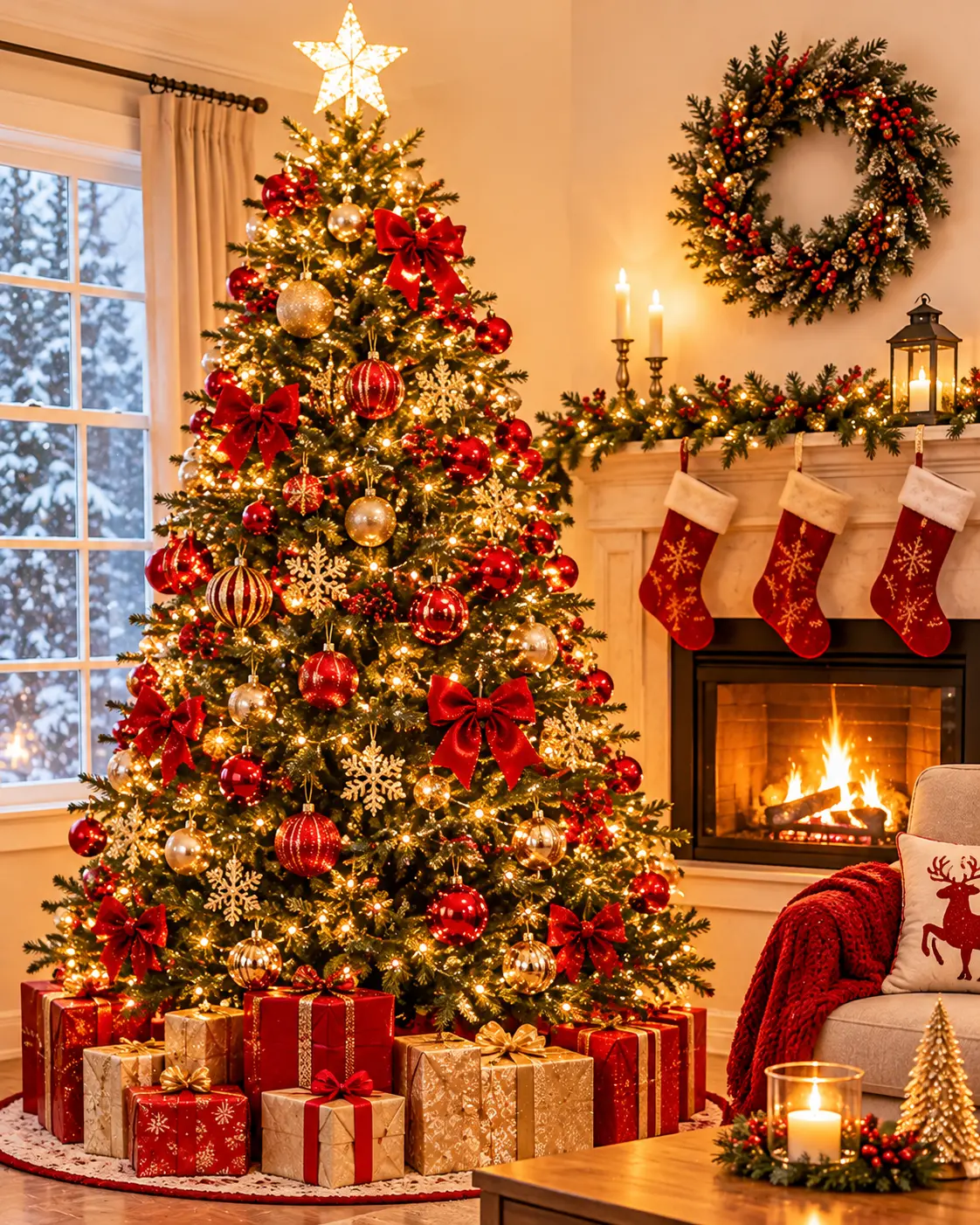
"A tall Christmas tree decorated with warm white lights, red and gold
ornaments, and a glowing star, in a cozy living room with a fireplace
and wrapped gifts underneath. Soft warm light, realistic photo.
Vertical 4:5 format."
32. Santa's Sleigh Over a Snowy Village
"Santa's sleigh pulled by reindeer flying over a snowy village at night,
with glowing windows below and a full moon in the sky. Magical,
cinematic, realistic style. Wide 16:9 format."
33. Gingerbread House
"A detailed gingerbread house decorated with colorful candies, white
icing snow, and gumdrops, on a wooden table with soft blurred
Christmas lights behind. Warm light, realistic food photo. Square 1:1
format."
34. Christmas Market at Night
"A busy outdoor Christmas market at night with wooden stalls, warm
hanging lights, a large lit tree in the center, and people walking
in winter coats. Festive, glowing atmosphere, realistic photo. Wide
16:9 format."
35. Hot Cocoa in a Christmas Mug
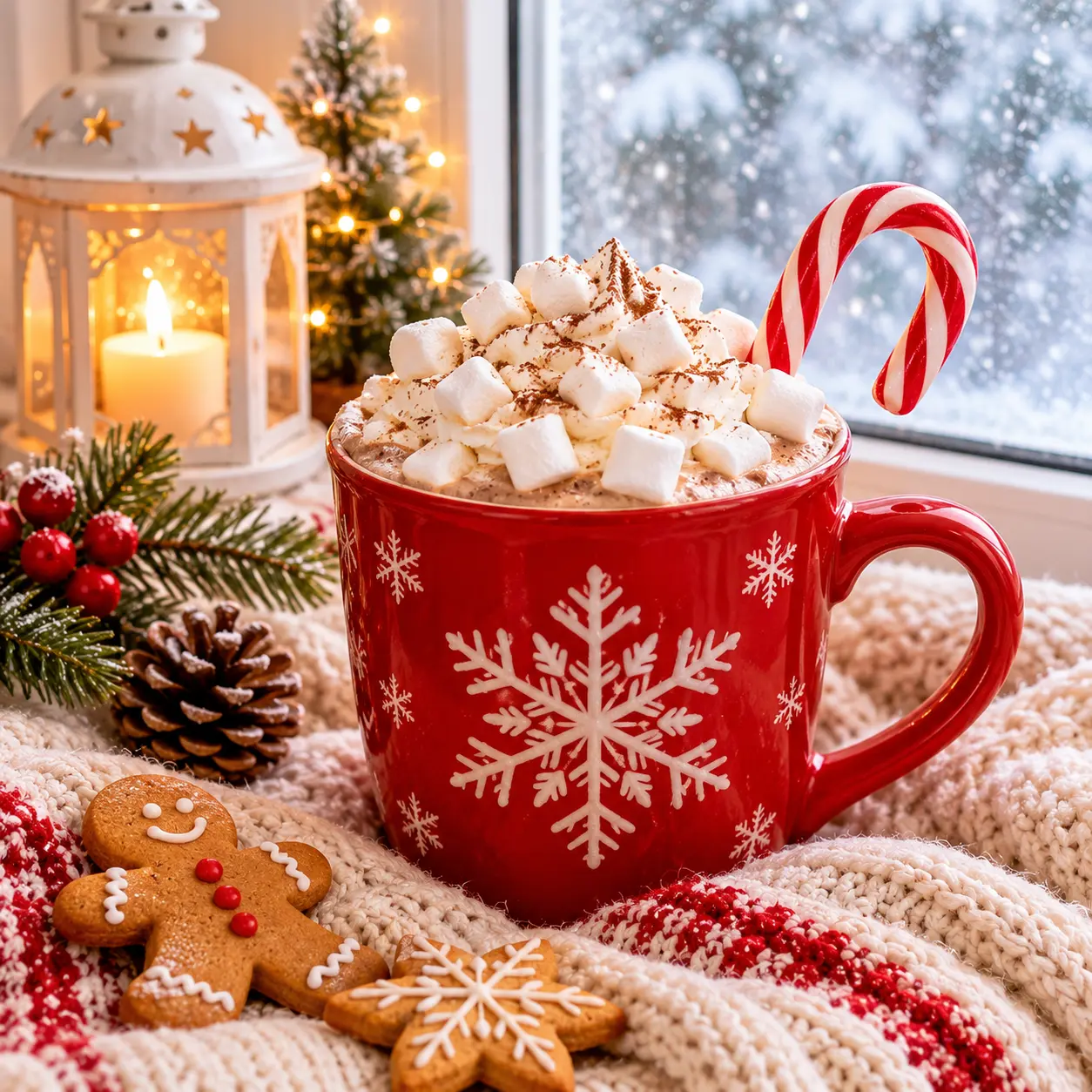
"A mug of hot cocoa topped with whipped cream and marshmallows in a red
Christmas mug, on a knitted blanket by a frosty window. Soft natural
light, cozy mood, realistic photo. Square 1:1 format."
Text-only prompts work best when you describe the scene the way a photographer would: the main subject first, then the surroundings, the light, and the format. Because there is no face to protect, you can be more adventurous with camera angles and lighting. Try swapping "realistic photo" for "watercolor illustration," "storybook illustration," or "vintage postcard" to get a completely different look from the same scene. These images are especially useful as phone wallpapers, background images for card designs, and festive filler posts between your personal photos.
These scenes also make good starting points for video. Bring any of them into a Templix video model to add falling snow, flickering lights, or a slow camera move. Our guide on how to generate high-converting video ads with AI on Templix shows how to turn still images like these into short promotional clips.
Christmas Photo Styles to Try
The same photo and scene can look completely different depending on the style line in your prompt. Once you have a result you like, try regenerating it with one of these style lines to build a varied holiday set.
Classic warm. Red, green, and gold tones with warm lamp and tree light. This is the traditional Christmas look and the safest choice for family cards. Add "warm, classic Christmas colors" to any prompt.
Scandinavian minimal. White, cream, and soft gray tones, with natural wood, simple greenery, and plenty of empty space. It feels calm and modern. Add "minimal Scandinavian Christmas style, soft neutral colors, natural wood and greenery."
Vintage film. Faded colors, soft grain, and slightly warm highlights, like a photo from an old family album. Add "vintage 1970s film photo look with soft grain and faded colors."
Polaroid snapshot. A square photo with a white frame and a candid, slightly imperfect feel. Add "instant Polaroid photo style with a white border" and use a square format.
Cinematic. Deep shadows, rich color, and a shallow depth of field, like a still from a holiday movie. Add "cinematic holiday movie still, shallow depth of field, rich warm and cool tones."
Storybook. Soft, magical light with a hint of illustration, ideal for photos of children. Add "soft magical storybook lighting, dreamy and warm."
Keep the face lock line and the setting the same, and only change the style line. This way you get several looks from one strong scene without losing the parts that already work.
Christmas Photo Ideas by Occasion
Christmas often overlaps with other special moments. A few small prompt changes can turn a standard holiday photo into a personal announcement.
Baby's first Christmas. Use prompt 14 or 15 and add a small wooden sign or ornament that reads "Baby's First Christmas" in quotation marks. Keep the text short and check the spelling.
Engagement or new couple. Use prompt 10 or 12 and add a detail such as "she is holding up her left hand to show an engagement ring" for a holiday engagement announcement.
New home. Use prompt 28 and describe your own living room style, such as "a bright modern living room with large windows," then add a line like "a small sign by the tree reads 'Our First Christmas Home.'"
Long-distance family. If your family cannot be together, upload clear individual photos of each person and use prompt 6 or 9 with "Keep all [number] faces exactly the same" to create one shared family picture.
Office or team card. Upload a clear team photo and describe a clean card with a white background, silver snowflakes, and short text that reads "Happy Holidays from the [Company Name] Team." It is an easy way to send a friendly card to clients and partners.
Pregnancy announcement. Use prompt 12 and add a small detail, such as a tiny baby stocking hanging by the window, for a gentle holiday announcement.
How to Use Your AI Christmas Photos This Season
Once you have a set of holiday photos, you can get much more out of them than a single post.
Profile pictures. Update your profile picture on social media and messaging apps for December. A square crop of a selfie prompt works perfectly.
Instagram feed and Stories. Post your best portrait in 4:5 on your feed, then share a 9:16 version in Stories. Posting a few different styles across the month keeps your feed festive without repeating the same picture.
Digital and printed cards. Send your card as an image in family group chats and by email, and print a small batch for relatives who still love a card in the mail.
Gift tags and wrapping. Print small versions of your family or pet photo as gift tags. It is a personal touch that makes every present feel special.
Calendars and photo gifts. Use your favorite Christmas photo as the December page of a family calendar, or print it on a mug, a frame, or an ornament as a gift for grandparents.
Phone and desktop wallpapers. The text-only scenes in this guide, such as the cozy tree or the Christmas market, make great seasonal wallpapers.
Holiday Reels. Combine several of your photos into a short slideshow or add gentle motion to one of them for a festive Reel or TikTok.
Which Format Should You Use?
Choosing the right aspect ratio before you generate saves you from awkward crops later. Here is a quick guide:
Where It Will Be Used | Format |
|---|---|
Instagram feed post | 4:5 vertical |
Instagram or Facebook Story, Reels cover | 9:16 vertical |
Profile picture or square post | 1:1 square |
Printed holiday card | 2:3 vertical |
Website banner, email header, Facebook cover | 16:9 wide |
Wide family or group portrait | 3:2 horizontal |
For a classic 5 x 7 inch printed card, generate in 2:3, then crop slightly in your printing service or design tool. Leave a little extra space around faces and text so nothing important gets cut off.
Tips for Better AI Christmas Photos
Always lead with the face lock. The first sentence of the prompt carries the most weight. Starting with "Keep my face exactly the same" tells the model that your face is the one thing it must not change.
Choose a strong source photo. A sharp, well lit, front-facing photo produces far better results than a blurry selfie taken in a dark room. If your face is small in a group shot, the model has less detail to work with.
Match the light to the scene. If your original photo was taken in bright daylight and you ask for a candlelit room, the face can look pasted in. Adding a line such as "match the lighting on my face to the warm light of the room" helps the result blend naturally.
Keep text short. For cards, use short greetings like "Merry Christmas," "Season's Greetings," or "Happy Holidays." Long sentences are more likely to come out with spelling mistakes.
Change one thing at a time. If the outfit is right but the room is wrong, only change the setting sentence. Rewriting the whole prompt can change the parts you already liked.
Check hands and small details. Look closely at hands, jewelry, and any text before you share or print. Regenerate if anything looks unnatural.
Upscale before you print. For a sharp printed card, run your final image through the Templix Image Upscaler, which offers 2x, 4x, and auto enhancement up to 4K.
Common Mistakes to Avoid
Using a blurry or dark photo. The model can only keep the detail that is in the photo. A clear source image is the biggest factor in a good result.
Leaving out the face lock. Without it, the model may change your face shape, eyes, or expression along with the scene.
Asking for too much at once. A prompt that changes your outfit, pose, setting, light, and adds text all in one go is harder for the model to follow. Start simple and add details in later revisions.
Choosing the wrong format. A horizontal image cropped into a vertical Story often cuts off heads. Pick your format first.
Skipping the proofread. Check every letter of card text before you print or send it. A small typo in a greeting is easy to miss and hard to fix once cards are in the mail.
Make Your AI Christmas Photo on Templix
Templix gives you everything you need for holiday photos in one place. Nano Banana 2 handles the photo edits and new scenes in this guide, with support for multiple reference images and output up to 4K. When you need a sharper file for print, the Image Upscaler is one click away, and if you want to go beyond still photos, Templix also offers ready-made Christmas templates such as Cozy Christmas Reel, Our Christmas Reel, Couple Christmas Card, Christmas Moments, and Merry Christmas Reel that you can open and customize in a few clicks.
Start with one photo and one prompt from this guide, see what you like, and build your holiday set from there. A single good photo can become your profile picture, your Instagram post, your family card, and your Stories content for the whole season.
Final Thoughts
AI Christmas photos are one of the easiest ways to make the holidays feel special without booking a photographer or setting up a single decoration. With a clear photo and the right prompt, you can put yourself by a glowing tree, your family in matching pajamas, your pet in reindeer antlers, or your product among wrapped gifts. Use the 35 prompts in this guide as templates, swap in your own details, and keep the face lock line at the top of every prompt so the final picture still looks like you. Start early in December so you have time to try a few styles, print your cards, and share your favorite photos before the holiday rush. One good photo and a little experimenting are all it takes to fill your whole season with festive pictures.
Frequently Asked Questions
Is it free to make an AI Christmas photo on Templix?
You can start on Templix with free coins and no credit card, and the coin cost of each generation is shown before you run it. Paid plans add a monthly coin balance for more generations. Coin allocations are plan-dependent, so check the Templix pricing page for current terms.
Which photo works best for AI Christmas photos?
A sharp, well lit photo with your face clearly visible and facing the camera works best. Avoid sunglasses, heavy shadows, strong filters, and very small faces. For group photos, make sure everyone's face is clear and roughly the same size.
Will my AI Christmas photo still look like me?
It will look much more like you when every prompt starts with a face lock line such as "Keep my face exactly the same," and when you use a clear source photo. If the face changes slightly, regenerate or try a different photo with better light.
Can I use my AI Christmas photo for printed cards?
Yes. Generate your card in a 2:3 vertical format, keep the greeting short, and check the spelling. For a sharp print, run the final image through the Templix Image Upscaler before sending it to your printing service.
Can I make a family Christmas photo from one picture?
Yes, as long as everyone's face is clearly visible in that picture. Start the prompt with "Keep all [number] faces exactly the same." If one person is small or turned away, upload an extra close photo of that person to help the model.
Do these prompts work with other AI tools?
The prompts are written in plain language, so they can work with other image models that accept a photo and a text prompt. They are tested and written for Nano Banana 2 on Templix, where you can upload your photo, choose the format, and generate in one place.
Can I add a Santa hat or Christmas background to an existing photo?
Yes. Prompt 3 adds a Santa hat while keeping everything else the same, and prompts 28 to 30 replace only your background with a Christmas scene. Tell the model exactly what to keep and what to change.
Can I make an AI Christmas photo of my pet?
Yes. Use a photo where your pet is looking toward the camera with its full face visible, and start the prompt with "Keep my dog's face and fur exactly the same" or "Keep my cat's face and fur exactly the same" to preserve its markings and color.
Mahnoor Asad
Mahnoor Asad blends design sensibility with AI video expertise at Templix, crafting content on visual creativity, motion generation, and high-converting ad concepts.