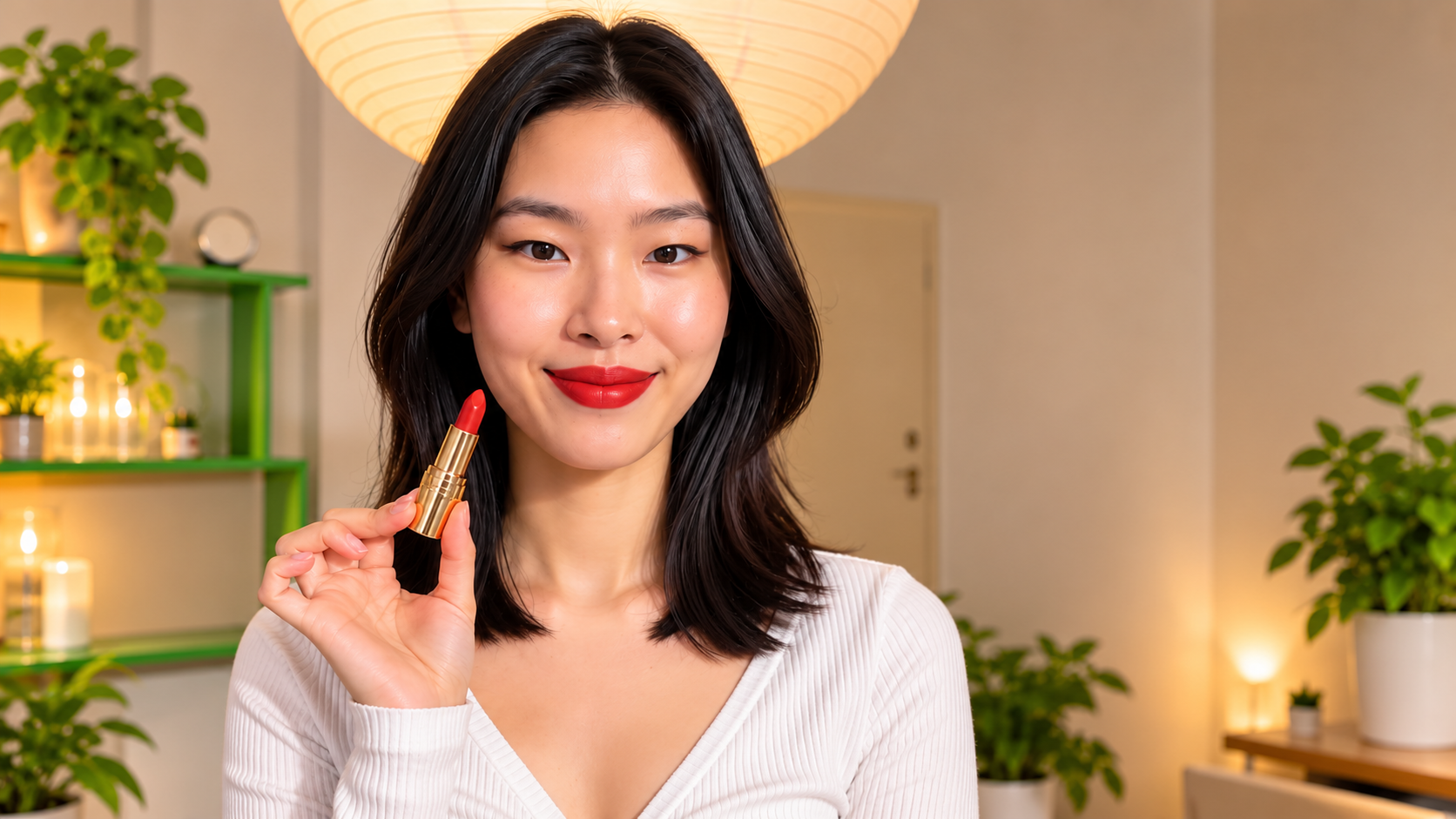
The lipstick ad above was made without a model, a studio, a makeup artist or a shoot. The creator is AI. The living room is AI. The only real thing in it is the product.
AI UGC ads are creator-style product videos where the person on screen is generated rather than hired. They look like the casual, phone-filmed clips that fill TikTok and Reels: someone holding a product, trying it, reacting. Brands use them because the economics of hiring models for UGC do not work past a handful of products, and because a well-made AI creator is now hard to tell from a real one.
This guide covers what AI UGC ads are, why brands are switching, what makes one look realistic rather than plastic, a six step workflow from product to finished ad, the prompts that work, and a full breakdown of the lipstick ad.
What Are AI UGC Ads?
UGC stands for user-generated content: videos customers and creators film themselves, at home, on a phone. UGC ads borrow that style on purpose. They are ads that do not look like ads.
An AI UGC ad is the same format with a generated creator. You give the tool a product image, a creator image and a short description of the scene, and it produces a vertical video of that creator holding, using and talking about the product. Voice, lip sync, lighting and movement are all generated.
The difference between a good AI UGC ad and a bad one is not the technology. It is whether the creator looks like a person. That is what the rest of this guide is about.
Why Create UGC Ads Without Hiring Models?
Lower production requirements. A model shoot needs a model, a location, a camera, lighting, a makeup artist, a day, and an edit. An AI UGC ad needs a product photo. For forty products, that is forty shoot days or one afternoon.
Flexible content creation. A hired model gives you what was filmed on the day. An AI creator can be in a kitchen on Monday and a car on Tuesday, say a different hook for each market, and redo the ad when the product changes colour.
Different creator styles. One brand rarely has one buyer. A skincare line sells to 22-year-olds and 45-year-olds. With AI you build a creator for each and test which face the audience trusts.
Product-focused videos. An AI creator is built around the product: her style, her room and her tone are chosen to make the product the point of the video.
What Makes an AI UGC Ad Look Realistic?
Most AI creators fail in the first second. Here is what separates the ones that pass.
Natural skin texture. Visible pores, slight unevenness, a natural flush. Every model defaults to glass skin, and glass skin reads as fake instantly. Ask for texture and forbid smoothing.
Realistic product interaction. The product has to be held like someone owns it, not presented on a palm. Fingers wrap around it. It gets opened. It gets used. In the lipstick ad the creator uncaps it, applies it and presses her lips together. That sequence is proof.
Natural lighting. One light source, one direction, real shadows. A paper lantern overhead, a window to the side. Studio lighting flattens the face and is the fastest route to the plastic look.
Authentic camera angles. Phone front camera, slightly off centre, slightly too close, a little handheld movement.
Natural expressions and movements. Small expressions: a half smile, a glance away, a nod. Pauses in the speech. A hand that moves while she talks. Big wide smiles and perfectly still heads look animated.
Realism is a list of small decisions, and every one goes in the prompt.
How to Create Realistic UGC Ads with AI
Step 1: Choose your product
Start with a clean product image: product alone, label readable, true colour, nothing touching it. For the lipstick ad, that was the gold tube with the cap off and the red bullet showing, on a white table. This image becomes the product reference in every later step. If the label is blurry here, it will be blurry in the ad.
Step 2: Create an AI UGC character
Open the UGC character generator and describe the creator: age, hair, skin, style, room, energy. Match her to the buyer. Ask for natural skin texture and one light source, and end with a "no" list. Generate several, pick the one that looks most like a person, and save that image. From here on it is the only reference for her face.
Step 3: Generate product images
Before the video, make stills. Use the UGC image generator with the creator and the product to make a hold shot and an in-use shot. These check that the product sits right in her hand and the label holds, and they become your thumbnails. Fix problems here before spending on video.
Step 4: Create an AI video
Open the UGC ad generator. Upload the creator as @image1 and the product as @image2. Describe the ad in one box: the room, what she says, what she does with the product, how she reacts. Settings: 9:16, 720P, 10 to 15 seconds, sound effect on. Run two or three attempts.
Step 5: Add voiceover and captions
The ad generator produces the spoken line and lip sync from the script in your prompt. Keep sentences short, because long sentences drift the lip sync. Add captions in the platform editor after export, hook as on-screen text in the first frame. Most Reels and TikTok views are muted.
Step 6: Review and export your ad
Check three things before export: the skin in the closest shot still has texture, the label is readable in the hold shot, and the product interaction looks like a real hand. If any fails, retry that attempt. Export at 9:16, and make a 1:1 crop for feed placements.
Real Example: AI UGC Lipstick Advertisement
The lipstick ad runs 12 seconds and has four scenes. Each one does a job.
Scene 1: the product, alone. The gold tube on a white table, cap beside it, red bullet up, a colourful living room out of focus behind. Two seconds. The viewer sees what is being sold before anyone speaks.
Scene 2: the creator talks. Cut to a woman with a dark bob in a white ribbed top, sitting on an orange sofa under a paper lantern, holding the lipstick up beside her face and talking to the camera. The room is lived-in. The light comes from the lantern and a side window, nothing else. Her expression is mid-sentence, not posed.
Scene 3: the application. Tight close-up. She uncaps the lipstick and applies it to her lips in one slow pass. The skin around her mouth has texture; you can see it is skin, not a render. This is the shot the whole ad exists for.
Scene 4: the result. Lips pressed together, red fully on, a small smile, then a cut back to her on the sofa holding the tube up with the colour on. The ad ends on the product and the result in the same frame.
What makes it realistic: the paper lantern as the only visible light, the slightly messy room, the creator's small movements between scenes, and the fact that the product gets used rather than held. For more on this category, see UGC ads for skincare brands and AI UGC for cosmetics brands.
Best AI UGC Prompts for Product Ads
The prompt behind the lipstick ad:
"@image1 sits on an orange sofa in a bright colourful living room, paper
lantern overhead, side table and plant out of focus. Phone front camera,
slightly off centre. She holds @image2 up beside her face, label to
camera, and says "okay this is the red I have been wearing every day".
Close-up: she uncaps it and applies it to her lips in one slow pass.
She presses her lips together, small smile, looks at camera. Cut back
to the sofa, holding the tube up with the colour on. Natural skin with
visible texture, soft light from the lantern and a side window, casual
speech with a pause. No studio lighting, no beauty smoothing, no
perfect symmetry, not a render."
Three reusable patterns for other products:
The hold and point. "@image1 holds @image2 at chest height, points at [one feature] and explains it in one sentence, then pulls it back and nods." For anything with a standout detail.
The problem and fix. "@image1 says 'if your [problem], this fixed it', shows @image2, uses it once, shows the result." For functional products.
The unboxing. "@image1 opens a plain shipping box at a kitchen table, lifts out @image2, turns the label to camera and reacts." For new brands and anything with packaging.
Every prompt ends with the same four lines: natural skin texture, one named light source, no studio lighting, no beauty smoothing.
How to Create AI UGC Ads Using Templix
Templix UGC Studio puts the whole workflow in one place.
Build or pick the creator in the character generator, or browse the Community for faces already built for realism.
Upload the product image.
Make the stills in the image generator to check fit and label.
Make the ad in the ad generator: creator as @image1, product as @image2, one prompt.
Make the organic clips between ads in the UGC video generator, so the same face shows up in the feed and not only in ads.
Cost per finished ad is around $2 across two or three attempts. No model fee, no shoot, no shipping, same day.
Common Mistakes to Avoid
Glass skin. The most common failure. Ask for texture in every prompt, forbid smoothing in every prompt.
A different creator each time. The face drifts and the brand loses recognition. Save the master image and reuse it. See how to keep AI UGC characters consistent.
Holding, not using. A product held for 12 seconds is a product video. It has to be opened, applied, worn, poured.
Studio lighting. Two light sources and no shadows is a commercial. Name one light.
Long sentences. Lip sync drifts. Keep every spoken line under ten words.
Brand name in the first line. Open on the person and the problem. The label does the branding.
Judging on one attempt. Run three. The first is rarely the keeper.
Frequently Asked Questions
What is an AI UGC ad?
A creator-style product video where the person on screen is generated by AI. It uses a product image and a creator image, and produces a short vertical video of the creator holding, using and talking about the product, with voice and lip sync.
Can AI UGC ads really look realistic?
Yes, when prompted for it. Natural skin texture, one light source, phone camera framing, small expressions and a product that gets used on camera are what make the difference. Default outputs look plastic; the prompt has to turn that off.
Do I need to hire a model for AI UGC ads?
No. The creator is built in a character generator from a description and saved as a reference image. No casting, no shoot, no usage rights.
How much does an AI UGC ad cost?
About $2 per finished ad across two or three attempts. A hired model or creator for a single product video is $150 to $800 plus shoot costs and one to three weeks.
How long should an AI UGC ad be?
Ten to fifteen seconds. A hook, the product, the use, the result.
Can I use the same AI creator for different products?
Yes. Keep the creator image fixed and change only the product image and the script. One creator across a catalogue is how a brand builds a recognisable face.

Eman Raza
Eman Raza is Templix's prompt engineering expert, writing practical guides on image and video generation that help users turn ideas into striking visuals